
Architecting a Secure Multi-Application Platform with CI/CD and Cross-Region Disaster Recovery on AWS

Why Manufacturing Enterprises Can No Longer Ignore Platform Resilience

In precision manufacturing, a single hour of unplanned system downtime doesn’t just cost IT budget — it stops production lines, breaches supplier SLAs, and triggers contractual penalties that can exceed the entire annual cloud spend.

Yet in our presales engagements with manufacturing enterprises across India and Southeast Asia, we consistently find the same pattern: business-critical applications running on infrastructure that has no automated failover, no standardized deployment process, and no tested disaster recovery plan. The gap between business criticality and infrastructure maturity is where the real risk lives.

This is not a technology problem — it’s a business continuity problem that technology leaders are accountable for. When a Tier-1 customer’s supply chain depends on your Supplier Portal being available, “we’ve never had a major outage” is not a risk mitigation strategy — it’s a bet. And the longer you go without an incident, the more catastrophic the eventual one becomes, because the organization has no muscle memory for recovery.

This post documents how we closed that gap for a high-precision manufacturing enterprise running three business-critical applications — and the architectural decisions that made the business case fundable.

How We Built the Business Case

Technical teams often struggle to get modernization funded because they present the problem in technical terms: “we need CI/CD” or “we should move to the cloud.” Executives don’t fund technology — they fund risk reduction, cost avoidance, and competitive advantage.

For this engagement, we framed the business case around three numbers:

  • Cost of a single production outage — calculated from SLA penalty clauses in the customer’s Tier-1 supplier contracts. One breach = 6 months of cloud infrastructure cost.
  • Developer time lost to manual deployments — 3 senior engineers spending ~20% of their time on deployment coordination. That’s 0.6 FTE of engineering capacity redirected from product development to operations.
  • Audit remediation cost — the customer’s last ISO audit flagged 4 findings related to access control and change management. Remediation was quoted at $200K+ by their compliance consultants. The modernized architecture resolves all four findings as a byproduct of good design.

The total business case was 3.2x the project investment in year-one risk avoidance alone — before counting the operational efficiency gains. That’s the framing that gets a CFO to sign.

The Technical Challenges

The enterprise operated three core applications:

  • Supplier Portal – A customer-facing application used by vendors for onboarding, order tracking, and supply chain coordination. This system experiences peak traffic during procurement cycles and requires high availability.
  • Tool Pulse – An internal analytics and monitoring platform that provides real-time insights into manufacturing operations, equipment utilization, and production efficiency.
  • Gauge Caliber – A quality assurance and calibration management system responsible for maintaining measurement accuracy, compliance records, and inspection workflows.

For confidentiality reasons, specific client identifiers and sensitive implementation details have been generalized. The application names used are representative placeholders, while the architecture, deployment patterns, and operational practices reflect the actual solution implemented.

The limitations of the existing environment included:

1. Manual Deployment Model

  • No CI/CD — human intervention required for every release
  • High rollback risk with long release cycles
  • Deployment failures during business hours directly impacted production operations

2. Limited Scalability

  • Static infrastructure with no auto-scaling
  • Performance degradation during procurement peak cycles
  • Over-provisioned hardware sitting idle 70% of the time

3. Security & Compliance Gaps

  • No fine-grained IAM controls
  • Limited audit visibility — ISO auditors flagged 4 findings
  • No structured encryption controls for data at rest

4. Disaster Recovery Risks

  • No automated failover — recovery was manual and untested
  • High RTO and RPO exposure with no documented runbook
  • Single-region deployment with no cross-region capability

5. Operational Overhead

  • Physical server management consuming senior engineering time
  • Maintenance complexity growing with each application addition
  • Infrastructure cost increasing without proportional business value

The objective was not just migration — it was to design a resilient, scalable, DevOps-driven, multi-application platform that reduced business risk while improving delivery velocity.

Solution Architecture Overview
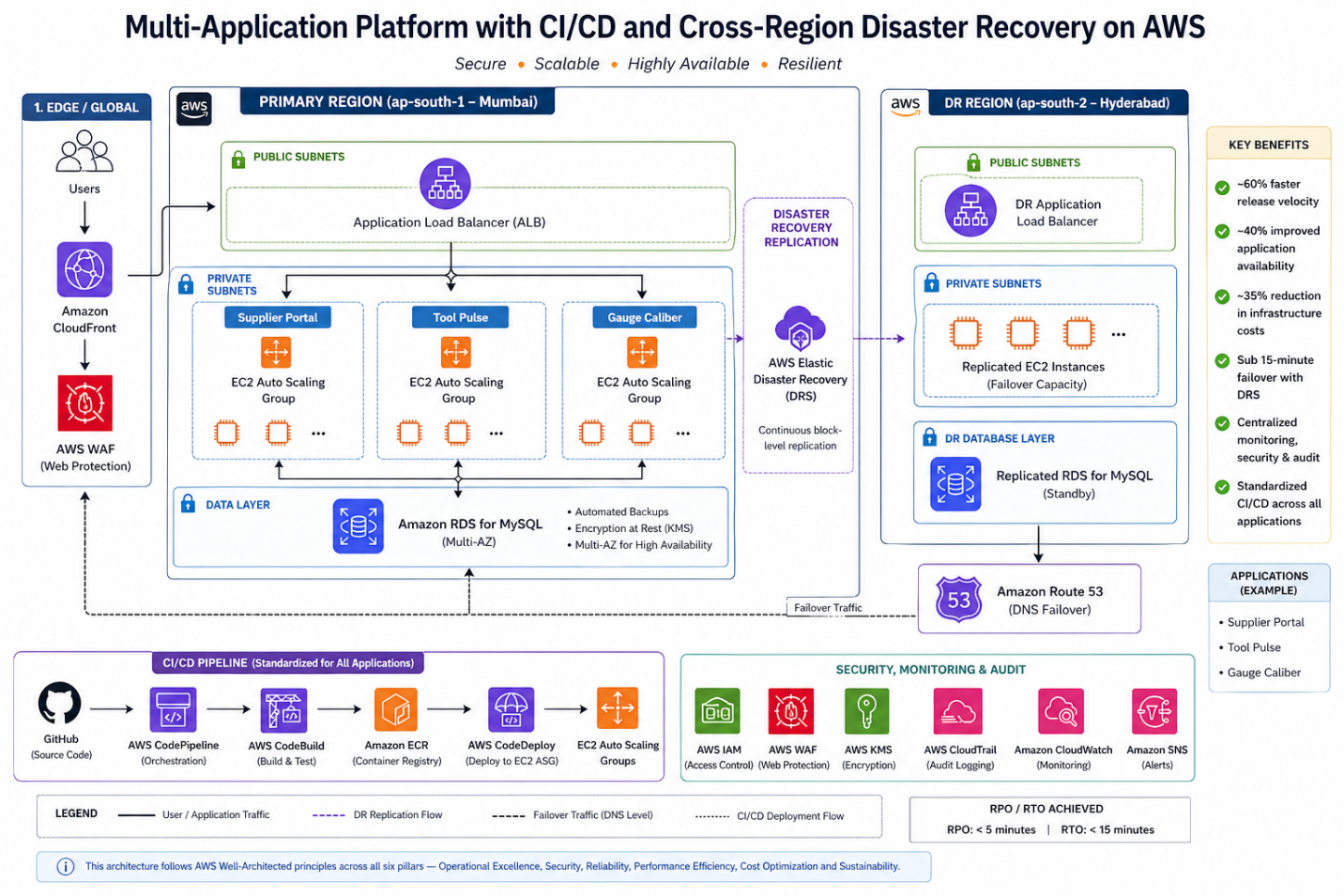
Multi-Application Platform Architecture

All three applications were deployed using a standardized pattern:

Layer Services Business Value
Compute EC2 + Auto Scaling Groups + ALB Elastic capacity, zero over-provisioning
Database Amazon RDS (MySQL), Multi-AZ Managed resilience, automated failover
CI/CD GitHub + CodePipeline + CodeBuild + CodeDeploy Standardized, repeatable deployments
Security IAM + WAF + KMS + CloudTrail + CloudFront Layered defense, audit-ready
Monitoring CloudWatch + SNS Proactive alerting, faster MTTR
DR AWS Elastic Disaster Recovery (DRS) Cross-region failover < 15 minutes

Strategic Decision: Standardized CI/CD Across All Applications

One of the most impactful design decisions was implementing a centralized CI/CD pipeline pattern across all three applications. This was a deliberate strategic choice, not just a technical convenience.

Why standardization matters more than optimization:

When each application has its own deployment process, you get three different failure modes, three different runbooks, and three different sets of tribal knowledge. Standardization means: – Any engineer can deploy any application — no single points of knowledge failure – One improvement benefits all three applications simultaneously – Incident response follows the same playbook regardless of which application is affected – New applications onboard in days, not weeks

Deployment Flow

  • Code committed to GitHub
  • CodePipeline triggers automatically
  • CodeBuild: compiles application, executes unit tests
  • CodeDeploy: deploys to staging, promotes to production EC2 Auto Scaling Group
YAML
# appspec.yml — CodeDeploy EC2 Deployment
version: 0.0
os: linux
files:
  - source: /
    destination: /var/www/app
hooks:
  BeforeInstall:
    - location: scripts/stop_server.sh
      timeout: 60
      runas: root
  AfterInstall:
    - location: scripts/install_dependencies.sh
      timeout: 120
      runas: root
  ApplicationStart:
    - location: scripts/start_server.sh
      timeout: 60
      runas: root
  ValidateService:
    - location: scripts/validate_service.sh
      timeout: 30
      runas: root

The ValidateService hook is critical — it runs a health check after deployment. If it fails, CodeDeploy automatically rolls back. This is what gives you safe, repeatable deployments across all three applications without manual intervention.

Business outcome: Release velocity improved by ~60%. More importantly, the risk of each release dropped dramatically — failed deployments auto-rollback instead of requiring 2 AM emergency calls.

Strategic Decision: Why EC2 Over Fargate?

This is a decision that technology leaders face constantly: the ideal architecture vs. the achievable architecture.

Fargate would have been architecturally cleaner — serverless containers with zero infrastructure management. But it would have required 3–4 months of application refactoring before any business value was delivered. These applications had: – OS-level dependencies requiring specific Linux configurations – Tight integration with legacy libraries that assumed filesystem access – A team more experienced with EC2 operations than container orchestration

EC2 with Auto Scaling delivered 80% of the benefit in 40% of the time — and positions the platform for a future Fargate migration once the applications are decoupled from OS-level dependencies.

The lesson for leaders: Don’t let architectural perfection delay business value delivery. A well-automated EC2 platform is infinitely better than a perfectly designed Fargate platform that’s still 6 months from production.

Auto Scaling Configuration

BASH
# Create Auto Scaling Group for Supplier Portal
aws autoscaling create-auto-scaling-group \
  --auto-scaling-group-name supplier-portal-asg \
  --launch-template LaunchTemplateName=supplier-portal-lt,Version='$Latest' \
  --min-size 2 \
  --max-size 10 \
  --desired-capacity 2 \
  --vpc-zone-identifier "subnet-<private-subnet-1>,subnet-<private-subnet-2>" \
  --target-group-arns arn:aws:elasticloadbalancing:ap-south-1:<account-id>:targetgroup/supplier-portal-tg/<id>

# Attach CPU-based scaling policy
aws autoscaling put-scaling-policy \
  --auto-scaling-group-name supplier-portal-asg \
  --policy-name cpu-target-tracking \
  --policy-type TargetTrackingScaling \
  --target-tracking-configuration '{
    "PredefinedMetricSpecification": {
      "PredefinedMetricType": "ASGAverageCPUUtilization"
    },
    "TargetValue": 60.0,
    "ScaleInCooldown": 300,
    "ScaleOutCooldown": 60
  }'

The same ASG pattern was applied consistently across all three applications. The ScaleOutCooldown of 60 seconds ensures rapid scale-out during production peak cycles, while the 300-second ScaleInCooldown prevents aggressive scale-in that could cause instability.

Business outcome: ~40% improvement in application availability during peak procurement cycles, with cost-efficient compute during non-peak hours.

Database Layer: Managed Resilience with Amazon RDS

All three applications used: – Amazon RDS for MySQL – Automated backups with point-in-time recovery – Multi-AZ failover for high availability – Encryption at rest via KMS

Why RDS over self-managed databases:

The customer had a single DBA managing databases for all three applications. RDS eliminated the undifferentiated heavy lifting — patching, backup management, failover configuration — and let that DBA focus on query optimization and schema design instead of server maintenance.

Business outcome: Eliminated manual backup complexity, reduced DBA operational burden by ~60%, and improved reliability with automated failover that requires zero human intervention.

Security by Design

Security controls were embedded across layers — not added as an afterthought:

Identity & Access

  • IAM role-based policies with least privilege
  • Separate roles per application — blast radius containment

Edge Security

  • AWS WAF in front of ALB — SQL injection, XSS, bot protection
  • CloudFront for content delivery and DDoS mitigation

Encryption

  • AWS KMS for data encryption at rest
  • Encrypted RDS storage and S3 buckets

Audit & Compliance

  • CloudTrail logging for all deployment activities, IAM changes, and infrastructure updates
  • Retention policies aligned with ISO audit requirements

Business outcome: All 4 ISO audit findings resolved as a byproduct of the architecture — no separate remediation project required. Audit readiness became a continuous state rather than a periodic scramble.

Disaster Recovery with AWS Elastic Disaster Recovery (DRS)

For a high-precision manufacturing enterprise, unplanned downtime is not just an IT problem — it is a production stoppage with direct revenue and contractual impact. This made structured, testable disaster recovery a non-negotiable part of the architecture, not an afterthought.

Previous State

  • Manual recovery with no documented runbook
  • Hours of downtime during any infrastructure failure
  • No cross-region failover capability
  • Backup processes dependent on individual team members

How DRS Works

AWS Elastic Disaster Recovery installs a lightweight replication agent on each source server. Once installed, the agent performs continuous block-level replication to a staging area in the secondary region (Hyderabad — ap-south-2). The recovery environment is always within minutes of the production state, not hours.

Implementation Phases

Phase 1 — Agent installation and initial sync

BASH
# Install the AWS Replication Agent on each source server (Linux)
wget -O ./aws-replication-installer-init.py \
  https://aws-elastic-disaster-recovery-ap-south-1.s3.amazonaws.com/latest/linux/aws-replication-installer-init.py

sudo python3 aws-replication-installer-init.py \
  --region ap-south-1 \
  --aws-access-key-id <replication-user-access-key> \
  --aws-secret-access-key <replication-user-secret-key> \
  --no-prompt

Replication credentials are created once in the DRS console under Settings → Replication Credentials. Never use your primary IAM credentials here — create a dedicated replication IAM user with DRS-only permissions.

Initial full sync took approximately 4–6 hours per server. After initial sync, replication is continuous and lightweight — typically under 5% of server CPU.

Phase 2 — Recovery settings configuration

For each source server: – Instance type mapping — production EC2 type matched in secondary region – Subnet and security group assignment in ap-south-2 – Launch template for recovery instances pre-configured to avoid manual steps during actual failover

Phase 3 — DR drill validation

Before going live, quarterly non-disruptive DR drills were established:

BASH
# Launch a non-disruptive DR drill — isolated instances, no production impact
aws drs start-recovery \
  --source-servers '[{"sourceServerID": "<source-server-id>"}]' \
  --is-drill true \
  --region ap-south-1

# Terminate drill instances once validated
aws drs terminate-recovery-instances \
  --recovery-instance-ids '["<recovery-instance-id>"]' \
  --region ap-south-1

The –is-drill true flag is the most important detail here. Without it, start-recovery triggers an actual failover. The drill mode launches recovery instances in an isolated network — production traffic is completely unaffected.

RPO / RTO Achieved

Metric Target Achieved How
RPO (Recovery Point Objective) ≤ 30 minutes ~5 minutes Continuous block-level replication
RTO (Recovery Time Objective) ≤ 1 hour < 15 minutes Automated instance launch

The RPO achieved is significantly better than the target because DRS replicates at the block level continuously — unlike snapshot-based backups which capture state at fixed intervals.

Actual Failover Sequence

  • Declare recovery event in DRS console or via CLI
  • DRS launches pre-configured recovery instances in Hyderabad from latest replicated state
  • DNS records updated to route traffic to secondary region
  • Health checks validate application availability
  • Team confirms normal operation — failover complete

Steps 1–4 are automated. Step 5 is the only human-in-the-loop action.

Business outcome: – Failover time: hours of manual recovery → < 15 minutes automated - Recovery testing: ad-hoc and untested → quarterly validated drills - Business risk: unquantified → defined, documented, and insured - Audit readiness: manual records → CloudTrail-logged failover events

A Presales Perspective: How to Sell DR to Executives

In Presales conversations, Disaster Recovery is the capability every enterprise says they want — and the first line item cut from the budget. The two objections I encounter most are: “We’ve never had a major outage” and “It sounds too complex to maintain.”

AWS Elastic DRS changed both conversations:

On complexity: The agent installs in under 30 minutes per server and replication is fully managed — there is no DR infrastructure to maintain. No separate DR environment to patch, no replication scripts to monitor, no manual sync processes.

On risk: The quarterly drill model lets customers see recovery happen before they need it. When a customer watches their application come up in a secondary region in 12 minutes during a drill, the budget conversation changes entirely.

For CFO conversations specifically: The framing that works is insurance math. Annual DRS cost for this platform: predictable monthly spend. Cost of a single 4-hour outage (production stoppage + SLA penalties + recovery labor + customer trust erosion): multiples of the annual DR investment. The question becomes: “Would you pay X/year to insure against a Y event that your current infrastructure has no protection against?” Framed as insurance, DR never loses the budget conversation.

For manufacturing enterprises specifically: The framing that resonates most is not technical — it is contractual. A single production stoppage that breaches an SLA with a Tier-1 customer costs more than the annual DRS bill. That is the business case, and it closes fast.

Monitoring & Operational Visibility

  • Amazon CloudWatch — EC2 metrics, Auto Scaling activity, RDS performance, application logs
  • Amazon SNS — Alert notifications and incident escalation triggers
  • AWS CloudTrail — Complete audit trail for compliance

Combined, the platform delivers proactive alerting, faster MTTR, and audit-ready logging. The operations team shifted from reactive firefighting to proactive monitoring — a cultural change as significant as the technical one.

Quantitative Outcomes

Metric Result Business Impact
Deployment Speed ~60% faster releases Features reach customers sooner
Scalability ~40% improved availability at peak No revenue loss during procurement cycles
Disaster Recovery Failover < 15 minutes Contractual SLA compliance guaranteed
Cost Optimization ~35% infrastructure cost reduction Budget redirected to innovation
Security ISO-aligned IAM & encryption Audit findings closed, compliance continuous

The biggest transformation was not technical alone — it was operational maturity. The organization moved from “hoping nothing breaks” to “knowing exactly what happens when something does.”

Lessons for Technology Leaders

  • Standardize before you optimize — Getting all three applications onto the same CI/CD pattern delivered more value than any single application optimization could have. Consistency reduces cognitive load, simplifies incident response, and accelerates onboarding.
  • DR is not a technical project — it’s a business continuity investment — Frame it in contractual and revenue terms, not infrastructure terms. The CFO doesn’t care about RPO numbers — they care about SLA penalty avoidance.
  • Gradual modernization beats big-bang migration — EC2 + Auto Scaling today, containers tomorrow. Deliver value incrementally and build organizational confidence with each phase.
  • Quantify everything from day one — The 60% faster releases, 35% cost reduction, and <15 minute failover are what made this project referenceable. If you don’t measure the before state, you can’t prove the after state.
  • Security and compliance are architecture outcomes, not separate projects — When IAM, KMS, WAF, and CloudTrail are embedded in the design, audit findings close themselves. Retrofitting security is always more expensive.

About the Author

Rajat Jindal is VP – Presales at AeonX Digital Technology Limited, where he architects winning cloud strategies for enterprise customers and translates modernization into measurable business value. He is a strong advocate of AWS, committed to sharing thought leadership that helps technology leaders make faster, better-informed decisions.
Architecting a Secure Multi-VPC R&D Platform on AWS with Hybrid Connectivity and CI/CD Automation

R&D environments in life sciences organizations are fundamentally different from traditional enterprise application stacks.

They require:

  • Strict environment isolation
  • High-compute experimental workloads
  • Controlled promotion pipelines
  • Regulatory-grade audit logging
  • Secure hybrid access for global research teams

In this post, I'll Walk through how we architected a multi-environment DevOps platform on AWS for a global life sciences research organization, implementing:

  • Four isolated VPC environments (Dev, QA, Prod, R&D)
  • AWS Transit Gateway for controlled inter-VPC routing
  • Site-to-Site VPN for secure hybrid connectivity
  • ECS-based container orchestration
  • Dedicated EC2 workloads for research flexibility
  • Centralized CI/CD using CodePipeline
  • End-to-end encryption and audit logging

The result was a scalable, secure, and research-ready cloud platform with ~80% reduction in manual deployment effort.


The Technical Challenge

The organization's R&D systems were constrained by:

  • Manual deployment processes
  • Inconsistent release management
  • Limited separation between environments
  • No centralized CI/CD
  • Need to support customer-managed container workloads
  • Requirement for secure on-premises connectivity
  • Compliance-sensitive data handling

For research workloads—especially in pharmaceutical and biotech domains—environment leakage between Dev, QA, Prod, and Research is unacceptable.

The goal was to design a fully isolated, auditable, multi-environment cloud architecture that supported both structured application workloads and experimental research containers.


Multi-VPC Architecture Design

The architecture consisted of:

  • Dev VPC
  • QA VPC
  • Prod VPC
  • R&D (R-Search) VPC

Each environment:

  • Deployed across multiple Availability Zones
  • Configured with isolated subnets
  • Enforced strict security group segmentation

Why Separate VPCs Instead of Logical Segmentation?

While subnet isolation could have been used within a single VPC, separate VPCs provide:

  • Stronger blast radius containment
  • Clearer compliance boundaries
  • Independent routing control
  • Environment-specific security policies
  • Reduced misconfiguration risk

For regulated research workloads, physical VPC separation provides higher operational assurance.


Inter-VPC Communication via AWS Transit Gateway

To allow controlled communication between environments, we implemented:

  • AWS Transit Gateway (TGW) as the central routing hub

Benefits:

  • Simplified routing management
  • Centralized network governance
  • Scalable VPC attachment model
  • Controlled cross-environment communication

Transit Gateway allowed:

  • Dev to QA promotion workflows
  • Shared services communication (logging, monitoring)
  • Strict route table controls to prevent unnecessary exposure

Secure Hybrid Connectivity

Research teams and developers required on-prem access to AWS workloads. We implemented:

  • Site-to-Site VPN Gateway
  • Encrypted IPSec tunnels
  • Controlled routing via Transit Gateway

This enabled:

  • Seamless hybrid operations
  • Secure private connectivity
  • No public exposure of backend systems

For life sciences R&D, hybrid connectivity is often mandatory due to lab-based systems and compliance constraints.


Compute Layer Design

The architecture differentiated between:

Standard Application Workloads (Dev/QA/Prod)

  • Amazon ECS (EC2 launch type)
  • Auto Scaling Groups
  • Application Load Balancers
  • Dedicated EC2-based database servers

Why ECS (EC2 launch type) instead of Fargate?

  • Greater control over instance configuration
  • Performance tuning flexibility
  • Custom compliance agents installed on hosts
  • Cost predictability for long-running workloads

Research Workloads (R-Search VPC)

The R&D environment required:

  • EC2-based compute
  • Customer-managed containers
  • Flexible experimentation capabilities
  • High-compute workloads

Unlike production workloads, research teams required the ability to:

  • Test experimental container configurations
  • Run custom compute workloads outside managed orchestration
  • Adjust runtime parameters freely

The R-Search VPC provided controlled freedom without impacting production systems.


CI/CD Standardization Across Environments

One of the most impactful improvements was implementing centralized CI/CD.

Pipeline Flow

  1. Code committed to GitHub
  2. CodePipeline triggers
  3. CodeBuild:
    • Builds container images
    • Runs automated checks
    • Pushes to Amazon ECR
  4. CodeDeploy:
    • Deploys to ECS in Dev
    • Promotes to QA
    • Promotes to Prod

Benefits:

  • Controlled environment promotion
  • Reduced manual intervention (~80% reduction)
  • Repeatable deployments
  • Improved release consistency

Database Strategy

Each environment included:

  • Dedicated EC2-based database servers

Why not Amazon RDS?

In this specific R&D use case:

  • Fine-grained database control was required
  • Custom extensions and tuning were necessary
  • Compliance-related logging agents needed OS-level access

While RDS is generally recommended, certain research workloads justify EC2-hosted databases for deeper configurability.


Monitoring, Logging & Observability

A multi-layered observability stack was implemented:

Amazon CloudWatch

  • ECS metrics
  • EC2 health
  • Custom application metrics

AWS SNS

  • Alert notifications
  • Incident escalation

AWS CloudTrail

  • Complete API activity capture
  • Audit trail for compliance

External Monitoring (Site24x7)

  • Uptime validation
  • Global availability checks

This ensured both internal infrastructure visibility and external service health monitoring.


Security & Encryption Controls

Security was enforced at multiple layers:

Encryption

  • AWS KMS for encryption at rest
  • Encrypted volumes
  • Secure VPN tunnels

Identity & Access

  • IAM role-based access
  • Environment-specific IAM policies

Edge Protection

  • AWS WAF in front of public endpoints

Audit Compliance

  • CloudTrail logs stored securely
  • Activity traceability across environments

This design ensured regulatory readiness for life sciences workloads.


Quantitative Results

Area Result
Deployment Automation ~80% reduction in manual steps
Environment Isolation Full separation of Dev, QA, Prod, R&D
Hybrid Connectivity Secure on-prem to AWS access
Security Full encryption + CloudTrail audit logging
Operational Agility Flexible support for experimental workloads

Beyond metrics, the largest impact was organizational:

  • Researchers gained flexibility without compromising production stability
  • DevOps teams achieved repeatable environment promotion
  • Security teams gained full visibility into activity

Architectural Lessons Learned

1. Separate VPCs Reduce Risk in Regulated Industries

Environment isolation must be enforced at the network boundary.

2. Transit Gateway Simplifies Multi-VPC Governance

Centralized routing improves visibility and control.

3. Research Workloads Require Flexibility

Not all compute should be fully managed — controlled EC2 workloads are sometimes necessary.

4. CI/CD Is Essential for Environment Consistency

Manual promotion processes are error-prone and non-compliant.

5. Hybrid Connectivity Must Be Designed Securely

VPN + route controls prevent public exposure.


Final Thoughts

Modernizing R&D infrastructure is not just about moving workloads to AWS — it is about:

  • Designing environment isolation
  • Enforcing compliance controls
  • Enabling flexible experimentation
  • Standardizing release pipelines
  • Securing hybrid connectivity

By implementing a multi-VPC architecture interconnected via Transit Gateway, supported by CI/CD automation and layered security, we delivered a secure, scalable, research-ready cloud foundation.

For AWS practitioners, this case demonstrates how:

Network isolation + DevOps standardization + hybrid connectivity can enable regulated R&D workloads to operate securely and efficiently in the cloud.


Author
Milan Rathod
AWS Project Manager
AeonX Digital Technology Limited

Building a Real-Time Inventory Validation System on AWS Using IoT, Containers, and Automated DevOps

Warehouse inventory errors are rarely caused by system outages — they are caused by human mistakes at scale.

In large retail and warehousing environments, incorrect brand mixing during packaging and dispatch leads to:

  • Inventory reconciliation mismatches
  • Customer dissatisfaction
  • Reverse logistics overhead
  • Operational rework costs

In this post, I'll walk through how we designed and implemented a real-time inventory validation and object detection platform on AWS, integrating:

  • Raspberry Pi-based IoT devices
  • Real-time object detection containers
  • Barcode validation workflows
  • Cloud-native messaging
  • Automated CI/CD pipelines
  • Secure multi-subnet architecture

The result was a scalable, secure, DevOps-driven system capable of near real-time warehouse validation across distributed facilities.


The Core Technical Problem

The organization relied on manual barcode scanning and brand verification processes. The limitations were:

  • Human error during packaging
  • Delayed reconciliation
  • No visual verification of packaging accuracy
  • Limited visibility across geographically distributed warehouses
  • Manual application deployments
  • No structured DevOps automation
  • Weak observability across edge and cloud layers

The requirement was not just to digitize scanning — but to:

  1. Introduce real-time object detection
  2. Integrate on-prem IoT devices with cloud services
  3. Ensure secure message transport
  4. Enable automated deployments
  5. Maintain low-latency validation workflows
  6. Provide full monitoring and audit trails

Target Architecture Design Principles

We designed the solution around:

  • Edge-to-cloud integration
  • Event-driven processing
  • Containerized object detection services
  • Infrastructure as Code (Terraform)
  • Immutable deployments via CI/CD
  • Multi-layer monitoring
  • Secure network segmentation

High-Level Architecture Overview

Edge Layer

  • Raspberry Pi devices
  • Surveillance cameras
  • Barcode scanners
  • Secure message publishing to Amazon MQ

Cloud Networking

  • VPC with public and private subnets
  • ALB in public subnet
  • NAT Gateway for outbound traffic
  • Backend compute in private subnets

Compute & Processing

  • Object Detection container
  • Backend application services (containerized)
  • EC2 instances and container orchestration
  • PostgreSQL database

Messaging Layer

  • Amazon MQ for reliable communication between IoT devices and backend

Frontend Delivery

  • Amazon S3 (static hosting)
  • Amazon CloudFront for low-latency delivery

DevOps Stack

  • GitHub
  • AWS CodePipeline
  • AWS CodeBuild
  • AWS CodeDeploy
  • Amazon ECR

Monitoring & Security

  • Amazon CloudWatch
  • AWS SNS
  • AWS CloudTrail
  • AWS KMS for encryption
  • Secrets Manager for credentials
  • Site24x7 external monitoring

IoT-to-Cloud Communication Design

One of the most critical architectural decisions was how to reliably transport real-time data from warehouse devices to the cloud. Instead of direct HTTP polling, we implemented Amazon MQ as the messaging backbone.

Why Amazon MQ?

  • Supports standard messaging protocols
  • Reliable message queuing
  • Decouples edge devices from backend processing
  • Handles intermittent network disruptions
  • Ensures guaranteed message delivery

This allowed Raspberry Pi devices to publish image frames, barcode metadata, and device health telemetry. The backend services then consumed messages asynchronously for processing. This decoupling improved system resilience and scalability significantly.


Real-Time Object Detection Layer

Object detection containers processed:

  • Image inputs from warehouse cameras
  • Barcode scan correlation
  • Brand validation logic
  • Mismatch detection alerts

Containerization provided:

  • Consistent runtime environment
  • Easy horizontal scaling
  • Isolation of ML dependencies
  • Faster deployment cycles

While not over-engineered with Kubernetes, the system retained flexibility for scale.


Backend Compute & Network Segmentation

The backend services were deployed in private subnets to reduce attack surface. Key security design decisions:

  • ALB exposed only necessary endpoints
  • Application servers isolated from direct internet access
  • Database (PostgreSQL) restricted via security groups
  • NAT Gateway controlled outbound connectivity

This design followed AWS Well-Architected security best practices.


Infrastructure as Code with Terraform

All infrastructure components were provisioned using Terraform, including VPC, subnets, ECS clusters, IAM roles, security groups, load balancers, and messaging services.

Why Terraform?

  • Version-controlled infrastructure
  • Repeatable multi-environment deployments
  • Reduced configuration drift
  • Faster environment replication

Infrastructure was treated as immutable — no manual console-based provisioning.


CI/CD Pipeline Deep Dive

The DevOps pipeline included:

  1. GitHub push triggers CodePipeline
  2. CodeBuild:
    • Builds Docker images
    • Pushes to Amazon ECR
  3. CodeDeploy:
    • Deploys to backend services
    • Handles container rollout
  4. Lambda:
    • Invalidates CloudFront cache
    • Ensures immediate UI updates

Deployment cycle reduced from hours → under 10 minutes.


Frontend Delivery Optimization

Frontend hosted on Amazon S3 and delivered via CloudFront provided global edge caching, low-latency access, secure HTTPS delivery, and reduced backend load. Automated CloudFront invalidation ensured no stale UI versions and immediate release propagation.


Monitoring & Observability

Amazon CloudWatch

  • Container metrics
  • CPU/memory alarms
  • Application logs
  • Custom validation metrics

AWS SNS

  • Alert notifications
  • Escalation triggers

AWS CloudTrail

  • API audit logs
  • Change traceability
  • Compliance visibility

External Monitoring (Site24x7)

  • Uptime checks
  • Regional latency tracking
  • Performance monitoring

This hybrid observability model improved MTTR significantly.


Security & Compliance Controls

Security mechanisms included:

  • KMS-based encryption
  • Secrets Manager for credentials
  • IAM least privilege policies
  • CloudTrail log archival to S3
  • Segmented VPC design
  • Encrypted database storage

Sensitive communication between IoT and cloud services was secured and auditable.


Measurable Outcomes

Area Outcome
Deployment Time Reduced to under 10 minutes via CI/CD
Inventory Validation Near real-time telemetry processing
Security Improved attack surface control via subnet segmentation
Observability Reduced operational blind spots
Manual Intervention Minimized via automated deployments
Scalability Supports distributed warehouse expansion

Beyond metrics, the biggest transformation was operational — remote device updates became seamless, warehouse validation became data-driven, and error detection became proactive instead of reactive.


Architectural Lessons Learned

1. Decoupling Edge and Cloud Is Critical

Messaging systems like Amazon MQ prevent tight coupling and improve reliability.

2. DevOps Automation Is Foundational

CI/CD pipelines are essential for distributed IoT-backed systems.

3. Infrastructure as Code Prevents Drift

Terraform ensured repeatability across warehouses.

4. Private Subnet Architecture Reduces Risk

Never expose backend services unnecessarily.

5. Monitoring Must Span Edge + Cloud

Observability should cover devices, network, containers, and APIs.


Final Thoughts

Inventory modernization is not just about scanning barcodes — it is about real-time validation, edge-to-cloud integration, automated deployments, secure messaging, and continuous observability.

By combining IoT devices, containerized object detection, Amazon MQ, DevOps automation, and a secure VPC architecture, we built a resilient inventory intelligence system capable of scaling with warehouse growth.

For AWS practitioners, this architecture demonstrates how:

IoT + Containers + DevOps + Secure Networking can transform traditional warehouse operations into intelligent, real-time systems.


Author
Milan Rathod
AWS Project Manager
AeonX Digital Technology Limited

Modernizing an Enterprise CRM Platform Using Amazon ECS Fargate and AWS CI/CD

The Modernization Imperative: Why Legacy CRM Is a Business Risk

In 2025, enterprise CRM platforms became the single largest source of unplanned downtime for mid-market companies in our customer base. Not because the business logic failed — but because the deployment and infrastructure patterns underneath them hadn’t evolved in a decade.

For technology leaders evaluating modernization, the question is no longer whether to containerize — it’s whether your current deployment model is actively costing you revenue. Every hour of deployment downtime on a customer-facing CRM is a measurable business event: missed SLAs, delayed onboarding, and support tickets that erode customer trust.

When we engaged with an enterprise running a legacy CRM and Employee Engagement platform, the symptoms were familiar: 2–3 hour deployments with downtime, hardcoded credentials, no observability, and an engineering team spending more time managing releases than building features. But the real problem wasn’t technical debt — it was business velocity. The platform’s fragility had become a constraint on how fast the organization could respond to customer needs.

This post documents that modernization — not as a step-by-step tutorial, but as a decision framework for leaders facing the same inflection point.

The outcome: deployment time reduced by 92%, three audit findings closed, zero-downtime releases from day one, and $180K in platform engineering budget redirected from infrastructure management to product development.

Why This Matters Now: The Modernization Inflection Point

Three market forces are pushing enterprise CRM modernization from “nice to have” to “board-level priority”:

  • Customer experience expectations have shifted — B2B buyers now expect the same responsiveness from supplier portals that they get from consumer apps. A CRM that goes down for 2 hours during a deployment is no longer acceptable to customers who compare every digital interaction to their best consumer experience.
  • Talent retention depends on developer experience — Engineering teams leave organizations where deployments are manual, risky, and slow. In a competitive hiring market, modernization is as much a talent strategy as a technology strategy. The engineers you want to retain are the ones who refuse to tolerate manual deployment processes.
  • Compliance and audit pressure is increasing — Hardcoded credentials and no audit trail were tolerable five years ago. Today they’re audit findings that delay deals, increase cyber insurance premiums, and create personal liability for technology leaders who sign off on compliance attestations.

The decision to modernize this platform was driven by all three — not by a technology team wanting newer tools, but by business leadership recognizing that the current state was a competitive liability.

The Business Problem

The existing system had:

  • 2–3 hour deployments with downtime during business hours
  • No CI/CD automation — releases required coordinated manual effort
  • Hardcoded credentials — an active audit risk
  • No centralized logging — incident response was reactive and slow
  • No scalability — performance degraded during peak usage periods

Business impact of the status quo:

  • Customer-facing CRM unavailable during every release window
  • Senior engineers spending ~20% of their time on deployment coordination instead of product development
  • 3 open audit findings related to credential management and change control
  • Customer complaints during peak periods with no ability to scale

The goal was not lift-and-shift, but true cloud-native modernization that addressed business risk, not just technical debt.

Target Architecture

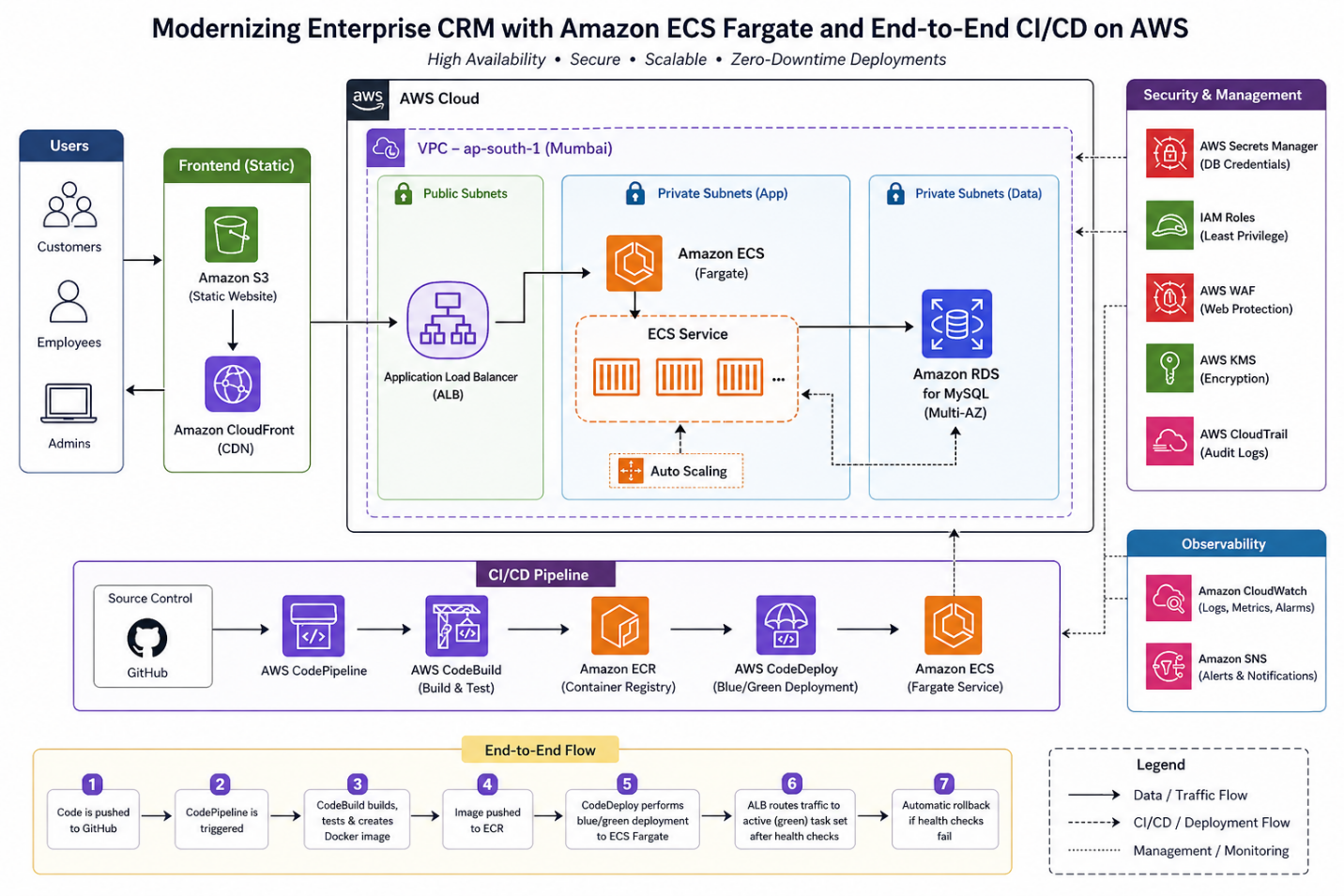
Enterprise CRM Architecture with ECS Fargate

AWS Services Used:

  • Amazon ECS (Fargate) — serverless container compute
  • Amazon RDS for MySQL — managed database with Multi-AZ
  • Amazon S3 — frontend hosting
  • AWS CodePipeline, CodeBuild, CodeDeploy — CI/CD automation
  • Amazon ECR — container image registry
  • AWS Secrets Manager — credential management
  • Amazon CloudWatch & CloudTrail — observability and audit
  • AWS WAF — web application firewall
  • AWS KMS — encryption at rest
  • Amazon SNS — alerting and notifications

Key Strategic Decisions

These are the decisions that shaped the architecture — and the business reasoning behind each one.

Decision 1: Why Fargate Over EKS or EC2?

As a Presales professional evaluating modernization options with enterprise customers, the decision point I see most often is not Fargate vs EC2 — it’s Fargate vs EKS.

Customers often arrive with EKS already in mind — drawn by its flexibility and ecosystem. But for most enterprise web applications and APIs, that flexibility comes at the cost of months of platform engineering. Fargate removes that burden entirely, letting teams focus on shipping features rather than managing cluster nodes.

Option Trade-off
EC2 Full control, but requires capacity management and patching
EKS Maximum flexibility, but 3–6 months of platform engineering before production value
Fargate Serverless containers — production-ready in weeks, not months

The business decision: Fargate eliminated an entire hiring requirement. The customer had budgeted for a platform engineering hire to manage Kubernetes — Fargate removed that need entirely, redirecting ~$180K annually toward feature development instead of infrastructure management. Unless a customer has strong Kubernetes expertise in-house or needs advanced scheduling, Fargate is almost always the faster path to production — and the safer recommendation.

Decision 2: Why Blue/Green Over In-Place Deployment?

In-place deployments are simpler to configure — CodeDeploy stops the old version, installs the new one, and restarts. For non-critical internal tools, that simplicity is acceptable. For a CRM handling active user sessions, in-place deployment creates a hard problem: the application is unavailable during the swap window, and there is no fast rollback path if the new version fails.

Blue/Green deployment eliminates both risks:

  • The new version is deployed to a fresh task set and validated by ALB health checks before a single user request touches it
  • Traffic switches in one atomic operation — a listener rule update on the ALB
  • If anything fails post-switch, rollback is equally instant: point the listener back at the blue environment
  • No re-deployment, no downtime, no manual intervention

The business decision: Zero-downtime deployment is not a DevOps preference — it’s a customer experience decision. The approximately 5-minute overhead of spinning up a parallel task set is the only cost. For an enterprise CRM where a failed deployment during business hours directly affects customer-facing operations, that trade-off closes in seconds. Frame it that way in your business case and it gets funded faster.

Decision 3: Why Secrets Manager Over Parameter Store?

Both AWS Secrets Manager and Systems Manager Parameter Store can store credentials securely, and Parameter Store is free for standard parameters. We chose Secrets Manager for three specific reasons:

  • Automatic secret rotation on a defined schedule without any application code change
  • Native RDS integration to rotate database passwords automatically
  • Dedicated audit trail in CloudTrail logging every secret access event

The business decision: For a CRM handling customer PII, a credential that auto-rotates every 30 days has a fundamentally smaller blast radius than one that relies on manual rotation discipline. This directly addressed two of the three open audit findings — closing them as a byproduct of good architecture rather than a separate remediation project.

Implementation Pattern

The implementation followed a standard containerization and CI/CD pattern. The specifics are below for practitioners, but the strategic decisions above are what differentiate this from a generic container deployment.

Containerization

DOCKERFILE
FROM node:18
WORKDIR /app
COPY package*.json ./
RUN npm install
COPY . .
EXPOSE 3000
CMD ["npm", "start"]

ECR Image Push

BASH
aws ecr create-repository --repository-name crm-app
aws ecr get-login-password --region ap-south-1 | \
  docker login --username AWS --password-stdin <account-id>.dkr.ecr.ap-south-1.amazonaws.com
docker build -t crm-app .
docker tag crm-app:latest <account-id>.dkr.ecr.ap-south-1.amazonaws.com/crm-app:latest
docker push <account-id>.dkr.ecr.ap-south-1.amazonaws.com/crm-app:latest

ECS Fargate Task Definition

JSON
{
  "family": "crm-task",
  "networkMode": "awsvpc",
  "requiresCompatibilities": ["FARGATE"],
  "cpu": "1024",
  "memory": "2048",
  "executionRoleArn": "arn:aws:iam::<account-id>:role/ecsTaskExecutionRole",
  "containerDefinitions": [
    {
      "name": "crm-container",
      "image": "<ECR-IMAGE-URI>",
      "portMappings": [
        { "containerPort": 3000 }
      ],
      "secrets": [
        {
          "name": "DB_PASSWORD",
          "valueFrom": "arn:aws:secretsmanager:ap-south-1:<account-id>:secret:crm-db"
        }
      ]
    }
  ]
}

CI/CD Pipeline (CodePipeline + CodeBuild + CodeDeploy)

Pipeline Flow: GitHub → CodePipeline trigger → CodeBuild (build & push Docker image) → CodeDeploy (Blue/Green deployment to ECS)

YAML
# buildspec.yml
version: 0.2
phases:
  pre_build:
    commands:
      - aws ecr get-login-password --region ap-south-1 | docker login --username AWS --password-stdin $REPO_URI
  build:
    commands:
      - docker build -t crm-app .
      - docker tag crm-app:latest $REPO_URI:latest
  post_build:
    commands:
      - docker push $REPO_URI:latest

Secrets Management

BASH
aws secretsmanager create-secret \
  --name crm-db \
  --secret-string '{"username":"admin","password":"your-secure-password"}'

Injected into ECS tasks securely — no hardcoding. Never use real credentials in CLI examples — use environment variables or a vault reference.

Security Architecture

Security controls were embedded across layers, not bolted on after deployment:

  • Identity & Access: IAM task roles with least privilege, role-based CI/CD permissions
  • Network Segmentation: Public subnets (ALB only), private subnets (ECS + RDS), Security Groups for micro-segmentation
  • Edge Protection: AWS WAF in front of ALB to protect against SQL injection, XSS, and malicious bot traffic
  • Encryption: AWS KMS for data at rest (RDS + S3), TLS for data in transit
  • Audit: CloudTrail for API logging, enabling compliance traceability

Business impact: For a CRM platform handling customer and employee data, WAF and KMS are non-negotiable layers. Combined with Secrets Manager for credentials, this eliminates all plaintext sensitive data from the system — resolving the audit findings that had been open for 18 months.

Observability and Operational Maturity

  • CloudWatch Logs → application logs with structured queries
  • CloudWatch Alarms → CPU, memory, deployment health — published to SNS for immediate team notification
  • CloudTrail → API auditing for compliance
  • Amazon SNS → routes alerts to on-call engineering via email and SMS

This ensures the right people are notified immediately when thresholds breach — without anyone manually watching dashboards. The result: faster MTTR and proactive monitoring instead of reactive firefighting.

Common Pitfalls (Real Lessons)

Pitfall Impact Fix
Wrong ALB health check endpoint Deployment auto-rollback Always expose /health and validate before go-live
IAM misconfiguration ECS task can’t pull secrets Attach correct execution role — test in staging first
Fargate cold start delays Slow initial response Set minimum running tasks to avoid cold starts
Docker push permission issues CI/CD pipeline failure Validate ECR access in CodeBuild service role

These are not theoretical — each one caused at least one failed deployment during the implementation. Document them in your runbook.

Business Outcomes

Metric Before After Impact
Deployment time 2–3 hours <15 minutes Feature velocity unlocked
Downtime per release 30–60 minutes Zero Customer experience protected
Manual operations High ↓ 80% 2 senior engineers redirected to product work
Security posture Hardcoded credentials, no audit Full encryption, audit-ready 3 audit findings closed
Scalability Fixed capacity Auto-scaling Peak performance without over-provisioning
Customer-reported downtime incidents 3–4/month Zero Trust and retention protected

The real ROI is not infrastructure cost savings — it’s the engineering capacity freed up and the customer experience risk eliminated. The 80% reduction in manual operations freed senior engineers for product work. Customer-reported downtime incidents during release windows dropped from an average of 3–4 per month to zero — and support ticket volume related to platform availability fell by over 60% within the first quarter post-modernization. That’s the real ROI, not the compute bill.

Developer Experience Transformation

Before Modernization

  • Developers manually shared builds with operations teams
  • Deployments required coordinated downtime windows
  • Debugging required direct server access
  • Releases were infrequent and risky — creating a culture of fear around change

After Modernization

  • Developer pushes code to GitHub
  • CodePipeline triggers automatically
  • CodeBuild builds, creates Docker image, runs validations
  • Image pushed to ECR
  • CodeDeploy deploys via Blue/Green, validates health checks
  • Success → deployment completes | Failure → automatic rollback

Developers no longer “request deployments” — they trigger them with every commit.

This shift matters beyond efficiency. When deployments are safe and fast, teams ship smaller changes more frequently. Smaller changes are easier to debug, easier to rollback, and lower risk. The cultural shift from “big scary releases” to “continuous safe delivery” is the most valuable outcome of this entire modernization — and the hardest to quantify on a spreadsheet.

Future Evolution Roadmap

Phase Investment Business Value
Infrastructure as Code (Terraform/CDK) Medium Reproducible environments, faster provisioning, version-controlled infrastructure
Observability maturity (X-Ray, structured logging) Low Faster root cause analysis, better performance insights
CI/CD hardening (automated tests, security scans, approval gates) Medium Enterprise-grade pipeline, reduced production incidents

Modernization is not a one-time project — it’s a continuous journey. This architecture establishes a strong foundation, but true cloud maturity comes from continuous optimization, automation expansion, and security evolution.

Building the Business Case: What Resonates with Executive Stakeholders

In enterprise presales, the most common objection to modernization is not technical — it’s “we don’t have time to stop and rebuild.” The architecture pattern in this post directly addresses that objection because it’s incremental: containerize first, automate deployment second, add observability third. No big-bang rewrite required.

When I present this pattern to CTO/VP Engineering audiences, the moment that shifts the conversation is the deployment time comparison: 2–3 hours with downtime → 10 minutes with zero downtime. That’s not a technology metric — it’s a business agility metric that every executive understands immediately.

The second moment is the security conversation. When a CISO hears “hardcoded credentials in config files,” the room gets uncomfortable. When they hear “Secrets Manager with automatic 30-day rotation and CloudTrail audit logging,” the compliance conversation is over. Security modernization sells itself — you just have to surface the current-state risk clearly enough.

For technology leaders evaluating this pattern: the question is not “can we afford to modernize?” It’s “can we afford the next audit finding, the next deployment outage, or the next senior engineer who leaves because they’re tired of manual releases?”

Lessons for Technology Leaders

  • Modernization ROI is not just infrastructure cost — The 80% reduction in manual operations freed senior engineers for product work. That’s the real ROI, not the compute bill.
  • Zero-downtime deployment is a customer experience decision, not a DevOps preference — Frame it that way in your business case and it gets funded faster.
  • The “Fargate vs EKS” decision is really a “build platform team vs ship features” decision — Unless you have Kubernetes expertise in-house already, Fargate gets you to production months faster.
  • Start with CI/CD, not containers — Containerization without automated deployment just gives you a more complex manual process. The pipeline is the real accelerator.
  • Security modernization pays for itself in audit avoidance — Every open finding has a cost. Closing them through good architecture is cheaper than remediating them separately.

About the Author

Rajat Jindal is VP – Presales at AeonX Digital Technology Limited, where he architects winning cloud strategies for enterprise customers and translates modernization into measurable business value. He is a strong advocate of AWS, committed to sharing thought leadership that helps technology leaders make faster, better-informed decisions.