by Rajat Jindal | Jul 2, 2026 | AWS
Problem Framing: 30+ Orders a Day, Zero Intelligence in How They Move
In early 2026, we engaged with a fast-growing Indian FMCG biscuit manufacturer operating a multi-city distribution network — dispatching from manufacturing plants to distributors and retailers across North and Western India. The company was scaling rapidly, but its logistics operations had not scaled with it.
Every day, the logistics team manually planned 30+ sales orders — deciding which orders to consolidate, which truck to assign, and which route to take. This was done in spreadsheets, phone calls, and experience-based judgment by a 4-person logistics planning team that was already operating at capacity.
The specific pain points:
- Truck utilisation averaged 52-58% — meaning nearly half of every truck's capacity was wasted on every trip. The logistics team selected trucks based on availability, not optimal fit for the load.
- No order consolidation logic — orders going to nearby destinations on the same day were dispatched separately because nobody had time to cross-reference delivery windows and geography manually across 30+ orders.
- Reactive communication with customers — distributors discovered delays only when the truck did not arrive. No proactive notification existed. This generated 15-20 inbound escalation calls daily from distributors asking "Where is my delivery?"
- Scaling meant hiring — every incremental growth in order volume required additional logistics planners. The cost of logistics coordination was growing linearly with revenue, not logarithmically.
The customer profile:
- FMCG manufacturer (biscuits and snacks) with national distribution
- 30+ sales orders dispatched daily from 2 manufacturing plants
- Fleet: mix of owned and hired trucks (8-tonne to 22-tonne capacity)
- 100+ truck movements monitored daily
- Existing systems: SAP (order management), GPS tracking on all vehicles, Google Maps for routing
- Logistics team: 4 planners handling all dispatch coordination manually
- Key metric: logistics cost as a percentage of revenue was significantly above the operations head's internal targets
The design constraint: The operations head needed the system live within 10 weeks — before the upcoming festive season when daily order volumes would double. The existing 4-person team could not absorb the festive spike without either hiring 2-3 temporary planners or finding a way to automate the intelligence layer of logistics planning. Hiring was the fallback; automation was the goal.
Why This Approach: Agentic AI Over Traditional Route Optimisation
The Decision We Made (and What We Rejected)
Rejected: Traditional route optimisation software (TMS)
Transport Management Systems with built-in route optimisation (like Oracle TMS or SAP TM) would address the routing problem but not the decision-making problem. They optimise a given set of shipments — they do not decide which orders to consolidate, which truck size is optimal for a variable load, or when to split vs combine shipments based on delivery urgency. Additionally, TMS implementations typically take 4-6 months and cost ₹30-50 lakh for mid-market FMCG companies.
Rejected: Rule-based automation (if-then dispatch logic)
Build a rules engine: "If destination is within 50km of another pending order and delivery window overlaps, consolidate." This handles the obvious cases but breaks on the edge cases that consume 60% of the planning team's time — variable truck sizes, partial loads, mixed urgency orders, weight-vs-volume constraints. Rules cannot reason about trade-offs; they can only execute predetermined paths.
Selected: Multi-Agent Agentic AI on Amazon Bedrock
The architecture uses collaborating AI agents, each responsible for a specific logistics reasoning task:
- Orchestrator Agent: Analyses all pending orders and decides the dispatch strategy (consolidate, direct, or express)
- Order Grouping Agent: Intelligently clusters orders by destination proximity, delivery window, and load compatibility
- Truck Selection Agent: Calculates total weight and volume, selects the optimal truck targeting 70-95% utilisation
- GPS ETA Monitoring Agent: Continuously tracks shipments, recalculates ETA using live traffic, and triggers proactive notifications when delays are detected
Why agentic over rule-based or TMS:
- Reasoning about trade-offs: The orchestrator weighs cost vs speed vs customer priority — "Is it worth sending a half-full truck now for an urgent order, or can we wait 4 hours for two more orders to the same region and send one full truck?" Rules cannot make this judgment; agents can.
- Continuous adaptation: The GPS agent does not just track — it reasons about what a delay means operationally and decides who to notify and when.
- Auditable decisions: Every agent logs its reasoning — "Selected 14-tonne truck because total weight is 11.2 MT and volume is 680 cubic feet. 18-tonne truck available but would result in only 62% utilisation. 10-tonne truck insufficient by 1.2 MT." This audit trail is critical for operations management.
- 10-week deployment: Unlike TMS (4-6 months), the agentic system was deployable within the festive deadline.
Implementation Architecture: 10 Weeks to Production
The system was implemented over 10 weeks, going live in mid-March 2026 — six weeks before the first festive demand spike.
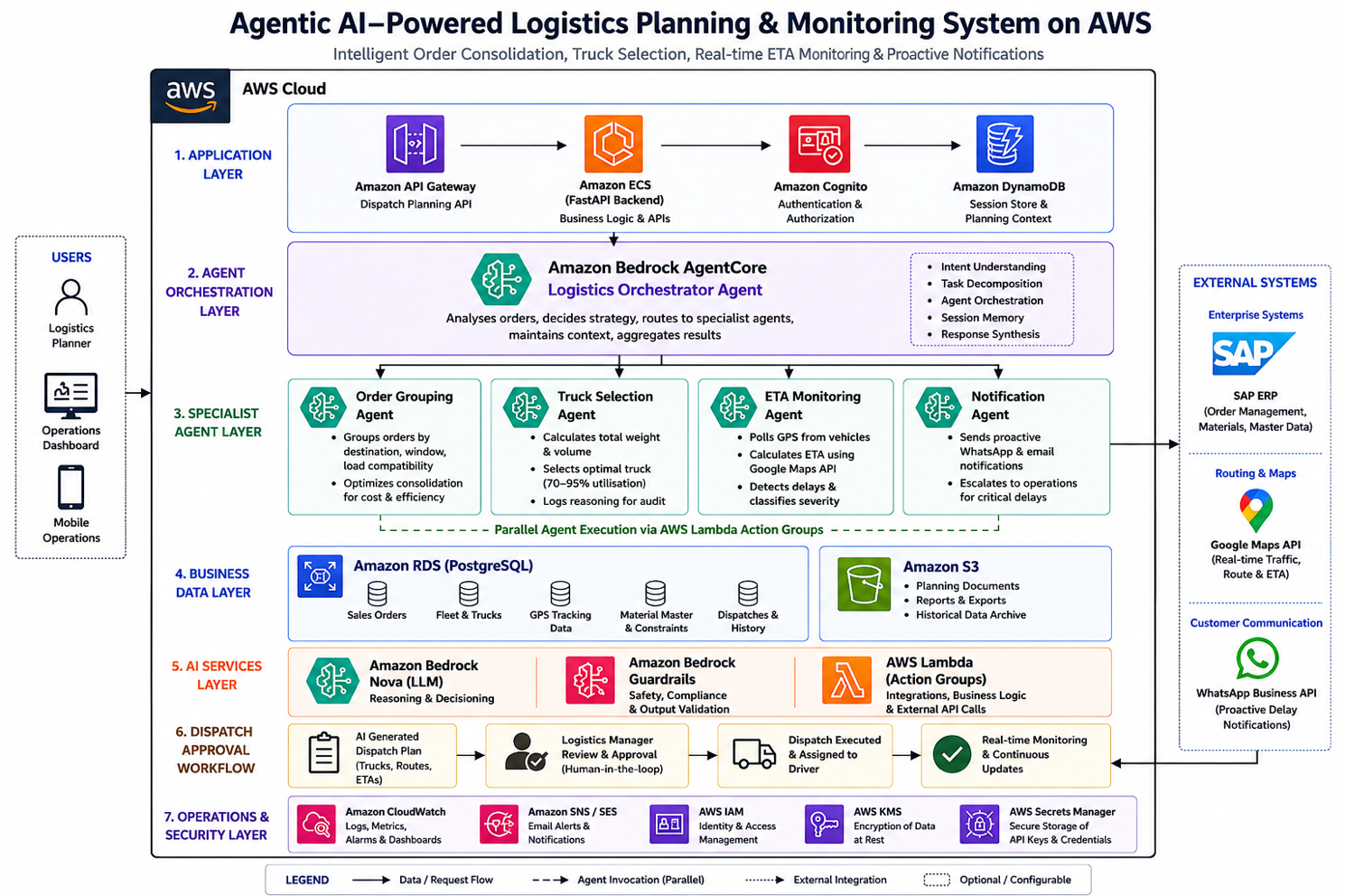
Key Implementation: The Orchestrator Agent Configuration
JSON
{
  "agentName": "logystix-orchestrator",
  "foundationModel": "amazon.nova-pro-v1:0",
  "instruction": "You are the logistics planning orchestrator for an FMCG distribution operation. Each planning cycle, analyse all pending sales orders and determine the optimal dispatch strategy. Consider: destination proximity for consolidation, delivery window constraints, truck capacity (weight and volume), customer priority tiers, and cost efficiency. For each dispatch decision, log your reasoning explicitly — why you grouped these orders, why you selected this truck size, and what trade-off you made between cost and speed. When truck utilisation would fall below 60%, evaluate whether waiting for additional orders is viable within delivery windows before dispatching. Always confirm the final dispatch plan with the logistics manager before execution.",
  "idleSessionTTLInSeconds": 3600,
  "memoryConfiguration": {
    "enabledMemoryTypes": ["SESSION_SUMMARY"],
    "storageDays": 30
  },
  "actionGroups": [
    {
      "actionGroupName": "OrderAnalysis",
      "description": "Fetch pending orders from RDS, analyse destinations, weights, volumes, and delivery windows",
      "actionGroupExecutor": {
        "lambda": "arn:aws:lambda:ap-south-1:<account-id>:function:logystix-order-analysis"
      }
    },
    {
      "actionGroupName": "TruckSelection",
      "description": "Query available truck fleet, calculate optimal truck-to-load assignment targeting 70-95% utilisation",
      "actionGroupExecutor": {
        "lambda": "arn:aws:lambda:ap-south-1:<account-id>:function:logystix-truck-selector"
      }
    },
    {
      "actionGroupName": "ETAMonitoring",
      "description": "Poll GPS coordinates for dispatched trucks, calculate ETA using Maps API, detect delays and trigger notifications",
      "actionGroupExecutor": {
        "lambda": "arn:aws:lambda:ap-south-1:<account-id>:function:logystix-eta-monitor"
      }
    },
    {
      "actionGroupName": "NotificationDispatch",
      "description": "Send WhatsApp and email notifications to customers and operations team when delays are detected",
      "actionGroupExecutor": {
        "lambda": "arn:aws:lambda:ap-south-1:<account-id>:function:logystix-notifications"
      }
    }
  ],
  "guardrailConfiguration": {
    "guardrailIdentifier": "logystix-operations-guardrail",
    "guardrailVersion": "1"
  }
}
The Truck Selection Reasoning Pattern
The most impactful agent behaviour is the truck selection logic — where the agent reasons about weight, volume, and utilisation rather than applying a simple lookup:
PYTHON
# Lambda: Truck Selection Agent — reasoning-based vehicle assignment
import boto3
import json

bedrock = boto3.client('bedrock-runtime', region_name='ap-south-1')
rds_client = boto3.client('rds-data', region_name='ap-south-1')

def select_optimal_truck(order_group: dict) -> dict:
    """
    AI-powered truck selection: reasons about weight, volume,
    utilisation targets, and available fleet to select optimal vehicle.
    """
    total_weight_mt = order_group['total_weight_mt']
    total_volume_cuft = order_group['total_volume_cuft']
    destination = order_group['destination_cluster']
    urgency = order_group['max_urgency_level']

    # Fetch available trucks from RDS
    available_trucks = query_available_fleet(destination)

    # Build reasoning prompt for the agent
    reasoning_prompt = f"""
    Order group for dispatch:
    - Total weight: {total_weight_mt} MT
    - Total volume: {total_volume_cuft} cubic feet
    - Destination cluster: {destination}
    - Urgency: {urgency}
    - Delivery window: {order_group['delivery_deadline']}

    Available trucks:
    {json.dumps(available_trucks, indent=2)}

    Select the optimal truck. Criteria:
    1. Truck must accommodate both weight AND volume
    2. Target utilisation: 70-95% (by the binding constraint — weight or volume)
    3. If no truck achieves >60% utilisation, recommend waiting for more orders
       (only if delivery window permits)
    4. If urgency is 'express', prioritise speed over utilisation

    Return JSON with: selected_truck_id, utilisation_percentage,
    binding_constraint (weight or volume), and reasoning explanation.
    """

    response = bedrock.invoke_model(
        modelId="amazon.nova-pro-v1:0",
        body=json.dumps({
            "messages": [{"role": "user", "content": reasoning_prompt}],
            "max_tokens": 512
        })
    )

    result = json.loads(response['body'].read())
    return result


# Example output from the agent:
# {
#   "selected_truck_id": "TRK-14T-007",
#   "utilisation_percentage": 82,
#   "binding_constraint": "weight",
#   "reasoning": "Total weight 11.2 MT fits 14-tonne truck at 80% weight
#    utilisation. Volume (680 cuft) is at 68% of 14T truck capacity (1000 cuft).
#    Weight is the binding constraint. 18-tonne truck available but would
#    result in only 62% utilisation — below target. 10-tonne truck insufficient
#    by 1.2 MT. Selected 14T as optimal fit."
# }
Bedrock Guardrails: Logistics Safety
JSON
{
  "name": "logystix-operations-guardrail",
  "description": "Ensure safe and valid logistics decisions",
  "topicPolicyConfig": {
    "topicsConfig": [
      {
        "name": "overload-recommendation",
        "definition": "Recommending truck loads that exceed the vehicle's rated weight or volume capacity",
        "type": "DENY"
      },
      {
        "name": "safety-bypass",
        "definition": "Suggesting dispatch decisions that bypass mandatory safety checks or driver rest requirements",
        "type": "DENY"
      }
    ]
  },
  "contentPolicyConfig": {
    "filtersConfig": [
      {"type": "MISCONDUCT", "inputStrength": "HIGH", "outputStrength": "HIGH"}
    ]
  }
}
Real Numbers: 12 Weeks of Production Data (Mid-March – Early June 2026)
The system went live in mid-March 2026. Here are the results from 12 weeks of production operation:
| Metric |
Before (Baseline: Jan-Feb 2026) |
After (Mar-Jun 2026) |
Change |
| Average truck utilisation |
52-58% |
72-79% |
+20 percentage points |
| Logistics cost per delivery |
Baseline indexed at 100 |
76 |
-24% |
| Daily orders processed |
30+ (with 4 planners at capacity) |
36-40 (same 4 planners, with AI handling planning) |
+20-25% throughput, zero additional headcount |
| Time spent on dispatch planning |
3-4 hours/day (team of 4) |
40-50 minutes/day (1 planner reviewing AI recommendations) |
-78% |
| Customer escalation calls ("where is my delivery?") |
15-20/day |
9-11/day |
-42% |
| Proactive delay notifications sent |
0 (no system existed) |
Average 5-7/day (sent before customer calls) |
New capability |
| Average ETA accuracy (predicted vs actual arrival) |
N/A (no prediction) |
82% within ±30 minutes |
New capability |
| Orders consolidated (that would have shipped separately) |
~5% (manual, when obvious) |
~28% of daily orders benefit from AI consolidation |
+23 percentage points |
Cost Profile (Monthly)
| Component |
Monthly Cost |
| Amazon Bedrock (Nova inference — orchestrator + specialist agents) |
₹0.9 lakh/month ($1,080) |
| Amazon RDS (orders, trucks, GPS data) |
₹0.4 lakh/month ($480) |
| Lambda (agent execution + API integrations) |
₹0.2 lakh/month ($240) |
| Google Maps API (ETA calculations — ~3,000 calls/day) |
₹0.5 lakh/month ($600) |
| WhatsApp Business API (notifications) |
₹0.1 lakh/month ($120) |
| CloudWatch + SES + IAM |
₹0.2 lakh/month ($240) |
| Total monthly platform cost |
₹2.3 lakh/month ($2,760) |
ROI Calculation
- Logistics cost reduction: 24% reduction on a monthly logistics spend of approximately ₹18-20 lakh = ₹4.3-4.8 lakh/month saved
- Avoided festive-season hiring: 2-3 temporary planners not needed (₹1.5-2 lakh saved over festive quarter)
- Reduced escalation handling: 6-9 fewer calls/day × 15 min each = ~2 hours/day of operations team time recovered
- Platform cost: ₹2.3 lakh/month
- Net monthly savings: ~₹2-2.5 lakh/month in direct logistics cost reduction alone (after platform cost)
- Payback period: Implementation cost (₹20 lakh / $24K) recovered in approximately 7-8 months
What Broke: Three Failure Modes and How We Fixed Them
Failure 1: Order Grouping Agent Consolidating Incompatible Products
What happened: In Week 2, the Order Grouping Agent consolidated a shipment of cream biscuits (temperature-sensitive, requires covered transport) with a bulk shipment of glucose biscuits (ambient, open truck acceptable). The cream biscuits arrived at the distributor with packaging damage from heat exposure during transit.
Root cause: The grouping agent was optimising purely on destination proximity and weight/volume fit — it did not consider product handling requirements. The product constraint ("requires covered transport" vs "ambient OK") was stored in SAP material master data but was not being passed to the agent as context.
Fix: Added a product-constraint lookup to the Order Grouping Agent's pre-processing step. Before grouping, the agent now queries material handling requirements from RDS and applies a hard constraint: orders requiring different transport conditions (temperature, fragility, hazmat) are never consolidated into the same truck, regardless of destination fit.
After fix in Week 3: zero product-incompatibility incidents in the remaining 10 weeks. The constraint eliminated approximately 8% of potential consolidations — an acceptable trade-off for product safety.
Failure 2: GPS Agent Triggering False Delay Alerts During Highway Toll Stops
What happened: In the first three weeks, approximately 22% of "delay detected" notifications sent to customers were false alarms. The truck was not actually delayed — it was stopped at a highway toll plaza for 15-25 minutes, which the GPS agent interpreted as an unexpected stop indicating a delay.
Root cause: The ETA monitoring agent used a simple heuristic: "if truck is stationary for >10 minutes and not at a known delivery point, flag as potential delay." Highway toll plazas, fuel stops, and mandatory driver rest points were not in the agent's context as expected stop locations.
Fix: Built a "known stop points" reference layer in RDS — toll plazas, fuel stations, and designated rest stops along all active routes. The GPS agent now checks whether a stationary truck is at a known stop point before classifying as delayed. Additionally, increased the stationary threshold from 10 minutes to 20 minutes for locations within 2km of a known stop point.
After fix in Week 4: false delay notifications dropped from 22% to 8%. The remaining 8% are genuine edge cases (unexpected stops not in the reference database) — acceptable and self-correcting as new stop points are added.
Failure 3: Truck Selection Agent Recommending Unavailable Vehicles
What happened: In Week 3-4, approximately 15% of truck selection recommendations referenced trucks that were not actually available — they were already dispatched, under maintenance, or committed to another route. The logistics manager had to override and manually select a truck.
Root cause: The truck fleet availability data in RDS was updated by the operations team manually — typically with a 1-2 hour lag. The Truck Selection Agent queried "available trucks" and received stale data showing trucks as available when they had already been dispatched 30-90 minutes earlier.
Fix: Implemented a real-time fleet status sync: when a dispatch is confirmed, the truck status in RDS is updated immediately (within the same Lambda execution that confirms the dispatch). Added a "last_status_update" timestamp to the fleet table, and the Truck Selection Agent now filters out any truck whose status was updated more than 30 minutes ago without reconfirmation — treating stale-status trucks as "availability uncertain" and excluding them from automatic selection.
After fix in Week 5: unavailable-truck recommendations dropped from 15% to 4%. The remaining cases occur when two dispatch cycles happen within minutes of each other (race condition) — resolved by the logistics manager's approval step.
Agent Reasoning in Action: Why This Is Not Route Optimisation
The distinction between this system and traditional logistics software is that these agents make judgment calls, not just calculations.
Examples of reasoning in production:
- Three orders to the same city: two are standard (2-day window) and one is urgent (same-day). Total weight: 14 MT. Available trucks: one 18T (leaves now) and one 10T (available in 3 hours). → The orchestrator decides: dispatch the urgent order immediately on a hired 10T truck (58% utilisation — below target but necessary for the SLA), and hold the two standard orders for consolidation with tomorrow's orders to the same region. Logs reasoning: "Splitting delivers the urgent order within SLA while avoiding an 18T truck at 78% utilisation that would leave the two standard orders without a vehicle for their window."
- An order group weighs 9.8 MT. Available trucks: 10T and 14T. → The agent selects the 10T truck at 98% weight utilisation, but checks volume: if volume exceeds 85% of the 10T's capacity, it escalates to the 14T. Reasoning is logged either way.
- GPS shows a truck stopped for 45 minutes, 12km from destination, not at a known stop point. → The ETA agent reclassifies from "minor delay" to "delayed," sends WhatsApp notification to the customer with updated ETA, and logs: "Vehicle stationary for 45 min, not at toll/fuel/rest point. Likely traffic blockage or breakdown. Updated ETA from 2:30 PM to 3:45 PM based on historical recovery time for this route segment."
A Presales Perspective: Why Logistics Is the Highest-ROI Agentic AI Use Case in FMCG
Why This Conversation Wins Every Time
In my presales engagements with FMCG manufacturers, the logistics conversation has the fastest path to executive buy-in of any AI use case — for one simple reason: logistics cost is a P&L line item that every CFO monitors monthly.
When I show a CFO that their logistics cost per delivery can drop by 20-25% through better truck utilisation and order consolidation — at a platform cost of ₹2.3 lakh/month — the ROI conversation is over in one slide. The payback period (7-8 months) is shorter than most enterprise software procurement cycles.
The Opening Question
"What percentage of your trucks leave your plant at less than 70% capacity? And how many orders per week ship to the same region on different trucks because nobody had time to consolidate them?"
Every FMCG logistics head knows these numbers are bad. They just have not had a solution that fits their timeline and budget. The 10-week deployment timeline is what makes this actionable — it is not a 6-month TMS implementation.
The Demonstration That Shifts the Conversation
Show the truck selection agent's reasoning log: "Selected 14-tonne truck because total weight is 11.2 MT and volume is 680 cubic feet. 18-tonne truck available but would result in only 62% utilisation." When the operations head sees the AI making the same judgment calls their best planner makes — but for every single order, every single day, without fatigue or oversight — they understand this is not automation. It is an intelligent planning partner.
The Objection You Will Hear
"Our logistics is too complex for AI — too many variables, too many exceptions."
Response: "That complexity is exactly why rule-based systems fail and why you are still doing this manually. Agentic AI reasons about complexity — that is its core capability. The more variables and trade-offs involved, the more value AI adds over spreadsheets. The simpler the problem, the less you need AI."
Lessons for Technology Leaders
- Logistics cost is a P&L line item — which makes AI ROI immediately visible — Unlike AI use cases buried in productivity metrics or qualitative improvements, logistics cost reduction shows up in the next month's financial statements. This makes the business case trivially easy to prove and fund.
- Agentic AI reasoning logs are an operational asset, not a debugging tool — The truck selection reasoning ("why this truck, not that one") became the operations team's primary planning review artifact. They stopped reviewing dispatches one-by-one and started reviewing the AI's reasoning for exceptions only. The logs are the operations intelligence layer.
- Start with the "boring" planning work, not the "exciting" prediction work — Order grouping and truck selection are not glamorous AI use cases. But they consume 3-4 hours of planning time daily and directly impact the largest logistics cost driver (utilisation). Solve the boring problem first; it funds the exciting problems.
- Real-time monitoring agents are only as good as their context — The GPS agent's false alarm problem (22% false positives) was entirely a context problem, not a reasoning problem. The agent's logic was correct; its knowledge of the world (toll plazas, fuel stops) was incomplete. In agentic systems, context quality determines output quality.
- Human-in-the-loop is not a limitation — it is a trust-building strategy — The logistics manager's approval step was initially a safety net. After 6 weeks of consistent AI quality, it evolved into a 2-minute review rather than a 3-hour planning session. Trust is earned incrementally — design for it.
Reusable Artifact: Agentic Logistics Planning Deployment Playbook
Based on this engagement, we developed a reusable 10-week framework for FMCG logistics automation:
Week 1-2: Order data audit + fleet data normalisation + RDS schema design
Week 3-4: Orchestrator agent + Order Grouping Agent development
Week 4-5: Truck Selection Agent + utilisation logic + reasoning templates
Week 5-6: GPS integration + ETA monitoring agent + Maps API configuration
Week 7-8: Notification system (WhatsApp + SES) + escalation logic
Week 8-9: Integration testing with live orders + known-stop-points database
Week 9-10: Production deployment + operations team training + false-positive tuning
Week 11+: Continuous improvement — route learning, seasonal pattern adaptation
Applicable to: Any FMCG, CPG, or distribution company with daily multi-order dispatches and a fleet of mixed-capacity vehicles. Particularly effective for companies where manual planning is the bottleneck to scaling order volume.
AWS services required: Bedrock AgentCore (Nova), Amazon RDS, Lambda, CloudWatch, SES, Bedrock Guardrails, IAM. External: Google Maps API, WhatsApp Business API.
Conclusion
This engagement proved that agentic AI is not limited to knowledge work and document processing — it is equally powerful for physical-world logistics planning where decisions have immediate, measurable financial impact.
The 24% logistics cost reduction was not achieved by optimising routes (the traditional TMS approach). It was achieved by giving the operations team an AI planning partner that reasons about order consolidation, truck selection, and delivery trade-offs — the judgment-intensive work that spreadsheets and rules cannot automate.
The most telling metric is not the cost reduction — it is the throughput change: 30+ orders/day with 4 planners at capacity → 36-40 orders/day with the same 4 planners spending 40-50 minutes reviewing AI recommendations instead of 3-4 hours building plans from scratch. The organisation scaled its logistics capacity by 20-25% without hiring a single additional person. That is the operational leverage of agentic AI.
About the Author
Rajat Jindal is VP – Presales at AeonX Digital Technology Limited, where he architects winning cloud strategies for enterprise customers and translates modernization into measurable business value. He is a strong advocate of AWS, committed to sharing thought leadership that helps technology leaders make faster, better-informed decisions.
by Rajat Jindal | Jun 11, 2026 | AWS
Problem Framing: 500 Employees × 45 Minutes × Every Month = A Productivity Crisis Nobody Measured
In late 2025, we engaged with one of India's leading textile and apparel enterprises — a household brand with a workforce distributed across corporate offices, manufacturing units, and field sales teams nationwide. Employees travel frequently for business, generating a high volume of expense claims that require accurate processing, policy compliance, and timely reimbursement.
At the time of engagement, the expense submission process was consuming 30-45 minutes per employee per claim. With over 500 employees submitting roughly 1,000 claims monthly, the organisation was burning over 500 person-hours per month on a process that was entirely manual, sequential, and error-prone.
The specific pain points:
- Employees uploaded invoices one-by-one, waited for individual OCR processing (1-2 minutes per invoice), then manually entered amount, date, expense type, and trip association for each
- Multi-trip employees managing 8-15 invoices per submission spent the full 45 minutes navigating the system
- Finance teams processed an average of 40+ policy violations per month that should have been caught before submission — each requiring a rejection cycle that added 5-7 business days to reimbursement
- Employee satisfaction scores on internal surveys ranked "expense reimbursement" as the #2 operational frustration (behind only "meeting overload")
The design constraint: The finance leadership required the solution to maintain 100% auditability, enforce all existing expense policies without exception, and integrate with their SAP-based ERP without modifying the core finance system. The IT team had 3 engineers available part-time. No data science capacity existed. The target: production deployment within 8 weeks.
Why this mattered beyond productivity: In a competitive talent market, operational friction is a retention risk. When a senior sales executive spends 45 minutes fighting an expense system after a gruelling travel week — every single time — the accumulated frustration compounds into disengagement. The HR team had flagged this in exit interviews: "administrative friction" appeared in nearly a quarter of voluntary departure feedback. The expense system was not just a finance problem — it was a talent problem.
Why This Approach: Agentic AI Over Traditional RPA or Workflow Automation
The Decision We Made (and What We Rejected)
Rejected: Enhanced OCR + Rule-Based Workflow (RPA approach)
The obvious first option: upgrade the OCR engine, build rule-based routing for policy validation, and add a bulk upload feature. Estimated improvement: processing time down to 15-20 minutes (from 45). Still manual classification. Still manual trip mapping. Still sequential processing.
We rejected this because it solves the speed problem partially but does not solve the intelligence problem at all. Employees still need to classify expenses, map invoices to trips, and validate policy compliance manually. The cognitive burden remains.
Rejected: Custom ML Pipeline (Classification + NER)
Train custom models for invoice classification and named entity recognition. Better accuracy than rules, but requires: training data labelling (6-8 weeks), model training and evaluation (4 weeks), ongoing model drift monitoring, and a data science team to maintain. Total timeline: 14-18 weeks. Exceeds the 8-week constraint.
Selected: Multi-Agent Agentic AI on Amazon Bedrock
The architecture we chose was fundamentally different from both alternatives: a system of collaborating AI agents, each responsible for a specific reasoning task, orchestrated through Amazon Bedrock AgentCore with Strands Agents executing within a FastAPI backend.
Why agentic over traditional automation:
- Reasoning, not rules: The policy compliance agent reasons about edge cases ("Is a ₹2,800 dinner receipt valid when the per-diem is ₹2,500 but the employee was dining with a client?") rather than applying binary rules
- Parallel processing: All invoices processed simultaneously through concurrent agent execution — not sequentially
- Ambiguity handling: When data is unclear, agents ask the employee for clarification rather than making assumptions or failing silently
- Natural language interaction: Employees describe what they need ("Process my Mumbai trip expenses from last week") rather than navigating forms
- Continuous learning: Corrections feed into the OpenSearch Knowledge Base, improving accuracy without retraining
Implementation Architecture: 8 Weeks to Production
The system was implemented over 8 weeks across the customer's AWS environment, with production launch in early February 2026.
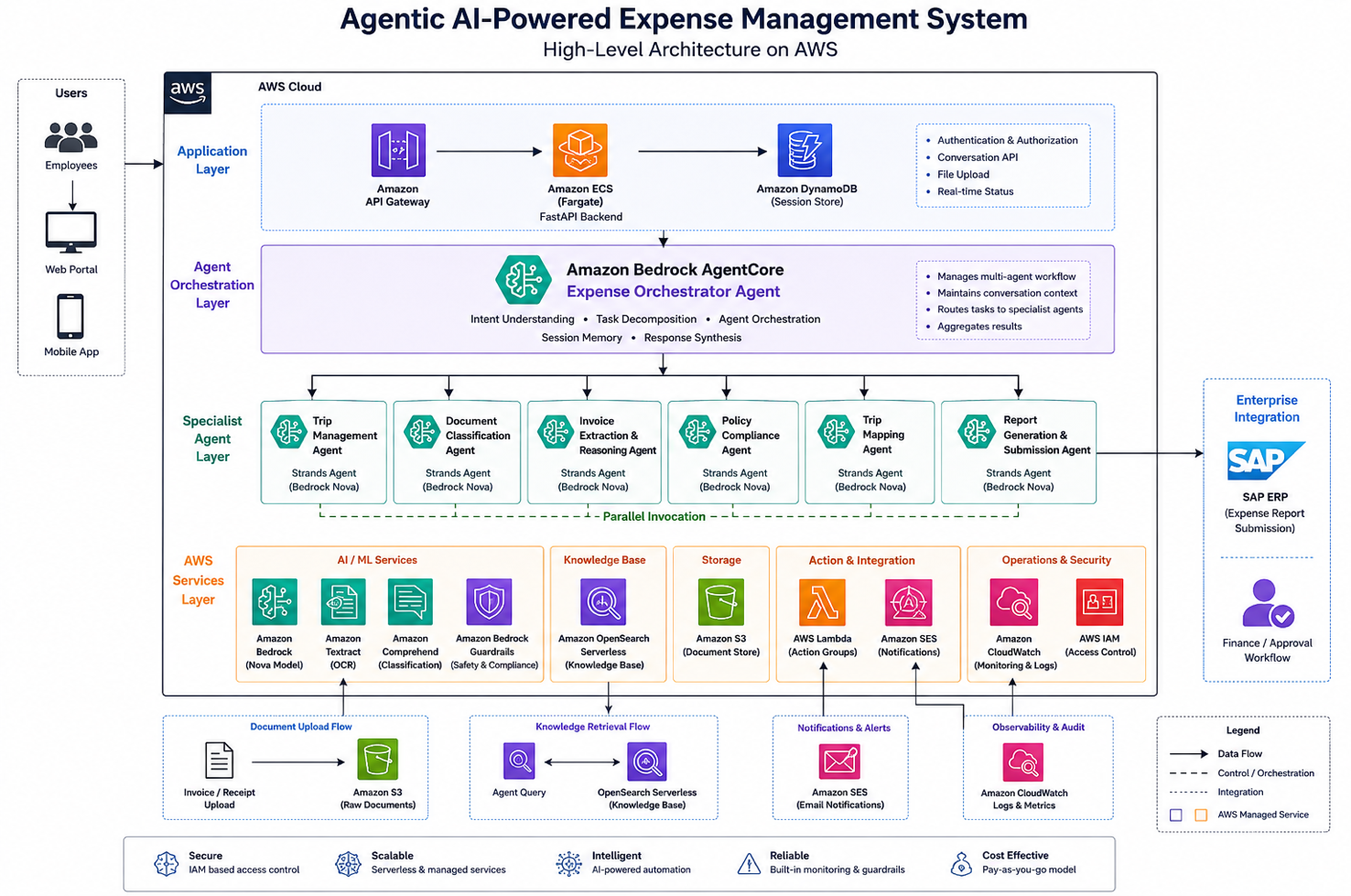
Key Implementation: The Orchestrator Agent Configuration
JSON
{
  "agentName": "xpense-orchestrator",
  "foundationModel": "amazon.nova-pro-v1:0",
  "instruction": "You are the expense management orchestrator for enterprise employees. When an employee initiates a request, understand their intent and execute the appropriate workflow: create or fetch a trip, process uploaded invoices in parallel, validate expenses against company policy, map invoices to trips, generate expense report, and submit for approval. Maintain context across all steps. Ask for clarification only when genuinely ambiguous — never assume. Always confirm the final report with the employee before submission.",
  "idleSessionTTLInSeconds": 1800,
  "memoryConfiguration": {
    "enabledMemoryTypes": ["SESSION_SUMMARY"],
    "storageDays": 30
  },
  "actionGroups": [
    {
      "actionGroupName": "TripManagement",
      "description": "Create new trips or fetch existing trips for the employee",
      "actionGroupExecutor": {
        "lambda": "arn:aws:lambda:ap-south-1:<account-id>:function:xpense-trip-mgmt"
      }
    },
    {
      "actionGroupName": "InvoiceProcessing",
      "description": "Process uploaded invoices — OCR extraction, classification, and validation",
      "actionGroupExecutor": {
        "lambda": "arn:aws:lambda:ap-south-1:<account-id>:function:xpense-invoice-processor"
      }
    },
    {
      "actionGroupName": "PolicyValidation",
      "description": "Validate expenses against internal company policies — per diem limits, allowed categories, documentation requirements",
      "actionGroupExecutor": {
        "lambda": "arn:aws:lambda:ap-south-1:<account-id>:function:xpense-policy-engine"
      }
    },
    {
      "actionGroupName": "ReportSubmission",
      "description": "Compile expense report, get employee confirmation, submit for approval, and send notification emails",
      "actionGroupExecutor": {
        "lambda": "arn:aws:lambda:ap-south-1:<account-id>:function:xpense-report-submit"
      }
    }
  ],
  "knowledgeBases": [
    {
      "knowledgeBaseId": "enterprise-expense-policy-kb",
      "description": "Company expense policy documentation, per-diem rates by city and grade, approved expense categories, and historical correction patterns"
    }
  ],
  "guardrailConfiguration": {
    "guardrailIdentifier": "xpense-financial-guardrail",
    "guardrailVersion": "1"
  }
}
The Parallel Processing Pattern
The critical performance improvement came from concurrent invoice processing. Traditional systems process invoices sequentially (1-2 min each × 10 invoices = 10-20 minutes). The agentic system processes all invoices in parallel:
PYTHON
# Lambda: Parallel invoice processing with concurrent agent execution
import boto3
import json
from concurrent.futures import ThreadPoolExecutor, as_completed

textract = boto3.client('textract', region_name='ap-south-1')
comprehend = boto3.client('comprehend', region_name='ap-south-1')
bedrock = boto3.client('bedrock-runtime', region_name='ap-south-1')

def process_single_invoice(s3_bucket: str, s3_key: str) -> dict:
    """Process one invoice: OCR → Classify → Extract → Validate"""

    # Step 1: Textract OCR extraction
    textract_response = textract.analyze_expense(
        Document={'S3Object': {'Bucket': s3_bucket, 'Name': s3_key}}
    )

    # Step 2: Comprehend classification
    raw_text = extract_text_from_textract(textract_response)
    classify_response = comprehend.classify_document(
        Text=raw_text,
        EndpointArn="arn:aws:comprehend:ap-south-1:<account-id>:document-classifier-endpoint/expense-classifier"
    )

    # Step 3: Bedrock reasoning — validate and structure extracted data
    reasoning_prompt = f"""
    Extracted invoice data: {json.dumps(textract_response['ExpenseDocuments'])}
    Classification: {classify_response['Classes'][0]['Name']}

    Extract and validate: amount, date, vendor name, expense category.
    Flag any ambiguity. Return structured JSON.
    """

    bedrock_response = bedrock.invoke_model(
        modelId="amazon.nova-pro-v1:0",
        body=json.dumps({
            "messages": [{"role": "user", "content": reasoning_prompt}],
            "max_tokens": 1024
        })
    )

    return json.loads(bedrock_response['body'].read())


def process_all_invoices(invoice_keys: list, s3_bucket: str) -> list:
    """Process ALL invoices in parallel — not sequentially"""
    results = []

    with ThreadPoolExecutor(max_workers=10) as executor:
        futures = {
            executor.submit(process_single_invoice, s3_bucket, key): key
            for key in invoice_keys
        }

        for future in as_completed(futures):
            key = futures[future]
            try:
                result = future.result()
                result['source_file'] = key
                results.append(result)
            except Exception as e:
                results.append({
                    'source_file': key,
                    'error': str(e),
                    'requires_manual_review': True
                })

    return results
Bedrock Guardrails: Financial Safety
JSON
{
  "name": "xpense-financial-guardrail",
  "description": "Prevent hallucinated financial values and enforce data integrity",
  "contentPolicyConfig": {
    "filtersConfig": [
      {"type": "MISCONDUCT", "inputStrength": "HIGH", "outputStrength": "HIGH"}
    ]
  },
  "sensitiveInformationPolicyConfig": {
    "piiEntitiesConfig": [
      {"type": "CREDIT_DEBIT_CARD_NUMBER", "action": "BLOCK"},
      {"type": "AWS_ACCESS_KEY", "action": "BLOCK"}
    ]
  },
  "topicPolicyConfig": {
    "topicsConfig": [
      {
        "name": "financial-amount-fabrication",
        "definition": "Generating or suggesting expense amounts that were not extracted from an actual invoice document",
        "type": "DENY"
      },
      {
        "name": "policy-bypass-suggestion",
        "definition": "Suggesting ways to categorise expenses to avoid policy limits or approval requirements",
        "type": "DENY"
      }
    ]
  }
}
Real Numbers: 14 Weeks of Production Data (Feb 3 – May 12, 2026)
The system went live in early February 2026. Here are the numbers from 14 weeks of production operation across the company's 500+ employee base:
| Metric |
Before (Baseline: Nov-Jan) |
After (Feb-May 2026) |
Change |
| Time per expense claim |
30-45 minutes |
4.2 minutes (median) |
-91% |
| Invoice processing mode |
Sequential (1-2 min each) |
Parallel (all simultaneously) |
Fundamental shift |
| Invoice extraction latency (p50) |
90 seconds (single) |
8.4 seconds (per invoice in parallel batch) |
-91% |
| Invoice extraction latency (p95) |
140 seconds |
22 seconds |
-84% |
| First-pass extraction accuracy |
N/A (manual entry) |
92.3% (no human correction needed) |
New capability |
| Policy violations caught pre-submission |
0 (caught post-submission) |
94% of violations caught before employee submits |
Shifted left |
| Policy violation rejection cycles |
40+/month (post-submission rejections) |
5-6/month (only edge cases that need human judgment) |
-86% |
| Employee reimbursement cycle time |
12-18 business days |
5-7 business days |
-58% |
| Monthly claims processed |
~1,000 |
~1,150 (increased due to ease of use — previously employees delayed submissions) |
+15% throughput |
| Employee satisfaction (internal survey) |
2.3/5 (expense process rating) |
4.2/5 |
+83% |
Cost Profile (Monthly)
| Component |
Monthly Cost |
| Amazon Bedrock (Nova inference — orchestrator + reasoning agents) |
₹1.1 lakh/month ($1,320) |
| Amazon Textract (invoice OCR — ~1,000 invoices × 3-5 pages) |
₹0.6 lakh/month ($720) |
| Amazon Comprehend (classification) |
₹0.2 lakh/month ($240) |
| OpenSearch Serverless (Knowledge Base) |
₹0.4 lakh/month ($480) |
| Lambda + S3 + SES + CloudWatch |
₹0.3 lakh/month ($360) |
| Total monthly platform cost |
₹2.6 lakh/month ($3,120) |
ROI Calculation
- Employee time saved: 500+ employees × 35 minutes saved per claim × ~1.5-2 claims/month = ~450 hours/month recovered
- Valued at: ~₹400/hour average blended rate = ₹1.8 lakh/month in productivity recovered
- Finance team time saved: Reduction from 40+ to 5-6 rejection cycles/month × 2 hours per cycle = ~70 hours/month
- Faster reimbursement: Working capital benefit from 8-11 day cycle reduction across ₹60-70 lakh monthly expense volume
- Platform cost: ₹2.6 lakh/month
- Net monthly value: Productivity + finance efficiency gains comfortably exceed platform cost within the first quarter
- Payback period: Implementation cost (₹22 lakh / $26K) recovered in approximately 5-6 months
What Broke: Three Failure Modes and How We Fixed Them
Failure 1: Textract Misreading Handwritten Amounts on Fuel Receipts
What happened: In the first two weeks, 18% of fuel receipts (petrol pump slips) had incorrect amount extraction. The amounts extracted by Textract were ₹200-₹500 off from the actual value — a critical accuracy failure for financial data.
Root cause: Indian fuel receipts frequently have machine-printed totals overlaid with handwritten adjustments (when the pump attendant corrects the amount). Textract was extracting the printed amount, not the handwritten correction. Additionally, thermal-printed fuel receipts from older pumps had low contrast that degraded OCR confidence.
Fix: Added a confidence-threshold routing layer after Textract extraction. For fuel-category invoices specifically:
- If Textract confidence on the amount field is >95%: auto-accept
- If confidence is 80-95%: route to Bedrock reasoning agent for cross-validation (compare extracted amount against fuel price × litres if both are visible)
- If confidence is <80%: flag for employee confirmation ("We extracted ₹2,340 from this receipt — is that correct?")
After implementing the confidence routing in Week 3, fuel receipt accuracy improved from 82% to 96.4%. The remaining 3.6% are caught by the employee confirmation prompt — no incorrect amounts reach finance.
Failure 2: Policy Agent Over-Flagging Legitimate Client Entertainment Expenses
What happened: The policy compliance agent was rejecting 34% of meal expenses above the per-diem limit — including legitimate client entertainment that is explicitly permitted under the company's policy when accompanied by a client name and business justification.
Root cause: The initial policy Knowledge Base contained the per-diem limits but not the exception conditions. The agent was applying the rule "meal expense > ₹2,500 = violation" without the nuance of "unless it is a client entertainment expense with documented justification."
Fix: Enriched the OpenSearch Knowledge Base with:
- The complete policy document including all exception clauses (not just the limit tables)
- Historical examples of approved exceptions (anonymised) to help the agent recognise legitimate exception patterns
- A structured exception-handling prompt addition: "Before flagging a policy violation, check if any documented exception applies. If an exception may apply, ask the employee if this was client entertainment before flagging as non-compliant."
After KB enrichment in Week 4: false policy violation flags dropped from 34% to 7% of above-limit expenses. The remaining 7% are genuine violations or edge cases requiring human judgment — an appropriate false positive rate for financial compliance.
Failure 3: Multi-Trip Invoice Misallocation
What happened: Employees who travelled to multiple cities in the same week (e.g., Mumbai Monday-Tuesday, Pune Wednesday-Thursday) had invoices from the overlap day (travel day) assigned to the wrong trip. A dinner receipt from Tuesday evening in Mumbai was being mapped to the Pune trip because the Pune trip start date was Wednesday (and the agent interpreted "Wednesday trip" as including Tuesday evening travel).
Root cause: The trip mapping logic used date overlap as the primary signal — but did not account for travel days that span two trips. An invoice dated Tuesday evening could legitimately belong to either the ending Mumbai trip or the beginning Pune trip.
Fix: Implemented a three-signal mapping approach instead of date-only:
- Date + time: Evening expenses map to the trip that includes that city on that date
- Location signal: If the invoice contains a city name or address (extracted by Textract), match to the trip that includes that city
- Ambiguity protocol: If signals conflict or are insufficient, ask the employee: "This ₹1,850 dinner receipt from Tuesday evening — does this belong to your Mumbai trip or your Pune trip?"
After implementing multi-signal mapping in Week 5: trip misallocation dropped from 12% to 2.3% of multi-trip submissions. The remaining 2.3% are caught by the employee confirmation step.
Agent Reasoning & Responsible AI: Why This Is Not RPA
The distinction between this system and traditional automation is critical: these agents reason about ambiguity rather than failing on it.
Examples of reasoning in production:
- Employee uploads a hotel bill showing ₹8,500 total, but ₹2,100 is room service (meals category) and ₹6,400 is accommodation. → The reasoning agent splits the invoice into two expense items automatically, classifying each correctly, rather than forcing the employee to manually split.
- An invoice date shows "03/04/2026" — is that March 4 or April 3? → The agent checks the trip dates. If the employee's trip was in March, it interprets as March 4. If April, it interprets as April 3. If ambiguous (trip spanning both), it asks.
- A receipt is in a regional language (Marathi/Hindi). → Textract extracts the text, Bedrock Nova reasons about the content in the extracted language and maps it to the correct expense category regardless of language.
Human-in-the-loop safeguards:
- Employee sees ALL extracted data before submission — nothing is auto-submitted
- Low-confidence extractions are flagged with "Please verify" rather than silently accepted
- Finance team retains final approval authority on all claims
- Corrections feed back into the Knowledge Base for continuous accuracy improvement
A Presales Perspective: Why Expense Automation Is the Gateway to Enterprise Agentic AI
Why This Engagement Matters Beyond Expense Processing
In my presales experience, expense automation is rarely the first use case a CTO asks about when they hear "agentic AI." They ask about customer support bots, code generation, or document summarization. But expense automation is the use case I recommend starting with — for three reasons:
- Universal pain: Every employee in every enterprise file expense claims. The pain is felt personally, not abstractly. When AI makes this better, adoption is organic — you do not need a change management programme.
- Bounded risk: An expense agent that makes a mistake costs you a rejected claim and a 5-minute correction. An AI agent that makes a mistake in customer-facing interactions costs you a customer. Start where the blast radius is small.
- Multi-agent proof point: Expense processing requires orchestration, classification, reasoning, validation, and action — the full agentic capability set. Once you deploy this successfully, the architecture pattern applies to procurement approvals, contract review, compliance checking, and dozens of other enterprise workflows.
The Conversation That Wins
When I walk enterprise leaders through this case study, the moment that shifts the conversation is not the technology architecture — it is the employee satisfaction score change: 2.3 to 4.2 out of 5. That number resonates with CHROs, COOs, and CEOs who care about workforce experience.
The follow-up question is always: "What other processes in our organization have this same profile — high volume, manual, error-prone, universally hated?" The answer is always a list of 8-12 processes. That list is the agentic AI roadmap.
Reusable Artifact: Multi-Agent Expense Automation Deployment Playbook
Based on this engagement, we developed a reusable 8-week deployment framework for enterprise expense automation:
Week 1-2: Policy document ingestion + Knowledge Base creation + expense category taxonomy
Week 3: Textract pipeline setup + Comprehend classifier training (using client's historical invoices)
Week 4-5: Agent development (orchestrator + specialist agents) + action group Lambda functions
Week 5-6: Policy compliance agent calibration + exception handling
Week 6-7: Integration testing with real invoice samples + confidence threshold tuning
Week 7-8: Production deployment + employee training + monitoring setup
Week 9+: Continuous improvement — KB enrichment from corrections, accuracy tracking
Applicable to: Any enterprise with high-volume expense processing — particularly effective for organisations with complex policy structures, multi-city travel patterns, and mixed-language invoice environments.
AWS services required: Bedrock AgentCore (Nova), Textract, Comprehend, OpenSearch Serverless, S3, Lambda, SES, CloudWatch, Bedrock Guardrails, IAM.
Lessons for Technology Leaders
- Agentic AI is not a research concept — it is production-ready today — This system was deployed in 8 weeks by a 3-person IT team with no data science capacity. The barrier to agentic AI is not technology readiness — it is imagination about where to apply it.
- Start with universally-hated processes, not strategically-important ones — Expense claims, leave approvals, travel bookings — processes every employee touches and nobody enjoys. These have the highest adoption rates because the alternative is personal pain. Strategic AI use cases can follow once the organisation has confidence in the pattern.
- Agents reason about ambiguity — that is the key difference from RPA — Traditional automation fails on edge cases and ambiguity. Agentic AI asks a clarifying question. That single capability — handling the 20% of cases that break rule-based systems — is what makes the 92%+ accuracy achievable without human intervention on the other 80%.
- The "What Broke" section is the most valuable part of any deployment narrative — Every failure mode we encountered (OCR confidence gaps, policy over-flagging, trip mapping ambiguity) has a generalised pattern that applies to other agentic deployments. Documenting failures is not weakness — it is the operational maturity that separates production systems from demos.
- Employee experience is an AI adoption metric, not a side benefit — If the humans using the system do not prefer it to the previous process, adoption will not sustain. The format shift from "spreadsheet of numbers" to "natural language reasoning with context" is what moved acceptance from rejection to embrace. Build AI for humans, not for dashboards.
Conclusion
This engagement proved a specific thesis: agentic AI is not a research concept — it is deployable in production for enterprise business processes today, on a timeline and budget that mid-market organisations can absorb.
The shift from 45 minutes to under 5 minutes was not achieved by making the old process faster. It was achieved by reimagining the process entirely: instead of an employee navigating a form system, an employee tells an AI agent what they need, and the agent handles everything — extraction, classification, validation, mapping, and submission — with human confirmation only where genuinely needed.
The 92.3% first-pass accuracy means that for every 10 invoices processed, 9 require zero human correction. The remaining 1 is flagged for confirmation — not rejected, not failed, just asked about. That is the difference between automation (which fails on ambiguity) and agentic AI (which reasons about it).
For this enterprise, the expense system went from the #2 employee frustration to a 4.2/5 satisfaction score in 14 weeks. That transformation was not about technology — it was about respecting employee time by giving them an AI that handles the administrative burden so they can focus on the work that matters.
About the Author
Rajat Jindal is VP – Presales at AeonX Digital Technology Limited, where he architects winning cloud strategies for enterprise customers and translates modernization into measurable business value. He is a strong advocate of AWS, committed to sharing thought leadership that helps technology leaders make faster, better-informed decisions.
by Rajat Jindal | May 21, 2026 | AWS
The Richest Data Source You Are Not Feeding to AI
Every enterprise AI initiative starts with the same discovery: “What data do we have that could power this?” The team surveys CRM records, support tickets, product documentation, customer emails. They build Knowledge Bases, generate embeddings, and deploy copilots.
But there is one system — the one that contains the most valuable structured business data in the organisation — that is almost never connected to AI in the first wave. It is your SAP ERP.
SAP holds the ground truth of your business: every purchase order, every invoice, every goods receipt, every vendor payment, every production order, every financial posting. It is the system of record for procurement, finance, supply chain, manufacturing, and HR. It contains ten years of transactional history that no other system in your enterprise possesses.
And yet, in my presales engagements across dozens of enterprise AI initiatives, SAP data is consistently the last to be connected — if it is connected at all. The reasons are always the same: “SAP is too complex,” “the ERP team will never approve it,” “we don’t know how to extract data from SAP safely.”
These objections are real but solvable. And the enterprises that solve them first will have an AI advantage that no competitor can replicate — because no competitor has their SAP transaction history.
This post is about why SAP data is the highest-value AI data source in the enterprise, how to connect it to AWS AI services without disrupting your ERP, and the business outcomes that become possible when your AI can finally answer questions that only SAP knows the answer to.
Why SAP Data Is Different: The Unique AI Value Proposition
Other Systems Tell You What People Said. SAP Tells You What Actually Happened.
CRM data tells you what a salesperson recorded about a customer conversation. Support tickets tell you what a customer described as their problem. Emails tell you what people promised each other.
SAP tells you what actually happened: the purchase order that was raised, the goods that were received, the invoice that was matched, the payment that cleared. It is the financial and operational ground truth — not a record of intentions, but a record of actions.
For AI, this distinction is transformative. An AI grounded in SAP data does not hallucinate about business performance — it reports what actually occurred, with document numbers, timestamps, and financial amounts that tie back to auditable transactions.
The Data Moat
Every enterprise has access to the same foundation models. Every enterprise can build a chatbot. The differentiator is not the AI — it is the data the AI has access to.
SAP data is the ultimate proprietary data moat:
- Your vendor payment history is uniquely yours
- Your procurement patterns are competitively sensitive
- Your production efficiency data reflects your specific operations
- Your financial transaction history tells the real story of your business
An AI connected to this data can answer questions that no public AI tool, no competitor, and no generic analytics platform can answer. That is the competitive advantage — and it compounds with every month of transaction history.
The Three Barriers (and How AWS Solves Each One)
The reality: SAP’s data model is complex — normalised across hundreds of tables with cryptic naming conventions (VBAK, EKPO, BSEG, MSEG). Extracting meaningful data historically required deep ABAP expertise and months of development.
The AWS solution: Amazon AppFlow provides native SAP connectors that extract data from SAP without ABAP development, without impacting ERP performance, and without exposing the underlying table complexity to downstream systems.
{
  "flowName": "sap-procurement-to-s3",
  "description": "Extract procurement data from SAP for AI consumption",
  "sourceFlowConfig": {
    "connectorType": "SAPOData",
    "connectorProfileName": "sap-s4hana-production",
    "sourceConnectorProperties": {
      "SAPOData": {
        "objectPath": "/sap/opu/odata/sap/API_PURCHASEORDER_PROCESS_SRV/A_PurchaseOrder",
        "paginationConfig": {
          "maxPageSize": 5000
        }
      }
    }
  },
  "destinationFlowConfig": [
    {
      "connectorType": "S3",
      "destinationConnectorProperties": {
        "S3": {
          "bucketName": "enterprise-data-lake",
          "bucketPrefix": "sap/procurement/purchase-orders/",
          "s3OutputFormatConfig": {
            "fileType": "PARQUET",
            "prefixConfig": {
              "prefixType": "PATH_AND_FILENAME",
              "prefixFormat": "YEAR/MONTH/DAY"
            }
          }
        }
      }
    }
  ],
  "triggerConfig": {
    "triggerType": "Scheduled",
    "triggerProperties": {
      "scheduleExpression": "rate(1day)",
      "dataPullMode": "Incremental",
      "scheduleStartTime": "2026-05-01T02:00:00Z"
    }
  }
}
The key architectural decision: incremental extraction on a schedule rather than bulk extraction. AppFlow pulls only changed records since the last run, keeping data fresh without overloading the SAP system. The ERP team’s concern — “extraction will degrade our production system” — is addressed by design.
Barrier 2: “The ERP Team Will Never Approve Access”
The reality: SAP teams are protective of their system — and rightfully so. ERP downtime is a business-stopping event. Any integration that risks performance or data integrity will be blocked.
The AWS solution: The extraction architecture operates through SAP’s OData APIs — the same API layer SAP itself provides for external integrations. It does not require direct database access, ABAP development, or changes to the SAP system. The SAP team approves an API user with read-only access to specific OData services — nothing more.
The governance conversation that works with ERP teams:
- Read-only access (no write-back to SAP)
- API-level extraction (no database-level queries)
- Scheduled during off-peak hours (configurable in AppFlow)
- Specific entity access only (not “all SAP data”)
- Full CloudTrail audit logging of every extraction
When framed this way — as a read-only, API-based, audited, scheduled extraction — the approval conversation shifts from “no” to “which entities do you need?”
Barrier 3: “We Don’t Know How to Make SAP Data AI-Consumable”
The reality: SAP data is heavily structured — transaction codes, document numbers, currency amounts, material numbers. AI models expect natural language or semantically meaningful text. The gap between SAP’s structured format and AI’s consumption expectations is real.
The AWS solution: A transformation layer that converts structured SAP transactions into semantically meaningful text for embedding and AI consumption — while preserving the structured data for analytics.
# Glue ETL: Transform SAP procurement data into AI-consumable format
import boto3
from awsglue.context import GlueContext
from pyspark.context import SparkContext
from pyspark.sql.functions import concat_ws, col, lit, when

sc = SparkContext()
glueContext = GlueContext(sc)

# Read SAP purchase orders from S3 (landed by AppFlow)
po_data = glueContext.create_dynamic_frame.from_catalog(
    database="sap_data_lake",
    table_name="purchase_orders"
).toDF()

# Transform structured SAP data into semantic text for AI embedding
ai_ready = po_data.withColumn(
    "semantic_text",
    concat_ws(" ",
        lit("Purchase Order"),
        col("PurchaseOrder"),
        lit("was created on"),
        col("CreationDate"),
        lit("for vendor"),
        col("Supplier_Name"),
        lit("with total value"),
        col("PurchaseOrderNetAmount"),
        col("DocumentCurrency"),
        lit("containing"),
        col("NumberOfItems"),
        lit("line items for material group"),
        col("MaterialGroup_Description"),
        lit("with delivery date"),
        col("DeliveryDate"),
        lit("and current status"),
        when(col("PurchasingProcessingStatus") == "02", lit("Approved"))
        .when(col("PurchasingProcessingStatus") == "04", lit("Goods Received"))
        .when(col("PurchasingProcessingStatus") == "06", lit("Invoice Received"))
        .otherwise(lit("In Progress"))
    )
)

# Write both formats:
# 1. Parquet (structured) — for analytics, Athena, Redshift
# 2. Semantic text — for Bedrock Knowledge Base, embeddings

# Structured for analytics
glueContext.write_dynamic_frame.from_options(
    frame=DynamicFrame.fromDF(ai_ready, glueContext, "ai_ready"),
    connection_type="s3",
    connection_options={"path": "s3://enterprise-data-lake/sap/ai-ready/procurement/"},
    format="parquet"
)
The dual-write pattern is the key design decision: the same data is available in structured format (for SQL analytics) and semantic format (for AI consumption). One extraction, two consumption patterns.
What Becomes Possible: AI Use Cases Powered by SAP Data
Once SAP data flows into your AWS AI platform, use cases that were previously impossible — or required weeks of manual analysis — become instant:
Use Case 1: Intelligent Procurement Insights
The question: “Which vendors have the highest rejection rates, and what is the financial impact of switching to alternatives?”
Without SAP-AI integration: A procurement analyst spends 2-3 days extracting data from SAP, building Excel models, cross-referencing quality records, and preparing a recommendation deck.
With SAP-AI integration: A Bedrock agent connected to SAP procurement history answers in seconds — grounded in actual goods receipt records, quality inspection results, and payment history spanning years.
Use Case 2: Cash Flow Forecasting
The question: “Based on our current open purchase orders, goods receipts pending invoice, and historical payment patterns, what is our expected cash outflow for the next 30/60/90 days?”
Without SAP-AI integration: Finance team manually runs SAP reports (ME2M, FBL1N), exports to Excel, applies assumptions, and builds a forecast. Takes 1-2 days each cycle.
With SAP-AI integration: An AI agent queries open PO data, historical payment terms compliance by vendor, and seasonal patterns — delivering a forecast in real-time that updates as new transactions post.
Use Case 3: Supplier Risk Early Warning
The question: “Are any of our critical suppliers showing patterns that indicate financial stress or delivery reliability issues?”
Without SAP-AI integration: Reactive — you discover supplier problems when deliveries are late or quality declines.
With SAP-AI integration: An AI agent monitors SAP transaction patterns continuously — increasing lead times, changing payment term requests, declining quality inspection pass rates — and alerts procurement before the risk materialises.
Use Case 4: Natural Language SAP Queries for Non-Technical Users
The question: Finance director asks “How much did we spend on logistics services in Q1 versus Q1 last year?”
Without SAP-AI integration: The finance director submits a request to the SAP reporting team, waits 2-3 days for a custom report.
With SAP-AI integration: Amazon Q Business, connected to SAP financial data in S3, answers the question immediately — in natural language, with source citations back to specific SAP document numbers.
The Architecture: SAP → AWS → AI
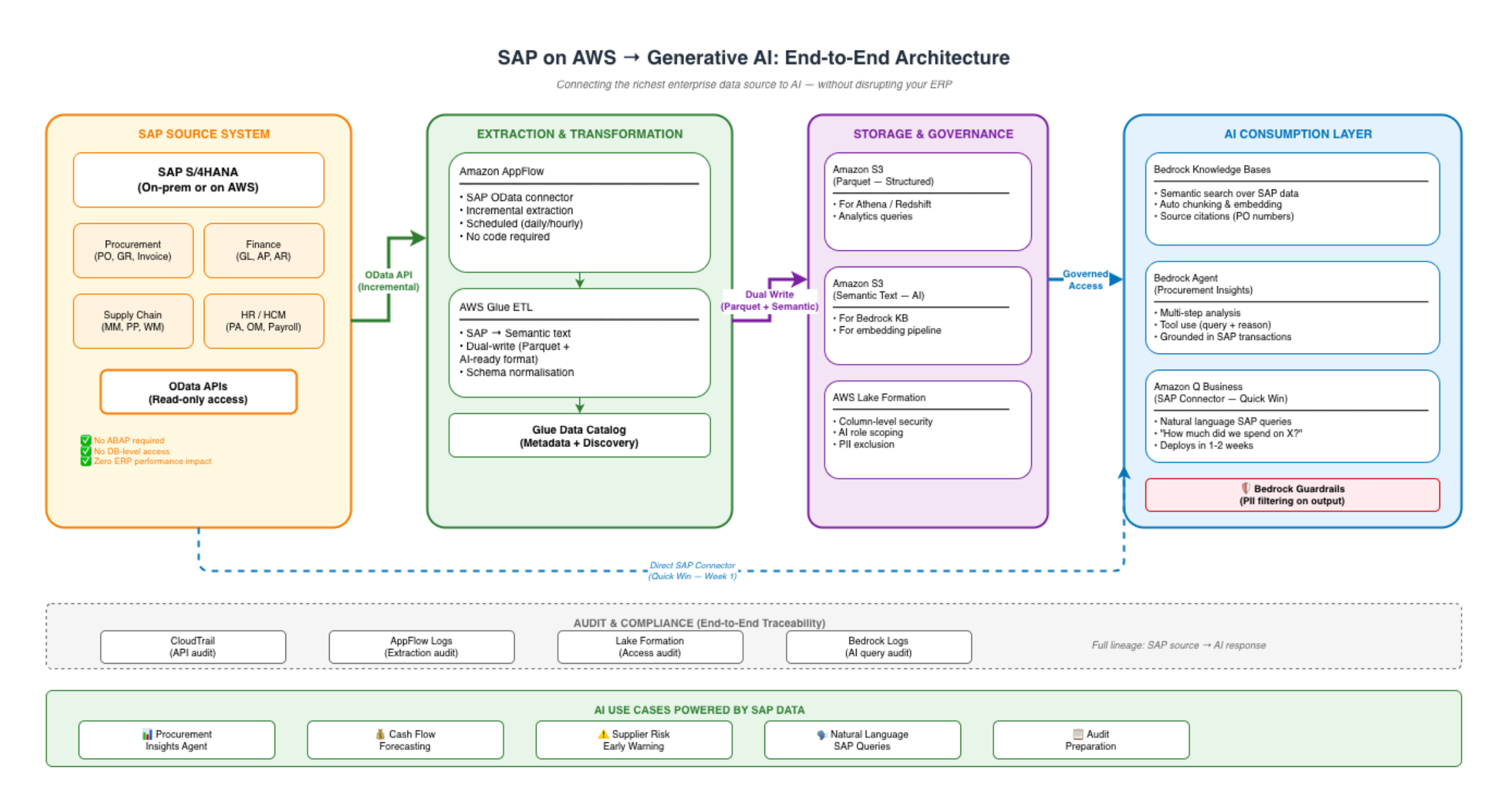
Amazon Q Business: The Quick Win
Amazon Q Business has a native SAP connector — meaning you can connect Q Business to SAP without building the full extraction pipeline first. For organisations wanting immediate value, Q Business provides natural language access to SAP data within weeks, not months.
The trade-off: Q Business provides conversational access but limited customisation. For advanced use cases (agents with tool use, custom reasoning, multi-step analysis), the full pipeline (AppFlow → S3 → Bedrock Knowledge Base → Bedrock Agent) gives you maximum flexibility.
My recommendation: Deploy Q Business with the SAP connector as Week 1 value demonstration. Build the full pipeline in parallel for advanced use cases. This gives stakeholders immediate evidence of AI-over-SAP value while the engineering team builds the production architecture.
The Business Case: SAP-AI Integration Economics
What Changes When AI Can Query SAP
| Business Function |
Current State (Manual) |
AI-Enabled State |
Time Savings |
| Procurement analysis |
2-3 days per report |
Real-time agent response |
90%+ |
| Cash flow forecasting |
1-2 days per cycle |
Continuous, auto-updating |
85%+ |
| Vendor performance review |
Quarterly (manual compilation) |
Continuous monitoring with alerts |
From reactive to proactive |
| Ad-hoc SAP queries |
2-3 day turnaround from SAP team |
Instant via Q Business |
95%+ |
| Audit preparation |
2-4 weeks |
Days (AI retrieves evidence instantly) |
80%+ |
Implementation Cost
| Component |
Cost |
Timeline |
| AppFlow SAP connector setup |
$5K-$15K |
1-2 weeks |
| Glue ETL for AI transformation |
$10K-$25K |
2-3 weeks |
| Bedrock Knowledge Base on SAP data |
$5K-$10K |
1 week |
| Q Business with SAP connector |
$20/user/month |
1-2 weeks |
| Lake Formation governance |
$10K-$20K |
2-3 weeks |
| Total initial investment |
$30K-$70K |
6-10 weeks |
ROI Drivers
- Procurement team productivity: 2-3 analysts each saving 1-2 days/week on manual SAP reporting = $60K-$80K/year in recovered capacity
- Faster decision-making: Cash flow forecasts available daily instead of monthly = better working capital management
- Risk avoidance: Early supplier risk detection prevents supply chain disruptions ($50K-$150K per incident avoided)
- Audit efficiency: 80% reduction in audit preparation time = $20K-$40K/year
Typical first-year ROI: 2-3x the initial investment — driven primarily by the productivity gains of giving finance and procurement teams natural language access to data they currently wait days to receive.
A Presales Perspective: Positioning SAP-AI in Customer Conversations
Why This Conversation Is Uniquely Powerful
Most AI presales conversations compete with dozens of other vendors offering generic AI capabilities. The SAP-AI conversation has no competition — because it requires specific expertise that few partners possess:
- Deep SAP knowledge — understanding the data model, OData services, extraction patterns
- AWS AI expertise — Bedrock, Knowledge Bases, Q Business, AppFlow
- Enterprise integration experience — governance, security, performance considerations
Partners who can credibly deliver all three are rare. That scarcity is the positioning advantage.
The Opening Question
“Your SAP system contains ten years of procurement, financial, and operational transaction data. Today, how long does it take someone in finance or procurement to get an answer from that data?”
The answer is always “days” or “we have to ask the SAP team.” That gap — between the value of the data and the accessibility of it — is the opportunity.
The Demonstration That Wins
Show Q Business answering a question about the customer’s own SAP data (in a demo environment): “What were our top 10 vendors by spend last quarter, and which of them had delivery delays exceeding 5 days?”
When a CFO sees that question answered in 3 seconds instead of 3 days, the business case conversation is over. The only remaining question is timeline.
The Objection You Will Hear
“We’re planning to move to S/4HANA — shouldn’t we wait?”
Response: “The AI platform we build today works identically whether your SAP is ECC or S/4HANA. AppFlow connects to both via OData. If anything, building AI-over-SAP now gives you a compelling reason to accelerate the S/4HANA migration — because S/4HANA’s improved APIs make AI integration even simpler. You are not building throwaway work — you are building the AI layer that survives the migration.”
Governance: What the CISO Needs to Hear
SAP data is among the most sensitive in the enterprise — financial records, vendor contracts, employee information. The CISO will rightfully scrutinize any AI system that touches it.
The governance architecture that addresses their concerns:
- Read-only extraction: AppFlow pulls data via OData with a service account that has zero write permissions in SAP. The AI can never modify ERP data.
- Lake Formation scoping: The AI service role sees only approved SAP entities — purchase orders and vendor master, for example — not HR compensation or financial postings.
- Column exclusion: Sensitive fields (bank account numbers, personal IDs, salary data) are excluded at the Glue transformation layer — they never enter the AI-accessible S3 path.
- Bedrock Guardrails: Output-layer protection ensures the AI does not surface financial amounts or vendor names that the requesting user is not authorised to see.
- Full audit trail: CloudTrail logs every AppFlow extraction, every Bedrock query, every S3 access — creating a complete lineage from SAP source to AI response.
The message: “The AI has less access to SAP data than your average SAP power user. It sees a governed subset, it can only read, and every access is logged.”
Lessons for Technology Leaders
- Your ERP is your AI moat — but only if you connect it — Every competitor has access to the same foundation models. None of them have your SAP transaction history. The enterprise that connects AI to SAP data first builds an insight advantage that compounds with every month of history.
- Start with Q Business for quick wins, build the full pipeline for advanced use cases — Q Business with the SAP connector demonstrates value in weeks. The full architecture (AppFlow → S3 → Bedrock) enables agent-level AI that Q Business alone cannot deliver. Run both in parallel.
- The SAP team is an ally, not a blocker — frame it correctly — Read-only API access, scheduled off-peak, specific entities only, fully audited. When framed as “we need to read purchase orders via OData,” the conversation is straightforward. When framed as “we need access to SAP,” it sounds terrifying. Language matters.
- Dual-write architecture serves both analytics and AI — The same extraction pipeline feeds structured data (for Athena/Redshift analytics) and semantic data (for Bedrock AI). One investment, two value streams.
- SAP-AI integration is a rare skill combination — and a presales differentiator — Most AWS partners cannot credibly deliver SAP + AI. Most SAP partners cannot credibly deliver AWS AI. The partner that delivers both wins deals that neither competitor can contest. That intersection is where the highest-value enterprise conversations happen.
About the Author
Rajat Jindal is VP – Presales at AeonX Digital Technology Limited, where he architects winning cloud strategies for enterprise customers and translates modernization into measurable business value. He is a strong advocate of AWS, committed to sharing thought leadership that helps technology leaders make faster, better-informed decisions.
by Rajat Jindal | May 7, 2026 | AWS
The Governance Conversation Nobody Wants to Have Before Deploying AI
Every enterprise wants AI deployed yesterday. The board is asking about it. Competitors are shipping it. The pressure to demonstrate AI capability is immense.
But here is what I observe in presales engagements every week: the enterprises that deploy AI fastest are not the ones that skip governance — they are the ones that solved governance first. The ones that skip it deploy a POC in four weeks, then spend six months in a compliance review that blocks production deployment indefinitely.
Governance is not the brake on AI adoption. The absence of governance is.
When a CISO asks “What data can this AI system access?”, the answer cannot be “everything in the data lake.” When a DPO asks “Can this AI surface PII in its responses?”, the answer cannot be “we’ll add guardrails later.” When the board asks “Who is accountable if the AI makes a decision based on data it should not have seen?”, silence is not an option.
AWS Lake Formation answers these questions architecturally — not through policy documents that nobody reads, but through enforced permissions that AI systems cannot bypass. This post is about why governance is the enabler that gets AI from POC to production, and how Lake Formation provides the technical implementation that satisfies security, compliance, and the board simultaneously.
Why AI Without Governance Is a Ticking Clock
The Fundamental Problem
Traditional application access control is simple: User A has access to System B. If User A opens System B, they see the data. If they do not have access, they cannot open it.
AI breaks this model completely. An AI system does not access data on behalf of a single user — it indexes, retrieves, and surfaces data to multiple users with different permission levels. A Bedrock Knowledge Base might index HR data, customer data, financial data, and product documentation in the same vector store. When User A asks a question, the AI must know which of those data sources User A is permitted to see — and return only results that respect those boundaries.
Without governance, one of two things happens:
- Over-restriction: The security team restricts AI access to the safest possible dataset (public knowledge base articles only), making the AI useless for anything beyond what Google could answer. Adoption dies.
- Under-restriction: The AI team gives the system broad access to demonstrate value, and six months later someone discovers that a junior employee’s AI assistant can surface executive compensation data, M&A strategy documents, or customer PII. The CISO shuts it down.
Both outcomes kill AI adoption. Governance prevents both by making fine-grained, permission-aware AI the default state — not an afterthought.
Real-World Governance Failures I Have Observed
Without naming specific customers, these are patterns I have seen repeated across industries:
- The HR data leak: An internal productivity AI was connected to a SharePoint instance that included HR performance reviews. A team lead asked the AI “How is my team performing?” and received a response that included verbatim quotes from confidential performance improvement plans. Deployed Monday, shut down Wednesday.
- The financial data surface: An AI assistant connected to a data lake surfaced quarterly revenue forecasts in response to a sales rep’s question about deal sizing. The forecasts were draft numbers not yet approved by finance. One email to a customer later, the organisation had a material disclosure concern.
- The cross-customer bleed: A customer support AI indexed all support tickets without customer-level access isolation. A customer asking “What similar issues have others experienced?” received details from competitor companies’ support tickets — including company names.
Every one of these was preventable with proper data governance applied before AI deployment, not after.
Lake Formation is not a new service — it launched in 2019. But its relevance has transformed. In 2019, it governed who could query your data warehouse. In 2026, it governs what your AI systems can see, surface, and reference. That is a fundamentally different — and more critical — function.
| Capability |
What It Controls |
Why AI Needs It |
| Table-level permissions |
Which tables a principal can access |
AI service roles get access only to approved data domains |
| Column-level security |
Which columns within a table are visible |
Salary, SSN, credit card columns hidden from AI roles |
| Row-level security |
Which rows are returned based on filter conditions |
AI serving Customer A sees only Customer A’s data |
| Tag-based access control |
Permissions assigned by metadata tags, not individual resources |
“PII=true” tag automatically restricts AI access without per-table configuration |
| Data location permissions |
Which S3 locations a principal can register and access |
AI embedding pipelines cannot process data from restricted locations |
The Key Insight: AI Systems Are Principals
The architectural shift that makes Lake Formation critical for AI: treat every AI system as an IAM principal with scoped permissions — exactly as you would treat a human user or application.
Your Bedrock Knowledge Base runs under an IAM role. That role is a Lake Formation principal. You grant it access to specific databases, tables, and columns — nothing more. When the Knowledge Base indexes data, it can only index what its role permits. When it retrieves data for a user query, it can only return data its role can see.
This is not a bolt-on. It is the same governance model that already controls your data lake — extended to AI identities.
Implementation: Four Governance Patterns for AI
Pattern 1: Domain-Scoped AI Access
The most common pattern: each AI application gets access only to its business domain.
# Customer Support AI — access ONLY to support-domain data
aws lakeformation grant-permissions \
  --principal '{
    "DataLakePrincipalIdentifier": "arn:aws:iam::<account-id>:role/SupportAI-KnowledgeBaseRole"
  }' \
  --resource '{
    "Database": {
      "Name": "support_domain"
    }
  }' \
  --permissions '["DESCRIBE"]'

aws lakeformation grant-permissions \
  --principal '{
    "DataLakePrincipalIdentifier": "arn:aws:iam::<account-id>:role/SupportAI-KnowledgeBaseRole"
  }' \
  --resource '{
    "Table": {
      "DatabaseName": "support_domain",
      "TableWildcard": {}
    }
  }' \
  --permissions '["SELECT", "DESCRIBE"]'

# EXPLICITLY DENY: HR, Finance, Legal domains
# (Lake Formation denies by default — no grant = no access)
# The support AI role has NO grants on hr_domain, finance_domain, or legal_domain
# Therefore it cannot index or retrieve data from those domains
The “deny by default” property of Lake Formation is what makes this secure: you grant what is permitted, and everything else is automatically inaccessible. No AI system can access data that has not been explicitly granted to its role.
Pattern 2: Column-Level PII Protection
Even within permitted tables, sensitive columns should be invisible to AI systems that do not require them.
# Grant the AI role access to the customer_interactions table
# BUT exclude PII columns (email, phone, address)
aws lakeformation grant-permissions \
  --principal '{
    "DataLakePrincipalIdentifier": "arn:aws:iam::<account-id>:role/SupportAI-KnowledgeBaseRole"
  }' \
  --resource '{
    "TableWithColumns": {
      "DatabaseName": "support_domain",
      "Name": "customer_interactions",
      "ColumnNames": [
        "ticket_id",
        "subject",
        "body",
        "resolution_status",
        "interaction_type",
        "created_at",
        "product_category"
      ]
    }
  }' \
  --permissions '["SELECT"]'

# Columns NOT listed (customer_email, customer_phone, customer_address)
# are invisible to the AI — it cannot index, retrieve, or surface them
This is defence-in-depth for AI: even if the AI is asked “What is this customer’s email?”, it literally cannot answer — the column does not exist in its view of the data. The protection is architectural, not prompt-based.
Pattern 3: Row-Level Security for Multi-Tenant AI
For SaaS platforms or multi-customer environments, AI must be isolated per tenant — Customer A’s AI cannot see Customer B’s data.
# Create a data filter that restricts to a specific customer
aws lakeformation create-data-cells-filter \
  --table-data '{
    "TableCatalogId": "<account-id>",
    "DatabaseName": "support_domain",
    "TableName": "customer_interactions",
    "Name": "customer-acme-filter",
    "RowFilter": {
      "FilterExpression": "customer_org_id = '\''ACME-001'\''"
    },
    "ColumnWildcard": {}
  }'

# Grant the ACME-specific AI role access through this filter
aws lakeformation grant-permissions \
  --principal '{
    "DataLakePrincipalIdentifier": "arn:aws:iam::<account-id>:role/ACME-AI-Role"
  }' \
  --resource '{
    "DataCellsFilter": {
      "TableCatalogId": "<account-id>",
      "DatabaseName": "support_domain",
      "TableName": "customer_interactions",
      "Name": "customer-acme-filter"
    }
  }' \
  --permissions '["SELECT"]'
With this pattern, ACME’s AI assistant queries the same table but sees only ACME’s rows. The isolation is enforced at the storage layer — not in the application logic, not in the prompt, not in the AI’s instructions. It is physically impossible for the AI to return another customer’s data.
Pattern 4: Tag-Based Governance at Scale
For enterprises with hundreds of tables and dozens of AI applications, per-table grants become unmanageable. Tag-based access control solves this — assign tags to data, assign tag permissions to roles, and governance scales automatically as new data is added.
# Define governance tags
aws lakeformation create-lf-tag \
  --tag-key "data_classification" \
  --tag-values '["public", "internal", "confidential", "restricted"]'

aws lakeformation create-lf-tag \
  --tag-key "ai_approved" \
  --tag-values '["yes", "no", "pending_review"]'

# Tag tables with their classification
aws lakeformation add-lf-tags-to-resource \
  --resource '{
    "Table": {
      "DatabaseName": "support_domain",
      "Name": "knowledge_articles"
    }
  }' \
  --lf-tags '[
    {"TagKey": "data_classification", "TagValues": ["internal"]},
    {"TagKey": "ai_approved", "TagValues": ["yes"]}
  ]'

aws lakeformation add-lf-tags-to-resource \
  --resource '{
    "Table": {
      "DatabaseName": "hr_domain",
      "Name": "employee_compensation"
    }
  }' \
  --lf-tags '[
    {"TagKey": "data_classification", "TagValues": ["restricted"]},
    {"TagKey": "ai_approved", "TagValues": ["no"]}
  ]'

# Grant AI role access based on tags — not individual tables
aws lakeformation grant-permissions \
  --principal '{
    "DataLakePrincipalIdentifier": "arn:aws:iam::<account-id>:role/EnterpriseAI-Role"
  }' \
  --resource '{
    "LFTagPolicy": {
      "ResourceType": "TABLE",
      "Expression": [
        {"TagKey": "ai_approved", "TagValues": ["yes"]},
        {"TagKey": "data_classification", "TagValues": ["public", "internal"]}
      ]
    }
  }' \
  --permissions '["SELECT", "DESCRIBE"]'
The power of this pattern: when a new table is added to the data lake and tagged ai_approved=yes and data_classification=internal, the AI automatically gains access — no manual grant required. When a table is tagged ai_approved=no, the AI is automatically excluded. Governance scales with your data, not with your team’s capacity to manage permissions.
Lake Formation controls what data the AI can access. Bedrock Guardrails controls what the AI can output. Together, they form a two-layer defence:
| Layer |
Controls |
Prevents |
| Lake Formation (data access) |
What data the AI can index and retrieve |
AI cannot see restricted data — it does not exist in its context |
| Bedrock Guardrails (output filtering) |
What the AI can include in responses |
Even if data leaks into context, PII is anonymised or blocked at output |
{
  "name": "enterprise-ai-output-guardrail",
  "description": "Second layer: filter outputs even if data access governance has gaps",
  "sensitiveInformationPolicyConfig": {
    "piiEntitiesConfig": [
      {"type": "EMAIL", "action": "ANONYMIZE"},
      {"type": "PHONE", "action": "ANONYMIZE"},
      {"type": "CREDIT_DEBIT_CARD_NUMBER", "action": "BLOCK"},
      {"type": "AWS_ACCESS_KEY", "action": "BLOCK"},
      {"type": "ADDRESS", "action": "ANONYMIZE"}
    ]
  },
  "topicPolicyConfig": {
    "topicsConfig": [
      {
        "name": "employee-compensation",
        "definition": "Questions about employee salaries, bonuses, equity grants, or total compensation",
        "type": "DENY"
      },
      {
        "name": "unreleased-financials",
        "definition": "Questions about quarterly results, forecasts, or financial data not yet publicly disclosed",
        "type": "DENY"
      }
    ]
  }
}
The principle: assume each layer might have gaps, and design so that both layers must fail simultaneously for a governance breach to occur. Lake Formation prevents the AI from seeing restricted data. Guardrails prevent the AI from outputting sensitive information even if it somehow enters the context. Neither layer alone is sufficient — together they are robust.
The Business Case: Governance as AI Accelerator
The Counterintuitive Truth
Every enterprise I work with assumes governance slows AI deployment. The data proves the opposite:
| Approach |
Time to POC |
Time to Production |
Total |
| AI first, governance later |
4 weeks |
6-12 months (stuck in compliance review) |
7-13 months |
| Governance first, AI second |
6 weeks |
2-4 weeks (compliance pre-approved) |
8-10 weeks |
The governance-first approach is 3-5x faster to production — because the compliance review happens once, during design, and all subsequent AI deployments inherit the approved governance model without repeating the review.
The Cost of Governance Failure
| Incident Type |
Average Cost |
Preventable With |
| PII exposure through AI (GDPR/DPDP) |
$100K-$500K (fines + remediation) |
Column-level security |
| Cross-customer data leak |
$150K-$500K (contractual liability + trust) |
Row-level security |
| AI deployment shutdown by compliance |
$100K-$200K (wasted engineering effort) |
Pre-approved governance model |
| Re-engineering AI for governance after deployment |
$100K-$250K (retrofit cost) |
Governance-first design |
The Governance-First ROI
- Governance implementation cost: $30K-$60K (Lake Formation setup, tag taxonomy, role design)
- Cost avoided per AI deployment: $80K-$150K (compliance review, retrofit, delay)
- Break-even: First AI deployment
- Year-one value (3-5 AI deployments): $200K-$500K in avoided delays and rework
A Presales Perspective: Making Governance the Hero of the AI Conversation
The Mistake Most Sellers Make
In AI presales, the natural instinct is to demonstrate the AI capability — show the chatbot answering questions, show the agent reasoning, show the knowledge base retrieving relevant documents. This impresses the CTO and the AI team.
But the person who blocks production deployment is the CISO, the DPO, or the legal team. They were not in the demo room. And when they review the architecture, their first question is: “What controls data access?”
I have learned to invite the CISO to the first demo — not the fifth. And I lead with governance, not capability.
The Three-Slide Governance Story
Slide 1: “Here is what the AI CAN see” — show Lake Formation grants, scoped to specific domains and tables. The CISO’s concern is “what if it sees everything?” Showing explicit, limited grants addresses this immediately.
Slide 2: “Here is what the AI CANNOT see” — show the deny-by-default model. Everything not explicitly granted is invisible. Show that HR, finance, and legal domains have zero grants to the AI role.
Slide 3: “Here is what happens if something slips through” — show Bedrock Guardrails as the second layer. Even if governance has a gap, PII is anonymised and sensitive topics are blocked at output.
After those three slides, the CISO becomes an advocate for the project rather than a blocker. They have seen the controls. They understand the model. The compliance review takes days, not months.
The Discovery Question
“If your AI system had access to your entire data lake today — every table, every column, every document — would your CISO be comfortable? If not, what would need to be true for them to approve production deployment?”
That question surfaces the governance requirements without me having to guess them. The customer tells me exactly what controls they need. I map those controls to Lake Formation capabilities. The conversation becomes collaborative, not adversarial.
The Governance Maturity Model for AI
| Level |
Description |
Lake Formation Usage |
AI Readiness |
| 0 — No governance |
All IAM principals have broad S3 access |
Not deployed |
❌ AI deployment will be blocked |
| 1 — Basic |
Database-level permissions, no column/row security |
Table grants only |
⚠️ AI can access too much within permitted databases |
| 2 — Intermediate |
Column-level security, PII columns excluded from AI |
Column filtering active |
✅ AI deployable for non-sensitive use cases |
| 3 — Advanced |
Row-level security, tag-based access, multi-tenant isolation |
Full feature usage |
✅ AI deployable across all use cases including regulated |
| 4 — Automated |
New data auto-governed via tags, AI access auto-scoped |
Tags + automation |
✅ AI scales without governance bottleneck |
Most enterprises I assess are at Level 0 or 1. Getting to Level 2 takes 4-6 weeks and unlocks AI deployment immediately. Getting to Level 3 takes 8-12 weeks and unlocks regulated/multi-tenant AI. The investment is modest relative to the deployment velocity it enables.
Lessons for Technology Leaders
- Governance is not the brake on AI — it is the accelerator — Enterprises that solve governance first deploy AI to production 3-5x faster than those who defer it. The compliance review either happens proactively (weeks) or reactively (months). Choose proactively.
- Treat AI systems as IAM principals with scoped permissions — Every Bedrock Knowledge Base, every agent, every Q Business instance runs under a role. Govern that role with Lake Formation exactly as you govern human access. Same model, same tools, same audit trail.
- Column-level security is the minimum viable AI governance — If your AI can see PII columns, it will eventually surface PII. Removing those columns from the AI’s view is a 30-minute configuration change that prevents a $100K+ incident. Do it today.
- Tag-based governance is the only model that scales — Per-table grants work for 10 tables. At 100+ tables, they become unmanageable. Tags let governance scale with your data — new tables inherit permissions automatically based on their classification.
- Defence-in-depth is not optional for enterprise AI — Lake Formation at the data layer AND Guardrails at the output layer. Either can have gaps. Both failing simultaneously is a governance architecture failure, not a single-point failure. Design for that redundancy.
- Invite the CISO to the first AI demo, not the fifth — The person who blocks production deployment should see the governance controls from day one. Early inclusion makes them an advocate. Late inclusion makes them a blocker.
About the Author
Rajat Jindal is VP – Presales at AeonX Digital Technology Limited, where he architects winning cloud strategies for enterprise customers and translates modernization into measurable business value. He is a strong advocate of AWS, committed to sharing thought leadership that helps technology leaders make faster, better-informed decisions.
by Rajat Jindal | Apr 23, 2026 | AWS
The Pipeline Problem Nobody Talks About in Board Meetings
Every enterprise I work with has the same invisible cost centre: ETL pipelines. Hundreds of them. Running nightly. Breaking silently. Consuming 30-40% of data engineering capacity not to create value, but to move data from where it is to where it needs to be.
ETL — Extract, Transform, Load — was a necessary evil in a world where operational databases and analytics systems were architecturally incompatible. You could not run an analytical query against your production MySQL database without degrading customer-facing performance. So you moved the data. Every night. Through fragile, hand-coded pipelines that nobody fully understood and everybody feared changing.
In 2026, this model is not just expensive — it is architecturally incompatible with AI. AI agents need fresh data. Embedding pipelines need real-time updates. Knowledge Bases need to reflect the current state of your business, not last night’s snapshot. Every hour of ETL latency is an hour where your AI is answering questions with stale information — and stale AI answers erode user trust faster than no AI at all.
AWS Zero-ETL integrations eliminate this entire layer. Not by building better pipelines — by eliminating the need for pipelines altogether. Data flows continuously from operational sources to analytics and AI destinations without any pipeline code, scheduling infrastructure, or failure-mode complexity.
This post is about the strategic implications of that shift — and why the enterprises that adopt Zero-ETL first will free 30-40% of their data engineering capacity for AI innovation instead of pipeline maintenance.
Why ETL Pipelines Are the Silent Tax on Every AI Initiative
The Hidden Cost
In every data & AI presales discovery I run, I ask the same question: “What percentage of your data engineering team’s time is spent building and maintaining data movement pipelines versus building AI features or analytical capabilities?”
The answer, consistently, across industries: 30-50%. Sometimes higher.
That is not engineering time spent creating business value. It is engineering time spent ensuring that data arrives at the right place, in the right format, at the right time — work that has zero business differentiation. Every enterprise runs similar pipelines. None of them gain competitive advantage from having better COPY commands.
The Freshness Problem
ETL pipelines run on schedules — typically nightly. That means:
- Your analytics dashboard shows yesterday’s state, not today’s
- Your AI agent answers questions based on data that is 8-24 hours stale
- Your embedding pipeline generates vectors from last night’s snapshot, missing today’s customer interactions entirely
For traditional BI, nightly freshness was acceptable. For AI systems that users interact with in real-time, it creates a trust problem. When an employee asks “What is this customer’s current status?” and the AI answers based on yesterday’s data, that employee stops trusting the AI after the second incorrect answer.
The Fragility Problem
Every ETL pipeline is a potential failure point:
- Schema changes in the source database break the pipeline silently
- Network issues between source and destination create data gaps that go undetected for days
- Resource contention during peak ETL windows slows both the pipeline and production workloads
- A single failed dependency in a pipeline DAG can cascade and delay the entire data platform
The operations overhead of monitoring, alerting, retrying, and debugging ETL failures is substantial — and it scales linearly with the number of pipelines. More data sources = more pipelines = more fragility = more engineering time spent on maintenance.
What Zero-ETL Actually Means: A Technical and Strategic Definition
Zero-ETL is not “better ETL.” It is the architectural elimination of the pipeline layer entirely.
With Zero-ETL integrations, data replicates continuously from the operational source to the analytics or AI destination using native AWS infrastructure. There is no pipeline code to write. No scheduler to configure. No failure modes to handle. No transformation jobs to maintain.
How It Works (Architecturally)
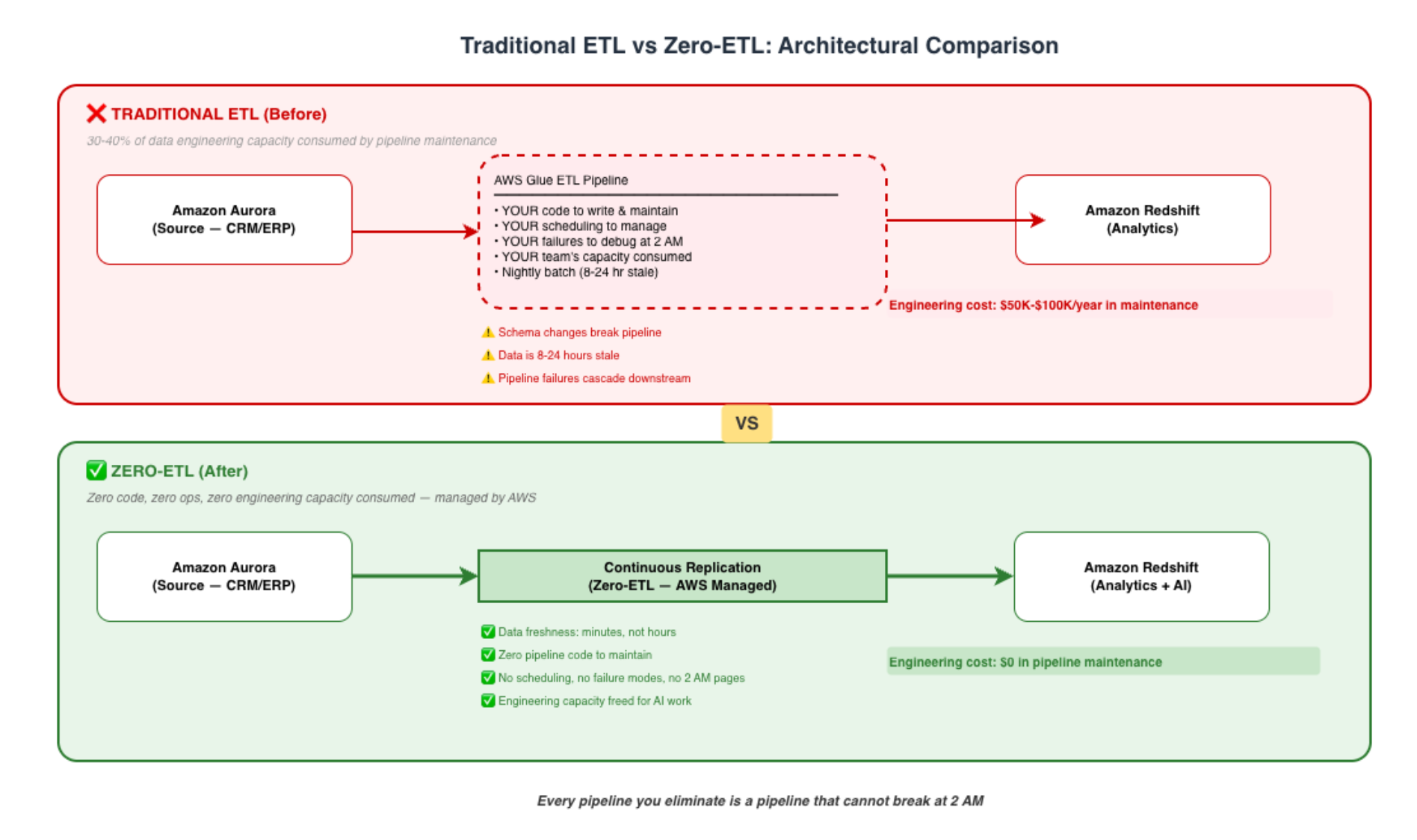
Available Zero-ETL Integrations on AWS (as of early 2026)
| Source |
Destination |
Use Case |
| Amazon Aurora MySQL |
Amazon Redshift |
Operational data → analytics without pipelines |
| Amazon Aurora PostgreSQL |
Amazon Redshift |
Same — for PostgreSQL workloads |
| Amazon RDS for MySQL |
Amazon Redshift |
Non-Aurora RDS → analytics |
| Amazon DynamoDB |
Amazon Redshift |
NoSQL operational data → SQL analytics |
| Amazon DynamoDB |
Amazon OpenSearch |
NoSQL data → search and vector search |
| Amazon Aurora |
Amazon OpenSearch |
Relational data → search (including semantic) |
The Strategic Implication
Every integration in that table eliminates one or more ETL pipelines — plus the scheduling, monitoring, alerting, and debugging infrastructure around them. For a mid-market enterprise with 20-50 ETL pipelines, Zero-ETL can eliminate 30-60% of them within a single quarter.
The AI Angle: Why Zero-ETL Is an AI Enablement Strategy
Zero-ETL is typically discussed as an analytics optimisation. That undersells it dramatically. For enterprises deploying AI, Zero-ETL is a freshness and velocity strategy that directly impacts AI quality.
Freshness Enables AI Trust
When Aurora transactional data flows continuously to Redshift (and from there to Bedrock Knowledge Bases), your AI is always grounded in current state. The customer who placed an order 10 minutes ago appears in the AI’s answers immediately — not tomorrow morning after the nightly batch runs.
This matters enormously for:
- Customer-facing AI: “What’s the status of my order?” must reflect the current state
- Internal copilots: “What’s our pipeline this quarter?” must include today’s deals
- AI agents: Autonomous agents making decisions on stale data make wrong decisions
Velocity Enables AI Experimentation
The most expensive property of AI development is iteration speed. When every new AI use case requires a new ETL pipeline to get data into the right format and place, the cycle time for each experiment is weeks. When data is already available in Redshift and OpenSearch via Zero-ETL, a new AI use case requires only a Bedrock Knowledge Base configuration — deployable in hours.
Example: CRM Data Flowing to AI Without Pipelines
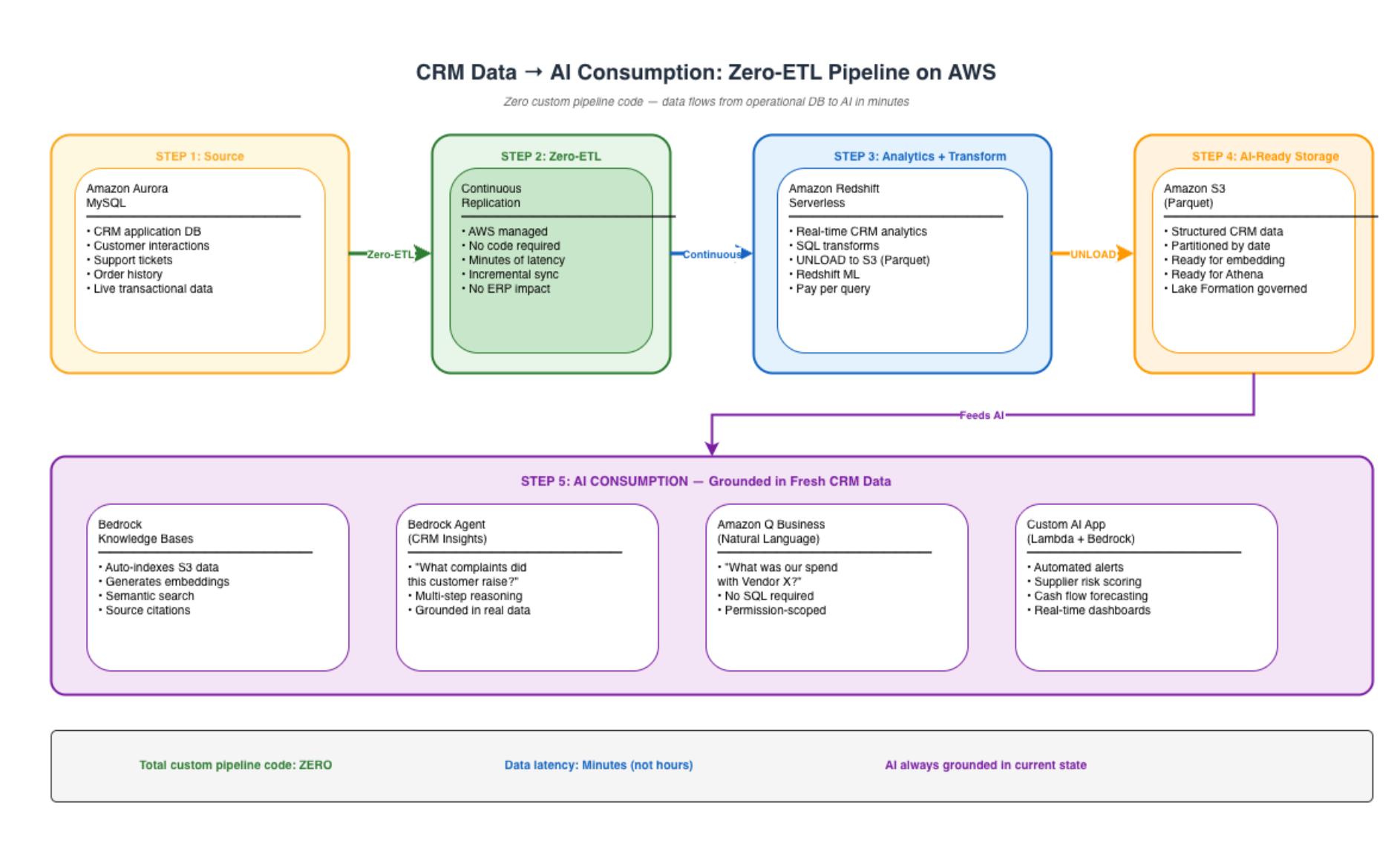
In this pattern, CRM data flows from Aurora to Redshift via Zero-ETL (zero code), then from Redshift to S3 via scheduled UNLOAD (one command), then into Bedrock Knowledge Bases for AI consumption. Total custom pipeline code: zero. Total latency: minutes, not hours.
Implementation: Setting Up Zero-ETL (Aurora → Redshift)
# Create a Zero-ETL integration from Aurora MySQL to Redshift
aws rds create-integration \
  --integration-name crm-zero-etl \
  --source-arn arn:aws:rds:ap-south-1:<account-id>:cluster:crm-aurora-cluster \
  --target-arn arn:aws:redshift-serverless:ap-south-1:<account-id>:namespace/<namespace-id> \
  --tags Key=Environment,Value=Production Key=Purpose,Value=AI-Analytics
Step 2: Authorise the Integration on Redshift
-- Run in Redshift: create the database from the integration
CREATE DATABASE crm_realtime FROM INTEGRATION '<integration-id>';

-- Data is now continuously available — query it immediately
SELECT customer_id, interaction_type, created_at
FROM crm_realtime.public.customer_interactions
WHERE created_at > CURRENT_DATE - INTERVAL '1 hour';
Step 3: Feed AI From Redshift
-- Unload fresh CRM data to S3 for Bedrock Knowledge Base consumption
UNLOAD ('
  SELECT customer_id, subject, body, resolution_status, created_at
  FROM crm_realtime.public.customer_interactions
  WHERE created_at > CURRENT_DATE - INTERVAL ''1 day''
')
TO 's3://data-lake-ai-ready/crm/daily/'
IAM_ROLE 'arn:aws:iam::<account-id>:role/RedshiftUnloadRole'
FORMAT PARQUET
ALLOWOVERWRITE;
This three-step pattern — Zero-ETL into Redshift, UNLOAD to S3, Bedrock Knowledge Base on S3 — gives you a continuously fresh AI data pipeline with zero custom ETL code.
The Business Case: Pipeline Elimination Economics
What You Stop Paying For
| Eliminated Cost |
Annual Savings (Mid-Market) |
Notes |
| Glue job compute (nightly batch ETL) |
$15K-$40K/year |
Depends on data volume and job complexity |
| Data engineer pipeline maintenance (30-40% of time) |
$50K-$100K/year |
1-2 FTE equivalent redirected to AI work |
| Incident response for pipeline failures |
$15K-$30K/year |
On-call time, investigation, remediation |
| Data freshness penalty (stale dashboards, stale AI) |
Unquantified but material |
Decisions made on old data have compounding cost |
| Total pipeline elimination value |
$80K-$170K/year |
— |
What You Start Paying For
| Zero-ETL Cost |
Annual Cost |
Notes |
| Zero-ETL integration (Aurora → Redshift) |
Included in Redshift pricing |
No separate charge for the integration itself |
| Redshift Serverless compute |
$30K-$80K/year |
Usage-based — pay for what you query |
| Net savings |
$15K-$130K/year |
Plus engineering capacity freed for AI |
The real ROI is not the infrastructure savings — it is the engineering capacity. Every data engineer freed from pipeline maintenance is a data engineer who can build AI features, train models, or optimise data quality. That reallocation is what accelerates AI adoption.
A Presales Perspective: Positioning Zero-ETL in Customer Conversations
The Question That Opens the Conversation
“How many ETL pipelines does your data team maintain today? And how many of them broke in the last 30 days?”
The first number is usually 20-100. The second number makes the room uncomfortable. That discomfort is the opening.
The Framing That Resonates
For CTOs: “Every pipeline is technical debt that consumes engineering capacity you could be spending on AI. Zero-ETL eliminates that debt category-by-category.”
For CDOs: “Your data freshness SLA is limited by your slowest pipeline. Zero-ETL makes freshness an infrastructure property, not an engineering challenge.”
For CFOs: “You are paying senior data engineers $150K-$200K to maintain COPY commands that AWS will run for you at infrastructure cost. That is a misallocation of your most expensive resource.”
The Objection You Will Hear
“We have custom transformations in our ETL — Zero-ETL can’t replace those.”
Response: “Correct. Zero-ETL replaces the data movement layer — the extract and load. Your custom transformation logic moves to Redshift (SQL transforms, Redshift ML) or to downstream processing. The transformation is still yours — you just stop paying for the plumbing around it.”
Not every pipeline disappears. But the 40-60% that are pure data movement with minimal transformation — those are immediately eliminable. Start there.
When to Use Zero-ETL vs Traditional Approaches
| Scenario |
Recommendation |
Why |
| Aurora/RDS data needed in Redshift for analytics + AI |
Zero-ETL |
Eliminates pipeline entirely |
| DynamoDB data needed for search/AI |
Zero-ETL to OpenSearch |
Enables vector search without ETL |
| Complex multi-source joins and transformations |
Glue ETL (keep) |
Transformation logic still needs code |
| Real-time streaming from external sources |
Kinesis + Glue Streaming |
Zero-ETL is for AWS-to-AWS sources |
| One-time historical data migration |
AWS DMS |
Zero-ETL is for ongoing replication |
Zero-ETL does not replace all pipelines. It replaces the ones that should never have been pipelines in the first place — pure data replication between AWS services that historically required engineering effort for no differentiated value.
The 12-Month Roadmap: From Pipeline-Heavy to Zero-ETL
| Month |
Action |
Outcome |
| 1 |
Audit existing pipelines — categorise as “pure movement” vs “transformation” |
Know which pipelines are eliminable |
| 2-3 |
Enable Zero-ETL for primary Aurora → Redshift flows |
3-5 pipelines eliminated, data freshness improved to minutes |
| 4-5 |
Migrate DynamoDB → OpenSearch pipelines to Zero-ETL |
Search and vector search fed automatically |
| 6-8 |
Connect Redshift to Bedrock Knowledge Bases via S3 UNLOAD |
AI consumption without custom integration |
| 9-12 |
Redeploy freed engineering capacity to AI use cases |
Data engineers building AI features, not maintaining pipes |
Lessons for Technology Leaders
- Every pipeline you eliminate is a pipeline that cannot break at 2 AM — Reliability is not about building better monitoring for your pipelines. It is about having fewer pipelines to monitor.
- Zero-ETL is a capacity strategy, not just a cost strategy — The $15K-$40K in Glue savings matters less than the $60K-$120K in engineering time redirected from maintenance to AI innovation.
- Data freshness is an AI quality metric — When your AI answers questions based on yesterday’s data, users stop trusting it. Zero-ETL’s continuous replication keeps AI grounded in current state.
- Not every pipeline should be Zero-ETL — Complex multi-source transformations still need Glue or custom code. But pure data replication (40-60% of most enterprise pipelines) should never be custom code. Eliminate those first.
- The CTO who says “our pipelines work fine” has not asked their data engineers how they feel about it — Pipelines “working” and pipelines being a good use of expensive engineering talent are different statements. Ask the team — they will tell you where the waste is.
About the Author
Rajat Jindal is VP – Presales at AeonX Digital Technology Limited, where he architects winning cloud strategies for enterprise customers and translates modernization into measurable business value. He is a strong advocate of AWS, committed to sharing thought leadership that helps technology leaders make faster, better-informed decisions.