by Rajat Jindal | Apr 9, 2026 | AWS
The Uncomfortable Truth About Your Data Lake Investment
Between 2020 and 2024, enterprises invested billions in data lake initiatives. The promise was compelling: centralise all your data in Amazon S3, break down silos, enable analytics at scale. The technology delivered on that promise — S3 is the most durable, scalable, and cost-effective storage ever built.
But here is the uncomfortable truth I encounter in nearly every presales engagement: most enterprise data lakes are graveyards of good intentions. The data is there. Petabytes of it. Perfectly stored, perfectly durable, perfectly useless to AI.
The reason is structural. Data lakes were designed for a world where humans write SQL queries and know exactly what they are looking for. AI systems do not work that way. An AI agent does not know your table names. A Bedrock Knowledge Base cannot query a Parquet file by column name. A customer support copilot cannot search your data lake for “interactions similar to this complaint” — because similarity is a semantic concept, and your data lake speaks only in exact matches.
The gap between what your data lake stores and what AI can consume is the semantic gap. Closing it does not require rebuilding your data lake — it requires upgrading it with three capabilities that were never part of the original design: metadata that describes meaning, embeddings that encode similarity, and a discovery layer that lets AI systems find relevant data without human guidance.
This post is about that upgrade — and why the enterprises that close the semantic gap first will have a 12-18 month AI advantage over those still running SQL queries against data nobody remembers putting there.
Why Data Lakes Become Data Swamps: The Three Missing Properties
Every data swamp I have audited in presales discovery shares the same three structural failures. None of them are technology failures — they are design failures from an era before AI was a requirement.
A typical enterprise data lake contains thousands of objects in S3. Filenames like export_20240315_final_v2.csv and folder paths like raw/erp/batch_load_7/ tell you nothing about what the data actually represents.
For a human analyst who built the pipeline, this is navigable through tribal knowledge. For an AI system, it is opaque. A Bedrock agent asked “What were our top customer complaints last quarter?” cannot answer if it cannot discover that customer complaint data lives in s3://data-lake/raw/crm/zendesk_exports/ and that the relevant column is ticket_body, not description_text or notes_field.
The fix: AWS Glue Data Catalog provides the semantic metadata layer — table definitions, column descriptions, data types, and business glossary terms that make data discoverable by meaning, not just by path.
2. No Vector Representations — The “Find Similar Things” Problem
Traditional data lakes support one query pattern: exact match. WHERE customer_id = 12345 or WHERE region = 'APAC'. AI systems need a fundamentally different pattern: similarity search. “Find customer interactions similar to this complaint.” “Find documents related to this product issue.” “Find contracts with similar terms to this one.”
Similarity search requires vector embeddings — mathematical representations of meaning that can be compared using distance metrics. Your data lake has none of these. Every document, every interaction record, every knowledge article is stored in its raw form with no vector representation.
The fix: An embedding generation pipeline that converts your existing data lake content into vector representations stored alongside the source data — enabling semantic search without moving or duplicating the raw data.
3. No Discovery Layer — The “What Data Do We Even Have?” Problem
The most expensive question in enterprise AI is: “What data do we have that could answer this question?” In most organisations, the answer requires emailing three people, scheduling a meeting with the data engineering team, and waiting two weeks for a response.
AI agents cannot send emails. They need programmatic discovery — the ability to query a catalogue, understand what data exists, assess its relevance, and access it autonomously. Without this, every AI use case requires a custom integration built by a data engineer. That does not scale.
The fix: A combination of Glue Data Catalog (for structured discovery) and Bedrock Knowledge Bases (for semantic discovery) that lets AI systems self-serve data access based on meaning, not manual integration.
The Semantic Data Lake Architecture on AWS
The semantic data lake is not a replacement for your existing data lake. It is a layer on top — three upgrades that transform stored data into AI-consumable data without rebuilding what you already have.
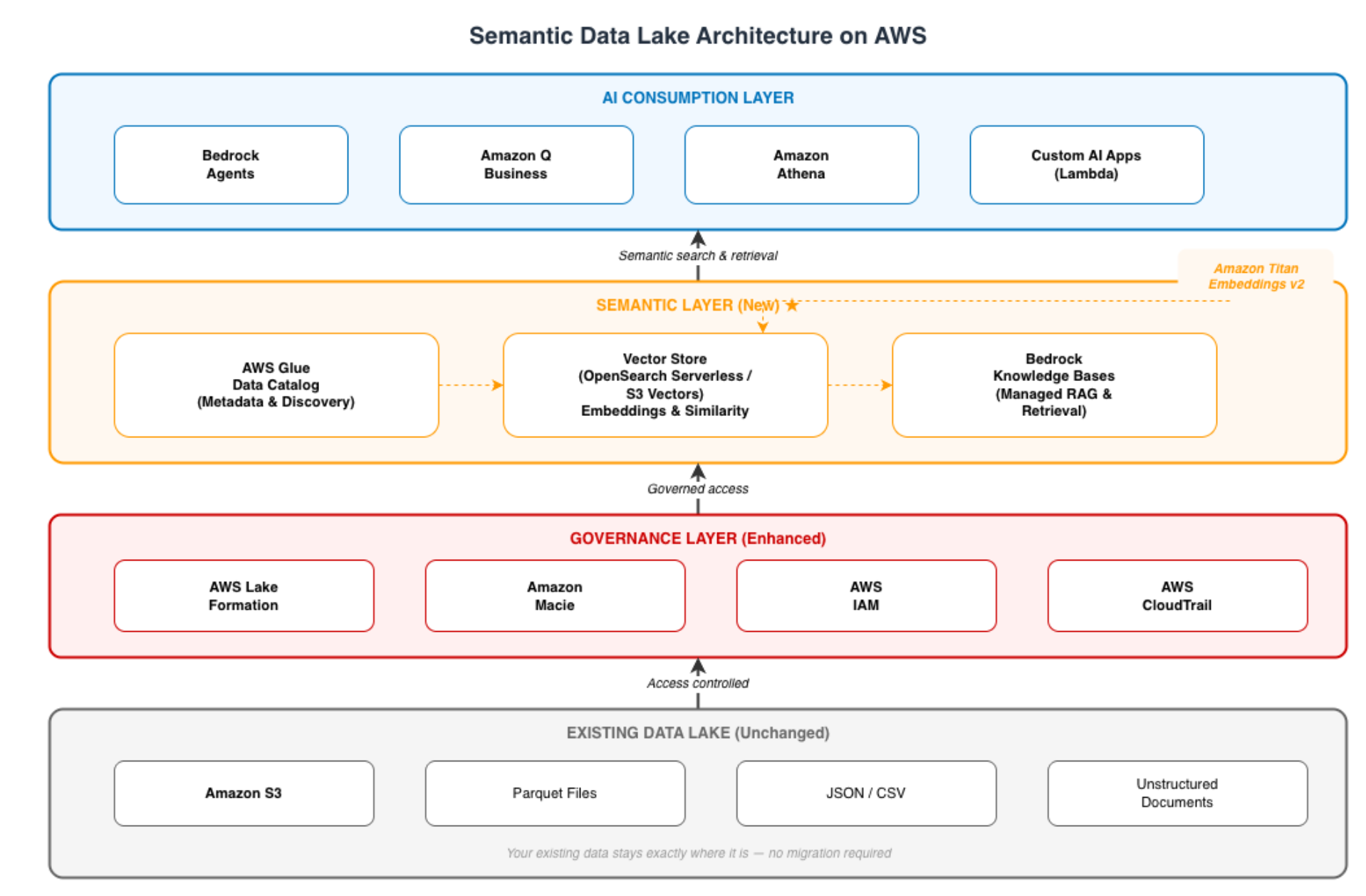
The critical design principle: your existing S3 data lake remains untouched. The semantic layer sits on top, indexing and embedding what is already there. No data migration. No pipeline rewrite. No disruption to existing analytics workloads.
The Glue Data Catalog is the first upgrade — it transforms your S3 storage from a file system into a discoverable knowledge repository.
Why This Matters for AI
Without a catalogue, an AI agent accessing your data lake is like a new employee on their first day with no onboarding — they can see the filing cabinets but have no idea what is in them or how to find anything relevant. The Glue Data Catalog provides the onboarding document.
Implementation Pattern
# Step 1: Create a database in the Glue Data Catalog
aws glue create-database \
  --database-input '{
    "Name": "crm_semantic_lake",
    "Description": "Semantically catalogued CRM data for AI consumption. Contains customer interactions, support tickets, and engagement history.",
    "Parameters": {
      "data_owner": "customer-success-team",
      "classification": "confidential",
      "ai_ready": "true",
      "last_catalogued": "2026-04-01"
    }
  }'

# Step 2: Run a Glue Crawler to auto-discover schema from S3
aws glue create-crawler \
  --name crm-data-crawler \
  --role arn:aws:iam::<account-id>:role/GlueCrawlerRole \
  --database-name crm_semantic_lake \
  --targets '{
    "S3Targets": [
      {"Path": "s3://enterprise-data-lake/crm/customer-interactions/"},
      {"Path": "s3://enterprise-data-lake/crm/support-tickets/"},
      {"Path": "s3://enterprise-data-lake/crm/engagement-history/"}
    ]
  }' \
  --schema-change-policy '{
    "UpdateBehavior": "UPDATE_IN_DATABASE",
    "DeleteBehavior": "LOG"
  }'

# Step 3: Start the crawler — it discovers schema, data types, and partitions
aws glue start-crawler --name crm-data-crawler
The Business Value of Cataloguing
The crawler runs once and then on schedule (daily or weekly). After it completes, every table, column, and partition in your data lake is discoverable through a single API. But the real value is what you add on top — business descriptions that make the data meaningful to AI:
# Add semantic descriptions to discovered tables
import boto3

glue = boto3.client('glue', region_name='ap-south-1')

# Update table with business-meaningful metadata
glue.update_table(
    DatabaseName='crm_semantic_lake',
    TableInput={
        'Name': 'customer_interactions',
        'Description': 'All customer touchpoints including support tickets, sales calls, onboarding sessions, and escalations. Each record represents one interaction with timestamp, channel, resolution status, and full text content.',
        'Parameters': {
            'business_domain': 'customer-success',
            'pii_contains': 'customer_name, email, phone',
            'ai_embedding_status': 'pending',
            'freshness_sla': 'daily',
            'primary_use_cases': 'customer-insights-agent, support-copilot, churn-prediction'
        }
    }
)
The primary_use_cases parameter is the key AI-readiness pattern. When a Bedrock agent needs to answer “What complaints has this customer raised?”, the agent can query the catalogue to discover which table serves that use case — without a data engineer manually wiring the connection.
Building Block 2: The Embedding Pipeline — Making Data Semantically Searchable
Cataloguing tells AI what data exists. Embeddings tell AI what data means. This is the transformation that converts your data lake from “searchable by exact match” to “searchable by meaning.”
The Embedding Pipeline Pattern
# Glue ETL job: Generate embeddings for CRM interaction data
# Reads from the catalogued data lake, writes embeddings to vector store

import boto3
import json
from awsglue.context import GlueContext
from pyspark.context import SparkContext

sc = SparkContext()
glueContext = GlueContext(sc)

bedrock = boto3.client('bedrock-runtime', region_name='ap-south-1')

def generate_embedding(text: str) -> list:
    """Generate vector embedding using Amazon Titan Embeddings"""
    response = bedrock.invoke_model(
        modelId='amazon.titan-embed-text-v2:0',
        contentType='application/json',
        body=json.dumps({
            "inputText": text,
            "dimensions": 1024,
            "normalize": True
        })
    )
    result = json.loads(response['body'].read())
    return result['embedding']

# Read from catalogued data lake
interactions = glueContext.create_dynamic_frame.from_catalog(
    database="crm_semantic_lake",
    table_name="customer_interactions"
)

# Convert to DataFrame for processing
df = interactions.toDF()

# Create searchable text by combining relevant fields
# This is the semantic content that AI will search against
df_with_text = df.withColumn(
    "searchable_content",
    concat_ws(" | ",
        col("subject"),
        col("body"),
        col("resolution_notes"),
        col("interaction_type")
    )
)

# Generate embeddings (simplified — production would use batch processing)
# Write results to vector store for semantic search
Strategic Decision: Where to Store Vectors
| Option |
Best For |
Trade-off |
| Amazon OpenSearch Serverless |
Hybrid search (keyword + semantic), existing OpenSearch expertise |
Higher cost, more operational control |
| Bedrock Knowledge Bases |
Fastest time-to-value, fully managed, zero infrastructure |
Less customisation, managed chunking |
| S3 Vectors |
Massive scale (billions of vectors), cost-sensitive |
Newer service, less ecosystem tooling |
| Aurora pgvector |
Applications already on PostgreSQL |
Performance ceiling at very large scale |
My recommendation for most enterprises: Start with Bedrock Knowledge Bases. It handles chunking, embedding, indexing, and retrieval as a fully managed service. You point it at your S3 data, it does the rest. Move to OpenSearch or S3 Vectors only when you need custom retrieval logic or are operating at billions of vectors.
The reason: the fastest path to demonstrating AI value is the one with the fewest engineering dependencies. Bedrock Knowledge Bases removes the entire vector infrastructure question from your critical path.
Building Block 3: The AI Discovery Layer — Bedrock Knowledge Bases Over Your Data Lake
This is where the semantic data lake delivers business value. Bedrock Knowledge Bases connects directly to your S3 data lake, automatically chunks documents, generates embeddings, and provides a retrieval API that any AI application can query by meaning.
Configuration
{
  "name": "enterprise-data-lake-kb",
  "description": "Semantic search across enterprise data lake — CRM interactions, support knowledge base, product documentation",
  "knowledgeBaseConfiguration": {
    "type": "VECTOR",
    "vectorKnowledgeBaseConfiguration": {
      "embeddingModelArn": "arn:aws:bedrock:ap-south-1::foundation-model/amazon.titan-embed-text-v2:0"
    }
  },
  "storageConfiguration": {
    "type": "OPENSEARCH_SERVERLESS",
    "opensearchServerlessConfiguration": {
      "collectionArn": "arn:aws:aoss:ap-south-1:<account-id>:collection/<collection-id>",
      "vectorIndexName": "data-lake-semantic-index",
      "fieldMapping": {
        "vectorField": "embedding",
        "textField": "content",
        "metadataField": "metadata"
      }
    }
  },
  "dataSourceConfiguration": {
    "type": "S3",
    "s3Configuration": {
      "bucketArn": "arn:aws:s3:::enterprise-data-lake",
      "inclusionPrefixes": [
        "crm/customer-interactions/",
        "knowledge-base/support-articles/",
        "product/documentation/"
      ]
    }
  }
}
What This Enables
Before the semantic layer, answering “What similar issues have other customers experienced with our payment integration?” required:
- A data engineer to write a custom SQL query
- Knowledge of which tables contain payment-related data
- Manual text matching (LIKE ‘%payment%’) that misses semantic variants
- Hours of turnaround time
After the semantic layer, the same question is answered in seconds — the Bedrock Knowledge Base searches by meaning across all indexed content, retrieves semantically similar interactions regardless of exact keyword match, and returns grounded answers with source citations.
That difference — from hours of human effort to seconds of AI retrieval — is the ROI of the semantic data lake.
The semantic layer must respect the same access controls as the underlying data. This is non-negotiable for regulated industries — and it is the property that makes enterprise AI deployable rather than just demonstrable.
The Governance Challenge AI Creates
Traditional data lake governance controls who can run queries. AI governance must control what an AI system can see, return, and reference. These are different problems:
- A human analyst with access to HR data understands not to include salary information in a customer-facing report. An AI system will include it unless explicitly prevented.
- A human knows that draft financial data should not be cited as fact. An AI system treats all indexed data as equally authoritative.
- A human understands that a document marked “internal only” should not be summarised in an external communication. An AI system has no concept of audience.
# Grant the Bedrock Knowledge Base service role access ONLY to
# customer-facing data — not internal HR, finance, or legal content

aws lakeformation grant-permissions \
  --principal '{
    "DataLakePrincipalIdentifier": "arn:aws:iam::<account-id>:role/BedrockKnowledgeBaseRole"
  }' \
  --resource '{
    "Table": {
      "DatabaseName": "crm_semantic_lake",
      "Name": "customer_interactions"
    }
  }' \
  --permissions '["SELECT"]' \
  --permissions-with-grant-option '[]'

# Explicitly DENY access to sensitive tables
aws lakeformation grant-permissions \
  --principal '{
    "DataLakePrincipalIdentifier": "arn:aws:iam::<account-id>:role/BedrockKnowledgeBaseRole"
  }' \
  --resource '{
    "Table": {
      "DatabaseName": "hr_data",
      "Name": "employee_compensation"
    }
  }' \
  --permissions '[]'
The principle: the AI service role gets the minimum access required for its use case. Customer-facing AI gets customer data. Internal productivity AI gets internal knowledge base content. No AI system gets unrestricted data lake access. This is the same least-privilege model that governs human access — applied to AI identities.
The Business Case: Semantic Upgrade vs Rebuild
The most common objection I hear: “We already spent $X million on our data lake. Now you want us to spend more?”
The answer is not “spend more.” The answer is “activate what you already paid for.”
Cost Comparison
| Approach |
Cost |
Timeline |
Risk |
| Rebuild data lake for AI from scratch |
$300K-$600K |
9-12 months |
High — disrupts existing analytics |
| Semantic layer upgrade (on top of existing) |
$50K-$120K |
6-10 weeks |
Low — existing workloads unchanged |
| Do nothing (build custom AI integrations per use case) |
$60K-$100K per use case |
4-8 weeks each |
Unsustainable — cost multiplies per use case |
The semantic upgrade pays for itself on the second AI use case. Every subsequent use case — customer insights agent, support copilot, knowledge search, compliance assistant — builds on the same semantic layer at near-zero marginal cost. The “custom integration per use case” approach costs $60K-$100K every time.
The 12-Month Value Timeline
| Month |
Milestone |
Business Value |
| 1-2 |
Catalogue + crawl existing data lake |
Discovery: “Here’s what data we actually have” |
| 3-4 |
First Knowledge Base on CRM data |
First AI use case live — customer insights agent |
| 5-6 |
Embedding pipeline for support articles |
Support copilot answers questions from your knowledge base |
| 7-8 |
Expand to product documentation + contracts |
Multi-domain semantic search |
| 9-12 |
Bedrock Agents autonomously querying the semantic lake |
Self-serve AI access — new use cases deploy in days, not months |
A Presales Perspective: Surfacing the Semantic Gap in Customer Conversations
The Discovery Question That Opens the Conversation
In every data & AI presales engagement, I ask one question early: “If I gave your AI team unlimited access to your data lake today, could they build a customer insights agent by Friday?”
The answer is always no. The follow-up question — “What’s missing?” — surfaces the semantic gap without me having to explain it. Customers self-identify the problems:
- “We don’t have good metadata — nobody knows what half the tables contain”
- “Our data is in raw format — AI can’t read Parquet files directly”
- “There’s no search — you have to know exactly what you’re looking for”
- “Governance would block it — we can’t give AI access to everything”
Each of those statements maps directly to a building block in the semantic data lake architecture. The customer has diagnosed themselves — I just need to show the solution.
The Framing That Resonates with CDOs and CTOs
“You already own the most valuable asset in AI — your proprietary enterprise data. It is sitting in S3, perfectly stored, perfectly durable. The only thing standing between that data and AI-powered business value is a semantic layer that makes it discoverable, searchable, and governed. That layer costs 5-10% of what you already invested in the lake — and it activates 100% of the value.”
That framing works because it positions the semantic layer as an activation investment, not a new initiative. Executives who approved the original data lake investment want to hear that their decision was correct — it just needs one more layer to deliver the AI value they are now being asked to demonstrate.
For CFOs: The Unit Economics
- Cost per AI use case without semantic layer: $60K-$100K (custom integration every time)
- Cost per AI use case with semantic layer: $10K-$20K (configuration + prompt engineering only)
- Break-even point: Second AI use case
- Year-one value (assuming 4-5 AI use cases): $180K-$350K in avoided custom engineering
Common Pitfalls: Lessons From Real Implementations
| Pitfall |
Consequence |
Prevention |
| Embedding everything without prioritisation |
$50K+ in unnecessary Titan Embeddings costs |
Start with highest-value data domains (CRM, support KB), expand based on demand |
| No freshness strategy |
AI answers based on stale data, user trust erodes |
EventBridge-triggered re-embedding on data updates, daily sync schedule minimum |
| Skipping governance |
AI surfaces confidential data in wrong context |
Lake Formation permissions BEFORE Knowledge Base indexing, not after |
| Choosing vector store before validating use case |
Over-engineering infrastructure |
Start with Bedrock Knowledge Bases (managed), migrate to self-hosted only when needed |
| No metadata standards |
Catalogue becomes as messy as the data lake |
Define naming conventions, required descriptions, and business glossary terms before crawling |
Why This Matters Now: The AI Advantage Window
The semantic data lake is not a permanent competitive advantage — it is a temporary one. Every enterprise will eventually upgrade their data lakes for AI. The question is who does it first.
The enterprises that close the semantic gap in 2026 will:
- Deploy AI use cases 4-5x faster than competitors still building custom integrations
- Compound their advantage as each new use case builds on the shared semantic layer
- Attract and retain AI talent who want to work on interesting problems — not spend months writing data pipeline glue code
The enterprises that wait will:
- Continue paying $80K-$150K per AI use case in custom engineering
- Watch competitors ship AI features monthly while they ship quarterly
- Eventually do the same upgrade, but under time pressure and at higher cost
The data lake investment was sound. The data is there. The semantic layer is the last mile that makes it useful to AI — and the organizations that build it first win the next 18 months.
Lessons for Technology Leaders
- Your data lake is not the problem — the missing semantic layer is — The storage investment was correct. The data is valuable. It just needs three properties (metadata, embeddings, discovery) to become AI-consumable.
- Catalogue first, embed second, govern always — The sequence matters. You cannot embed data you cannot find, and you cannot deploy AI over data you cannot govern. Glue Data Catalog → Embedding pipeline → Lake Formation → Bedrock Knowledge Bases.
- The semantic layer pays for itself on the second AI use case — Every use case after the first builds on the same infrastructure at marginal cost. The custom-integration-per-use-case approach does not have this property.
- Start with Bedrock Knowledge Bases, not custom vector infrastructure — The fastest path to proving value is the one with the fewest engineering dependencies. Prove the use case first, optimise the infrastructure second.
- The “data swamp” is a metadata problem, not a data problem — Your data is fine. Your metadata is missing. The Glue Crawler + business descriptions fix this in weeks, not months. The ROI of cataloguing is immediate — for AI and for human analysts.
About the Author
Rajat Jindal is VP – Presales at AeonX Digital Technology Limited, where he architects winning cloud strategies for enterprise customers and translates modernization into measurable business value. He is a strong advocate of AWS, committed to sharing thought leadership that helps technology leaders make faster, better-informed decisions.
by Rajat Jindal | Mar 26, 2026 | AWS
The Strategic Mistake Enterprises Are Making Right Now
In 90% of my presales conversations about AI, the first question from a CTO or VP Engineering is: “Which model should we use?” It is the wrong question — and answering it too early is the most expensive strategic mistake an enterprise can make in 2026.
The right question is: “How do we build an AI architecture that lets us use the best model for each task — and switch models without re-engineering when the market moves?”
The AI model landscape is evolving faster than any technology market in enterprise history. The model that was state-of-the-art six months ago is now mid-tier. The provider that was dominant in January may be third-choice by June. Any architecture that hardcodes a single model dependency is building in an expiration date — and that expiration date is measured in months, not years.
This post is about the architectural decisions that prevent model lock-in, the business case for a multi-model strategy, and how Amazon Bedrock makes this technically achievable without building a platform engineering team from scratch.
Why Single-Model Strategies Fail: Three Market Forces
In 2023, there was a clear performance hierarchy among foundation models. By late 2024, that hierarchy has become a rotation — different models lead on different tasks, and the gap between top-3 models on any given benchmark is often within statistical noise.
What this means for enterprise strategy: the “best model” changes depending on what you are asking it to do. A model that excels at structured data extraction may underperform on creative content generation. A model optimised for reasoning may be wastefully expensive for simple classification tasks. A single-model strategy forces you to use a premium model for every task — including the 60% of tasks where a smaller, cheaper model would deliver identical quality.
2. Pricing Pressure Is Restructuring the Economics
Foundation model pricing has dropped 80-90% in 18 months. But the price drops are not uniform — they favour organisations that can route traffic across multiple models based on task complexity. A single-model commitment means you cannot capitalise on pricing asymmetries that emerge monthly.
The concrete example: an enterprise running all AI workloads through a single large model at $15 per million input tokens could achieve identical output quality on 60-70% of those workloads using a model priced at $0.25-$3.00 per million input tokens. That is a 5-10x cost difference on the majority of production traffic — invisible to organisations locked into a single-model architecture.
3. Regulatory and Sovereignty Requirements Are Fragmenting
Data residency requirements, industry-specific regulations, and emerging AI governance frameworks are creating scenarios where different workloads must use different models — not by preference, but by mandate. A customer PII workload may require a model hosted in-region. An internal productivity workload may have no such constraint. A single-model strategy cannot accommodate this fragmentation without building separate infrastructure stacks.
What “Multi-Model” Actually Means: A Decision Framework
“Multi-model” is not “use every model available.” That creates chaos. It is a deliberate architectural strategy with three components:
Component 1: Task-to-Model Mapping
Every AI workload in your enterprise can be classified by complexity, latency requirement, and data sensitivity. Different classes of work should route to different models.
| Task Type |
Complexity |
Recommended Model Tier |
Example |
| Classification & routing |
Low |
Micro/Lite models |
Ticket categorisation, sentiment detection |
| Summarisation & extraction |
Medium |
Mid-tier models |
Document summarisation, data extraction |
| Complex reasoning & generation |
High |
Frontier models |
Architecture analysis, strategic content, multi-step planning |
| Code generation & debugging |
High |
Code-specialised models |
Application development, code review |
| Creative content |
Medium-High |
General-purpose large models |
Marketing copy, customer communications |
The strategic insight: most enterprise AI traffic is medium-complexity or below. Routing 60-70% of requests to appropriately-sized models — rather than sending everything to the most expensive frontier model — reduces AI infrastructure cost by 40-60% with no measurable quality degradation on those workloads.
Component 2: Model Evaluation as a Continuous Practice
Model selection is not a one-time decision. It is an ongoing operational practice — because models improve, new models launch, and your workload patterns evolve.
Amazon Bedrock Model Evaluation provides this capability as a managed service: run your actual production prompts against multiple models, score the outputs using LLM-as-a-judge evaluation, and make data-driven model selection decisions rather than relying on public benchmarks that may not represent your specific workload.
{
  "evaluationConfig": {
    "automated": {
      "datasetMetricConfigs": [
        {
          "taskType": "Summarization",
          "dataset": {
            "name": "crm-summarization-test-set",
            "datasetLocation": {
              "s3Uri": "s3://ai-evaluation-data/test-sets/crm-summarization.jsonl"
            }
          },
          "metricNames": [
            "Accuracy",
            "Completeness",
            "Relevance"
          ]
        }
      ]
    }
  },
  "inferenceConfig": {
    "models": [
      {
        "bedrockModel": {
          "modelIdentifier": "anthropic.claude-3-5-sonnet-20241022-v2:0"
        }
      },
      {
        "bedrockModel": {
          "modelIdentifier": "amazon.nova-pro-v1:0"
        }
      },
      {
        "bedrockModel": {
          "modelIdentifier": "meta.llama3-1-70b-instruct-v1:0"
        }
      }
    ]
  }
}
The practice this enables: quarterly model evaluation sprints where you test new models against your actual workloads and rebalance your routing decisions. This turns model selection from a political debate (“our team prefers Claude” vs “my developer likes Llama”) into a data-driven engineering practice with measurable outcomes.
Component 3: Abstraction Layer Architecture
The critical architectural decision: never let application code directly reference a specific model. Build an abstraction layer — a routing tier — that maps application requests to models. When you need to change models (and you will), you change the routing configuration, not the application code.
Amazon Bedrock provides this abstraction inherently. Every model is accessible through the same API contract (InvokeModel), the same authentication model (IAM), and the same governance layer (Guardrails). Switching from Claude to Nova to Llama requires changing a model identifier string — not rewriting your application.
This is the fundamental architectural advantage of a platform approach over direct API integration with individual model providers. Direct integration with a single provider’s API creates coupling at the application layer that makes future model migration a re-engineering project. Bedrock eliminates that coupling by design.
The Business Case: Multi-Model vs Single-Model Economics
Cost Comparison (Annual, 1,000-seat enterprise)
| Approach |
Model Cost |
Engineering Cost |
Total |
Risk |
| Single frontier model for all tasks |
$150K-$300K/year |
Low (one integration) |
$150K-$300K |
High lock-in, no pricing leverage |
| Multi-model with routing |
$60K-$120K/year |
Medium (routing layer) |
$80K-$140K |
Low lock-in, continuous optimisation |
| Estimated savings |
$90K-$180K/year |
— |
— |
— |
The savings come from three sources:
- Right-sizing: 60-70% of AI requests routed to appropriately-sized (cheaper) models
- Pricing leverage: ability to shift workloads to providers offering better pricing
- Innovation capture: ability to adopt better-performing models without migration cost
The Hidden Cost of Lock-In
Beyond direct model pricing, single-provider lock-in creates three hidden costs:
- Negotiation leverage: a customer committed to one provider has no leverage in pricing negotiations. A customer demonstrably running multiple models negotiates from strength.
- Innovation lag: when a better model launches from a competing provider, a locked-in customer faces a 3-6 month migration project before they can use it. A multi-model customer redirects traffic in hours.
- Talent retention: engineers want to work with the best tools. Locking into a single model provider signals architectural stagnation — the opposite of what retains strong engineering talent.
Implementation on Amazon Bedrock: The Multi-Model Architecture
Architecture Overview
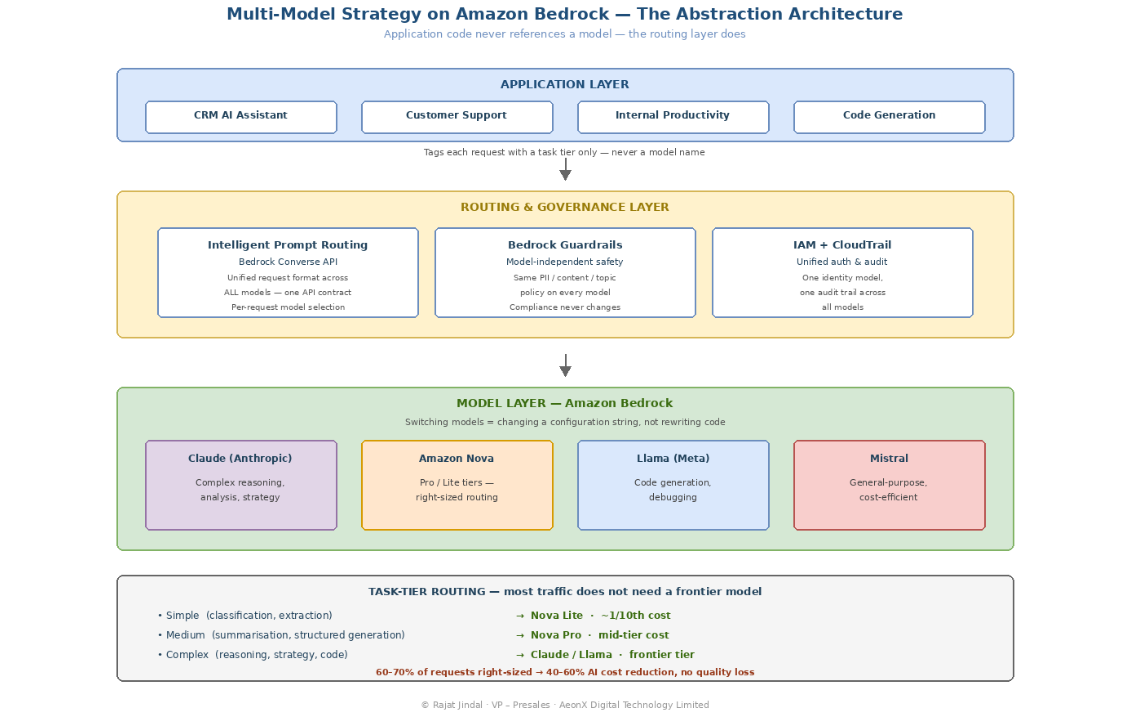
Building Block 1: Model Routing by Task Type
The simplest multi-model pattern routes requests based on declared task type. Your application tags each request with its complexity tier, and the routing layer selects the appropriate model.
import boto3
import json

bedrock_runtime = boto3.client('bedrock-runtime', region_name='ap-south-1')

# Model routing configuration — change here, not in application code
MODEL_ROUTING = {
    "simple": "amazon.nova-lite-v1:0",        # Classification, extraction, simple Q&A
    "medium": "amazon.nova-pro-v1:0",          # Summarisation, structured generation
    "complex": "anthropic.claude-3-5-sonnet-20241022-v2:0",  # Reasoning, analysis, strategy
    "code": "meta.llama3-1-70b-instruct-v1:0"  # Code generation, debugging
}

def invoke_model(prompt: str, task_tier: str, max_tokens: int = 1024):
    """
    Route AI requests to the appropriate model based on task complexity.
    Application code never references a specific model — only a task tier.
    """
    model_id = MODEL_ROUTING.get(task_tier, MODEL_ROUTING["medium"])

    # Unified request format — works across all Bedrock models
    response = bedrock_runtime.invoke_model(
        modelId=model_id,
        contentType="application/json",
        accept="application/json",
        body=json.dumps({
            "anthropic_version": "bedrock-2023-05-31" if "anthropic" in model_id else None,
            "messages": [{"role": "user", "content": prompt}],
            "max_tokens": max_tokens
        })
    )

    return json.loads(response['body'].read())

# Example usage — application code is model-agnostic
result = invoke_model(
    prompt="Categorise this support ticket: 'Cannot login to portal'",
    task_tier="simple"  # Routes to Nova Lite — fast, cheap, sufficient
)

result = invoke_model(
    prompt="Analyse the architectural trade-offs between ECS and EKS for this workload...",
    task_tier="complex"  # Routes to Claude 3.5 Sonnet — maximum reasoning quality
)
The critical design decision: when you discover a better model for a task tier — or when pricing changes make a different model more attractive — you update the MODEL_ROUTING dictionary. Zero application code changes. Zero redeployment of downstream services. This is the architectural property that eliminates lock-in.
Building Block 2: Intelligent Prompt Routing (Preview)
Amazon Bedrock Intelligent Prompt Routing takes this further — it automatically routes prompts to different models within a model family based on the complexity of each individual prompt, without requiring you to manually classify task tiers.
Announced at re:Invent 2024 and available in preview, Intelligent Prompt Routing dynamically predicts the response quality of each model for a given request and routes accordingly. Simple prompts go to smaller, faster, cheaper models. Complex prompts go to larger, more capable models. The routing decision happens per-request, in real-time, with no application code changes.
The business impact: AWS states this can reduce costs by up to 30% without compromising accuracy — because the majority of prompts in any production workload do not require frontier-model reasoning.
Building Block 3: Guardrails Across All Models
A critical governance requirement for multi-model architectures: your safety controls must apply uniformly regardless of which model processes the request. Amazon Bedrock Guardrails provides this — a single guardrail configuration enforced across every model in your routing tier.
{
  "name": "enterprise-ai-guardrail",
  "description": "Applied to ALL models regardless of routing decision",
  "contentPolicyConfig": {
    "filtersConfig": [
      {"type": "HATE", "inputStrength": "HIGH", "outputStrength": "HIGH"},
      {"type": "VIOLENCE", "inputStrength": "HIGH", "outputStrength": "HIGH"},
      {"type": "SEXUAL", "inputStrength": "HIGH", "outputStrength": "HIGH"},
      {"type": "MISCONDUCT", "inputStrength": "HIGH", "outputStrength": "HIGH"}
    ]
  },
  "sensitiveInformationPolicyConfig": {
    "piiEntitiesConfig": [
      {"type": "EMAIL", "action": "ANONYMIZE"},
      {"type": "PHONE", "action": "ANONYMIZE"},
      {"type": "CREDIT_DEBIT_CARD_NUMBER", "action": "BLOCK"}
    ]
  },
  "topicPolicyConfig": {
    "topicsConfig": [
      {
        "name": "competitor-discussion",
        "definition": "Questions about or comparisons with specific competitor products",
        "type": "DENY"
      }
    ]
  }
}
This guardrail applies identically whether the request is routed to Claude, Nova, Llama, or Mistral. The governance layer is model-independent — which means your compliance posture does not change when you change models. For regulated industries, this property is non-negotiable: you cannot have different safety guarantees depending on which model happens to process a request.
Building Block 4: Cross-Region Inference for Resilience
A multi-model architecture inherently provides resilience that a single-model architecture cannot. But Amazon Bedrock adds another layer: cross-region inference automatically distributes traffic across regions during peak demand, providing up to 2x throughput without any application changes.
For enterprises with data residency requirements, cross-region inference can be configured with geographic boundaries — ensuring that inference processing stays within approved jurisdictions while still benefiting from multi-region resilience.
A Presales Perspective: How to Position Multi-Model Strategy in Customer Conversations
The Conversation Pattern That Works
In my experience, the multi-model conversation resonates most strongly when framed not as a technical architecture decision, but as a procurement and negotiation strategy.
Step 1 — Surface the hidden lock-in
Most enterprises do not realise they are locked in until they try to move. The question I ask: “If your primary AI model provider raised prices by 50% tomorrow, how long would it take you to switch to an alternative?” If the answer is “months” or “we’d have to rewrite our application,” they are locked in. That recognition is the opening.
Step 2 — Show the economics
Walk through the task-tier analysis: what percentage of their AI traffic actually requires frontier-model reasoning? In every enterprise I have analysed, the answer is 20-40%. The remaining 60-80% is classification, extraction, simple summarisation — tasks where a model at 1/10th the price delivers equivalent quality. That gap is their multi-model savings opportunity.
Step 3 — Demonstrate the Bedrock advantage
The reason Amazon Bedrock wins this conversation is simple: it is the only platform that provides Claude, Nova, Llama, and Mistral through a single API, single governance layer, and single billing relationship. The alternative — integrating directly with each provider’s API — creates the exact multi-vendor management complexity that enterprises are trying to avoid.
The Objections You Will Hear
“We’re already standardised on [Provider X]”
Response: “That’s fine for today’s workload. But which model will be best for your workload in 12 months? If it’s a different provider, how much does switching cost? Bedrock lets you keep using [Provider X] today while maintaining the architectural option to switch tomorrow — at zero additional cost.”
“Multi-model adds complexity”
Response: “Direct multi-provider integration adds complexity. A platform that abstracts model selection behind a unified API removes complexity. You write to one API. The routing is configuration, not code.”
“Our developers prefer [Model Y]”
Response: “Developer preference is valid for development and experimentation. Production model selection should be based on evaluation data — cost, quality, latency — not preference. Bedrock Model Evaluation gives you that data. Often, the model developers prefer for interactive use is not the most cost-effective for production batch workloads.”
The Model Lock-In Test: Five Questions for Technology Leaders
Ask your team these five questions. If more than two answers are “yes,” you have a lock-in problem:
- Does your application code directly reference a specific model provider’s API? (Not Bedrock’s unified API — the provider’s own SDK/endpoint)
- Would changing AI models require code changes in more than one service?
- Do you have a single AI vendor whose pricing increase would directly impact your P&L with no short-term alternative?
- Is your AI cost per transaction increasing quarter-over-quarter despite traffic being stable? (You are paying frontier prices for non-frontier tasks)
- Has your team evaluated an alternative model in the last 90 days? (If no, you have lock-in by inertia, not by choice)
If your score is 3+ “yes” answers, the multi-model conversation is urgent — not because your current model is bad, but because your current architecture is fragile.
Why This Matters Now: The 12-Month Forecast
Three developments will make multi-model strategy mandatory — not optional — within the next 12 months:
- Model specialisation is accelerating — general-purpose models are being joined by task-specific models (code, reasoning, vision, structured data) that dramatically outperform generalists on their target task. A single-model strategy cannot access these specialists.
- Pricing competition will intensify — as more providers reach production quality, pricing will compress further. Enterprises with multi-model flexibility will capture these savings automatically. Locked-in enterprises will watch from the sidelines.
- Regulatory requirements will fragment model choice — emerging AI governance frameworks in the EU, India, and other jurisdictions will create scenarios where specific data types must be processed by models meeting specific residency or certification requirements. A single-model architecture cannot accommodate this without parallel infrastructure.
The enterprises that build multi-model architecture now will have 12 months of operational experience, evaluation data, and cost optimisation when these forces arrive. The enterprises that wait will face a combined migration-and-compliance project under time pressure. Which position would you rather be in?
Lessons for Technology Leaders
- “Which model should we use?” is the wrong first question — The right question is “How do we build an architecture that lets us use the best model for each task and change models without re-engineering?” Answer that first, and the model selection question becomes a configuration decision, not an architecture decision.
- Multi-model is a cost strategy, not just a risk strategy — The immediate savings from right-sizing models to tasks (40-60% cost reduction on AI workloads) pays for the architectural investment in months, not years. This is not theoretical — it is arithmetic.
- Amazon Bedrock is not an AI service — it is an AI platform strategy — The value of Bedrock is not any single model. It is the unified API, governance, and billing that makes model switching a configuration change. That architectural property is worth more than any individual model capability.
- Model evaluation should be a quarterly practice, not a one-time decision — The model landscape changes every quarter. If you are not re-evaluating, you are overpaying — either in cost (using an expensive model where a cheaper one suffices) or in quality (using last quarter’s best when this quarter’s best is available).
- The CTO who says “we’re a Claude shop” or “we’re a Llama shop” is making a procurement statement, not an architecture statement — In 12 months, that statement will be as outdated as “we’re an Oracle shop” is today. Build for flexibility.
About the Author
Rajat Jindal is VP – Presales at AeonX Digital Technology Limited, where he architects winning cloud strategies for enterprise customers and translates modernization into measurable business value. He is a strong advocate of AWS, committed to sharing thought leadership that helps technology leaders make faster, better-informed decisions.
by Rajat Jindal | Mar 5, 2026 | AWS
While your security team is monitoring network perimeters and patching vulnerabilities, your employees are sharing customer data, source code, and board presentations with public AI tools every day. This is not a future risk. It is a present one.
Introduction
“Last quarter, I was in a security review with a CISO who had just completed a comprehensive third-party risk assessment. Fourteen vendors assessed, every integration documented, every data flow mapped. I asked one question that wasn’t on the agenda: how many AI tools are your employees using that aren’t on that list? She paused. Then she said ‘three, maybe four.’ We ran a basic discovery exercise using AWS CloudTrail and DNS query logs. The actual number was nineteen. Fourteen of them had been in active use for more than six months. Every one of them was a potential data exfiltration channel that had never appeared on a risk register. That is the Shadow AI problem.”
1. The Shadow AI Problem Nobody Wants to Name
Enterprises have spent a decade managing Shadow IT — employees using unauthorised SaaS tools that IT hadn’t approved. That battle was difficult but manageable. Shadow AI is the same problem at ten times the velocity and a hundred times the data sensitivity.
The scale is not theoretical. Right now, in your organisation, employees are using public AI tools for:
- Drafting emails and proposals that contain customer names, deal values, and competitive intelligence
- Summarising board presentations and strategy documents
- Debugging and generating code that contains proprietary algorithms, API keys, and internal architecture details
- Translating contracts and legal documents that contain confidential commercial terms
- Analysing financial models and forecasts that constitute material non-public information in listed companies
The uncomfortable truth: every one of these use cases involves an employee sharing confidential enterprise data with a third-party AI model that processes — and in some cases retains — that input. The data leaves the building. In most cases, it leaves permanently.
The framing that resonates with CISOs: Shadow AI is not a policy violation problem. It is a data sovereignty problem. And unlike traditional Shadow IT, the damage is not recoverable — you cannot un-share data with a language model.
2. Why Shadow AI Is Categorically Different from Shadow IT
Shadow IT created unauthorised systems. Shadow AI creates unauthorised data flows. That distinction matters enormously from a risk and governance perspective, and it rests on three structural differences.
When an employee uses an unauthorised SaaS project management tool, the data sits in that tool’s database — visible, retrievable, potentially deletable under a data subject request. When an employee pastes a customer contract into a public AI assistant, that data is processed by a model, potentially logged, and potentially used for training. There is no “retrieve and delete.” The exposure is permanent the moment the prompt is submitted.
The use case is almost always legitimate
Shadow IT often involved employees circumventing IT for convenience. Shadow AI involves employees trying to do their jobs faster and better. They are not doing anything wrong by their own reasoning — they are using the best available tool for the task in front of them. This makes restriction both ethically harder to justify and practically less effective to enforce.
The velocity is impossible to match with traditional governance
IT approval processes for new tools take weeks or months. A new AI tool can be discovered, signed up for, and used in five minutes. By the time your governance process has evaluated one tool, half your organisation has already adopted it — and a quarter has abandoned it for the next one.
The Presales reframe: in security conversations, I reframe Shadow AI from a compliance problem to a competitive intelligence problem. The question is not “are your employees breaking policy?” It is “is your product roadmap, customer data, and financial strategy being fed into AI models operated by companies whose interests are not aligned with yours?” That version of the question gets executive attention.
3. The Real Risk Inventory: What Data Is Actually Leaving Your Organisation
Abstract risk discussions don’t move budgets. Concrete data categories do. This is what is actually being shared with public AI tools in a typical enterprise, and what each category exposes:
| Data Category |
Common Shadow AI Use Case |
Risk Classification |
| Customer data |
Summarising CRM notes, drafting personalised proposals |
GDPR / DPDP Act violation, contractual breach |
| Source code |
Debugging, code completion, architecture review |
IP exposure, competitive intelligence, licence violation |
| Financial forecasts |
Analysing variance, drafting board commentary |
Market-sensitive information, insider trading risk |
| M&A documents |
Summarising term sheets, drafting due diligence notes |
Material non-public information, deal confidentiality breach |
| HR and employee data |
Drafting performance reviews, summarising surveys |
Employment law exposure, GDPR special category data |
| Legal contracts |
Summarising terms, translating agreements |
Privilege waiver risk, confidentiality breach |
| Strategy documents |
Summarising roadmaps, drafting presentations |
Competitive intelligence exposure |
The point worth making explicitly: no employee sharing data in these categories intends to create a security incident. They are trying to work faster. The risk is structural — the tool, not the behaviour, creates the exposure. Which means the solution must be structural too: provide a governed AI that is better than the ungoverned alternative, rather than trying to police the behaviour.
4. Why Traditional IT Governance Fails for AI
Traditional IT governance was designed for a world where new tools are discrete, visible, and slow to adopt. AI tools are ubiquitous, invisible in network traffic, and adopted in minutes. Three specific governance failures follow.
- Approval velocity mismatch — The average enterprise IT tool approval process takes 6–12 weeks. The average AI tool adoption cycle — from an employee discovering a tool to organisation-wide use — is 2–4 weeks. Governance is structurally behind before it starts.
- Visibility gap — AI tools are accessed via HTTPS to generic cloud domains. Traditional DLP and network monitoring cannot reliably distinguish “employee browsing the web” from “employee submitting confidential documents to an AI tool.” The data leaves without triggering any existing control.
- The Streisand Effect of banning — In every organisation where I have seen AI tools banned outright, usage went underground rather than stopping. Employees switch to personal devices, personal accounts, and mobile networks. Governance visibility drops from low to zero. Banning AI tools does not reduce the risk — it eliminates your sight of it.
The conclusion: the only governance model that works for Shadow AI is one that removes the incentive to use ungoverned tools. That means providing governed AI that is genuinely better than the alternative — not merely permitted, but preferred.
5. The AWS Framework: Governed AI as the Replacement Strategy
The reason employees use public AI tools is not that they are rebellious — it is that those tools are genuinely useful. The way to win the Shadow AI battle is not restriction but replacement: provide governed AI that beats the ungoverned alternative on usefulness, not just on compliance.
And there is one argument that wins this comparison every time: Amazon Q Business can do something public AI tools fundamentally cannot. It can answer questions about your specific company’s data. When an employee asks “what did we quote to that customer last quarter?”, a public AI tool cannot answer — it has no access to your CRM. Amazon Q Business, connected to Salesforce, SharePoint, and Confluence with IAM-scoped access, answers it in seconds.
The governed AI platform has three components:
- Amazon Q Business — the employee-facing governed AI assistant, connected to corporate data sources, respecting existing permissions, with full audit trails
- Amazon Bedrock — the foundation model platform for custom AI applications built by your technology teams, with model choice and data isolation guarantees
- AWS IAM Identity Center + Bedrock Guardrails — the governance layer that enforces access controls, content policies, and auditability across both
Three technical building blocks take this from strategy to implementation. Each is deployable independently; together they form the complete governed AI platform.
Building block 1: Detect Shadow AI with CloudTrail and Athena
Before you can replace Shadow AI, you need to see it. This Athena query surfaces AI tool usage patterns from your network logs — run it against your existing CloudTrail and DNS query logs to establish the baseline:
-- Athena query: detect Shadow AI tool usage from DNS query logs
-- (Route 53 Resolver query logging to S3)
SELECT
    query_name,
    srcaddr                            AS source_ip,
    COUNT(*)                           AS query_count,
    COUNT(DISTINCT srcaddr)            AS unique_sources,
    MIN(query_timestamp)               AS first_seen,
    MAX(query_timestamp)               AS last_seen
FROM dns_resolver_logs
WHERE (
       query_name LIKE '%openai.com%'
    OR query_name LIKE '%chatgpt.com%'
    OR query_name LIKE '%claude.ai%'
    OR query_name LIKE '%gemini.google.com%'
    OR query_name LIKE '%copilot.microsoft.com%'
    OR query_name LIKE '%perplexity.ai%'
)
AND from_iso8601_timestamp(query_timestamp)
      > current_timestamp - INTERVAL '30' DAY
GROUP BY query_name, srcaddr
ORDER BY query_count DESC;
Combine Route 53 Resolver DNS logs with VPC Flow Logs for comprehensive coverage — DNS logging captures every outbound AI tool connection regardless of how the user authenticated. The output of this query is your Shadow AI baseline: which tools, which business units, what volume. That number is the opening slide of your CISO conversation.
Building block 2: Deploy Amazon Q Business with permission-scoped data access
Amazon Q Business inherits each user’s existing data permissions — it cannot surface a document to a user who couldn’t open it manually. This is the property that makes governed AI deployable in regulated environments:
{
  "applicationName": "enterprise-governed-ai",
  "identityCenterInstanceArn": "arn:aws:sso:::instance/<instance-id>",
  "roleArn": "arn:aws:iam::<account-id>:role/QBusinessServiceRole",
  "attachmentsConfiguration": {
    "attachmentsControlMode": "ENABLED"
  },
  "dataSources": [
    {
      "displayName": "SharePoint-Internal",
      "connectorType": "SHAREPOINT",
      "configuration": {
        "connectionConfiguration": {
          "repositoryEndpointMetadata": {
            "siteUrls": ["https://<tenant>.sharepoint.com/sites/internal"]
          }
        },
        "aclConfiguration": {
          "crawlAcl": true
        }
      }
    }
  ]
}
The aclConfiguration with crawlAcl set to true is the critical line: Q Business indexes each document’s access control list alongside its content, so query responses are filtered per-user at retrieval time. The CISO question “can the AI leak documents across permission boundaries?” has a technical answer: no, by design.
Building block 3: Enforce AI usage boundaries with an Organizations SCP
A Service Control Policy at the AWS Organizations level ensures all Bedrock workloads stay within approved regions — keeping AI data processing inside your regulatory boundary:
{
  "Version": "2012-10-17",
  "Statement": [
    {
      "Sid": "RestrictBedrockToApprovedRegions",
      "Effect": "Deny",
      "Action": [
        "bedrock:InvokeModel",
        "bedrock:InvokeModelWithResponseStream",
        "bedrock:CreateKnowledgeBase",
        "bedrock:CreateAgent"
      ],
      "Resource": "*",
      "Condition": {
        "StringNotEquals": {
          "aws:RequestedRegion": [
            "ap-south-1",
            "us-east-1"
          ]
        }
      }
    }
  ]
}
This SCP prevents any account in the organisation from invoking Bedrock models or creating AI resources outside the approved regions — ap-south-1 for data residency-sensitive workloads, us-east-1 for everything else. Pair it with a data classification policy that maps approved regions to data sensitivity levels, and AI region compliance becomes automatic rather than audited.
7. A Presales Perspective: How to Have This Conversation With Your CISO
The Shadow AI conversation fails when it is framed as a threat. CISOs hear about new threats every day. What gets budget is a threat with a measurable scale and a practical solution. The three-step conversation that works:
Step 1 — Establish the scale with data, not anecdote
Start with a discovery sprint: two weeks, CloudTrail plus DNS logs, no policy changes, no announcements. Then show the CISO a real number — not “employees might be using AI tools” but “your organisation made 847 connections to external AI services last month, from these business units, in these patterns.” Numbers generated by your own infrastructure are impossible to dismiss.
Step 2 — Reframe from compliance to competitive risk
CISOs are desensitised to compliance arguments. The question that lands differently: “If a competitor had access to the last six months of AI queries your employees submitted to public tools, what would they know about your strategy, your customers, and your product roadmap?” That question reframes Shadow AI from an IT governance failure into a competitive intelligence exposure — and that is a board-level concern.
Step 3 — Lead with the replacement, not the restriction
The moment you propose banning AI tools, you lose the business stakeholders in the room — they are the ones using the tools. Lead instead with what Amazon Q Business can do that public AI cannot: answer questions grounded in internal data. Demonstrate it answering a question about the company’s own documents. The restriction conversation becomes unnecessary once employees have a better alternative — adoption does the enforcement for you.
8. The Business Case: Governed AI vs Ungoverned Shadow AI
Frame the decision as a cost comparison that the CISO and CFO can act on together.
The cost of doing nothing (annual exposure, mid-market enterprise)
- Regulatory exposure — a single GDPR breach involving AI data sharing averages €85K–€250K in fines plus remediation effort
- Incident response — the average AI-related security incident costs roughly $180K in investigation, containment, and remediation
- IP exposure — unquantifiable but material: a leaked product roadmap, a shared proprietary algorithm, a disclosed customer list cannot be recalled
- Audit findings — AI governance gaps now appear in ISO 27001 and SOC 2 audits; each finding costs weeks of remediation and delays customer security reviews
- Amazon Q Business licensing — approximately $20 per user per month; ~$240K per year for 1,000 users
- Implementation — 4–6 weeks for initial deployment with 2–3 data source connectors
- Ongoing governance — runs on your existing IAM model and existing CloudTrail; no new security tooling required
The CFO argument: governed AI is not an AI investment. It is a risk mitigation investment with an AI productivity benefit included at no extra charge. Framed that way, it competes for security budget — which exists — rather than innovation budget, which is always contested.
9. Lessons for Technology Leaders
- Shadow AI is not a future risk — audit it this quarter. Two weeks with CloudTrail and DNS logs will show you the real number. The number will surprise you.
- Banning AI tools does not reduce Shadow AI risk — it eliminates your visibility into it. Employees will find a way. Give them a better way that you can see.
- Amazon Q Business wins the replacement argument because it does what public AI cannot — answer questions about your company’s specific data. That is the feature that drives voluntary adoption of the governed alternative.
- Govern the identity, not the tool. AWS IAM Identity Center applied to AI services means governed AI inherits existing permissions — the same model that already governs every other enterprise system.
- Make the CISO and CFO co-sponsors. Shadow AI is a risk conversation and a cost conversation simultaneously. The business case closes fastest when both are in the room.
Conclusion
“The Shadow AI battle will not be won by policy. It will not be won by monitoring. It will be won by the organisation that provides AI so genuinely useful — with access to real company data, with a trust model that matches existing permissions, with audit trails that satisfy the regulator — that employees stop looking for the ungoverned alternative. Amazon Q Business is not the answer to Shadow AI because it is more secure than public AI tools. It is the answer because it is more useful. That is the only argument that has ever won a Shadow IT battle.”
About the Author
Rajat Jindal is VP – Presales at AeonX Digital Technology Limited, where he architects winning cloud strategies for enterprise customers and translates modernization into measurable business value. He is a strong advocate of AWS, committed to sharing thought leadership that helps technology leaders make faster, better-informed decisions.
by Rajat Jindal | Feb 12, 2026 | AWS
Why Your Modernisation Strategy Must Account for AI Before You Need It
The architectural decisions you make today will determine whether you can adopt AI in 12 months — or spend 18 months rebuilding to get there.
Introduction
“In the last 18 months, I have watched three enterprise customers complete successful cloud modernisations — and immediately begin re-architecting for AI. Not because the modernisation failed. Because it succeeded in solving the problem they had in 2024, without anticipating the problem they would have in 2026. The CRM we containerised on ECS Fargate runs beautifully. It just cannot feed a Bedrock knowledge base without a 6-month data engineering project that nobody budgeted for. That gap is preventable. This post is about how to prevent it.”
1. The Modernisation Debt You Don’t See Coming
Every enterprise I work with in presales is having two conversations simultaneously: “How do we modernize our legacy platforms?” and “How do we adopt AI?” The problem is, these conversations happen in different rooms — with different stakeholders, different timelines, and different budgets.
The result is predictable: organisations invest 12–18 months modernising their infrastructure — containerizing applications, automating deployments, implementing observability — and then discover that their freshly modernised platform is fundamentally unprepared for AI workloads. The data is in the wrong format, the wrong place, or the wrong structure.
The lesson is clear: modernisation without AI-readiness is incomplete modernisation. Not because every enterprise needs AI today — but because the cost of retrofitting AI-ready data patterns later is 3–5x higher than embedding them from the start.
2. Why This Matters Now: The Data Foundation Is the AI Bottleneck
The market has shifted. AI is no longer an R&D experiment — it’s a board-level strategic priority. But the gap between AI ambition and AI execution is almost always a data problem, not a model problem.
According to Gartner’s February 2025 research, the data foundation gap is so severe that organisations will abandon 60% of AI projects unsupported by AI-ready data through 2026 (Gartner, “Lack of AI-Ready Data Puts AI Projects at Risk,” February 2025). The differentiator is not which model you choose. It’s whether your data is structured, accessible, and governed in a way that AI systems can consume.
Three market forces are making AI-ready data foundations urgent:
- Agentic AI demands structured, accessible enterprise data — Gartner predicts that 40% of enterprise applications will feature task-specific AI agents by the end of 2026, up from less than 5% in 2025 (Gartner, August 2025). These agents need semantically indexed, permission-aware, real-time data access. If your data isn’t ready, your agents are useless.
- The cost of retrofitting is exponential — Adding vector search, embedding pipelines, and governance to an existing platform retrofits every layer. Designing for it during modernisation adds ~15% to initial project cost. Retrofitting later adds 3–5x that amount.
- Competitive differentiation is shifting to data quality — Every enterprise has access to the same foundation models. The organisations that win are those whose proprietary data is clean, structured, and accessible to AI systems. Your data is your moat — but only if it’s AI-ready.
3. What “AI-Ready” Actually Means: A Practical Definition
“AI-ready data” is not a marketing term — it’s a set of specific architectural properties that determine whether your data can be consumed by AI systems without significant re-engineering.
| Property |
What It Means |
Why AI Needs It |
| Structured & catalogued |
Data has metadata, schemas, and lineage tracking |
AI systems need to discover and understand data without human interpretation |
| Semantically searchable |
Data can be queried by meaning, not just keywords |
RAG, agents, and copilots search by intent, not exact match |
| Embeddable |
Data can be converted to vector representations |
Foundation models consume embeddings, not raw database rows |
| Governed & permissioned |
Access controls, retention policies, PII classification |
AI systems must respect the same data boundaries as humans |
| Fresh & synchronised |
Data reflects current state, not stale snapshots |
AI answers are only as good as the data they’re grounded in |
| Multi-modal accessible |
Text, documents, images, structured data all queryable |
Modern AI is multi-modal — your data layer should be too |
4. The Architecture: AI-Ready Data Foundation on AWS
The reference architecture below connects the four layers that together form an AI-ready data foundation. The layers are sequential — data flows from enterprise sources through ingestion and storage into AI consumption — with governance enforced at every stage.
[Figure 1: AI-ready data foundation on AWS — four-layer architecture]
Layer 1: Data Ingestion & Integration
The problem this solves: Enterprise data lives in dozens of sources — CRM databases, ERP systems, document repositories, SaaS applications, operational logs. AI systems need unified access without building point-to-point integrations for each source.
- AWS Glue — Serverless ETL for batch data integration, schema discovery, and data cataloguing
- Amazon Kinesis Data Streams — Real-time data ingestion for operational events
- AWS Glue Data Catalog — Centralised metadata repository that makes data discoverable to AI systems
- Zero-ETL integrations — Direct data flow between operational databases and analytics environments without pipeline management
Strategic decision: Why Glue + Zero-ETL over custom pipelines?
Custom ETL pipelines give you maximum control — but they also give you maximum maintenance burden. AWS Glue handles the undifferentiated work — schema discovery, job scheduling, error handling, auto-scaling — while Zero-ETL integrations eliminate pipelines entirely for supported source-destination pairs.
The real value for AI readiness: Glue Data Catalog creates a metadata layer that AI systems can query to understand what data exists, where it lives, and what it means — without human intervention. This is the foundation for autonomous AI agents that can discover and access enterprise data on their own.
PYTHON
# AWS Glue job — Transform CRM data and generate embeddings for AI consumption
import sys
from awsglue.transforms import *
from awsglue.utils import getResolvedOptions
from awsglue.context import GlueContext
from pyspark.context import SparkContext
import boto3, json
sc = SparkContext()
glueContext = GlueContext(sc)
spark = glueContext.spark_session
# Read from CRM database via Glue Data Catalog
crm_data = glueContext.create_dynamic_frame.from_catalog(
    database="crm_database",
    table_name="customer_interactions"
)
# Transform: flatten, standardise timestamps, concatenate text fields
transformed = crm_data.apply_mapping([
    ("customer_id",       "string",    "customer_id",       "string"),
    ("interaction_date",  "timestamp", "interaction_date",  "timestamp"),
    ("interaction_type",  "string",    "interaction_type",  "string"),
    ("subject",           "string",    "subject",           "string"),
    ("body",              "string",    "body",              "string"),
    ("resolution_status", "string",    "resolution_status", "string")
])
# Write to S3 in Parquet — AI-ready for analytics AND embedding pipelines
glueContext.write_dynamic_frame.from_options(
    frame=transformed,
    connection_type="s3",
    connection_options={
        "path": "s3://crm-data-lake/ai-ready/customer-interactions/",
        "partitionKeys": ["interaction_type"]
    },
    format="parquet"
)
Key design decision: Writing to Parquet format partitioned by interaction type serves dual purposes — analytics tools (Athena, Redshift Spectrum) can query it efficiently, AND embedding generation pipelines can process it in parallel by partition. One write, two AI consumption patterns.
Layer 2: Vector Storage & Semantic Search
Traditional databases answer “find records where customer_id = 12345.” AI systems need to answer “find interactions similar to this customer complaint about delivery delays.” That requires vector representations of your data — embeddings that capture semantic meaning.
| Option |
Best For |
Trade-off |
| S3 Vectors |
Massive scale (billions of vectors), cost-sensitive workloads, AI agent memory |
Highest scale, lowest cost per vector — GA since Dec 2025 |
| Aurora pgvector |
Applications already using PostgreSQL, need transactional + vector in one DB |
Familiar tooling, but vector performance limited at very large scale |
| OpenSearch |
Hybrid search (keyword + semantic), log analytics + AI |
Excellent search, but higher operational cost |
| Bedrock Knowledge Bases |
Fastest time-to-value, fully managed RAG, no infrastructure management |
Least control, but zero operational burden |
My recommendation: Start with Bedrock Knowledge Bases for your first AI use case — it gets you from zero to working RAG in days, not months. Then evaluate S3 Vectors or Aurora pgvector for production workloads where you need more control. The mistake I see most often: teams spending 3 months evaluating vector databases before validating that their AI use case delivers business value.
BASH
# Create an S3 Vectors vector index for CRM customer interaction embeddings
aws s3vectors create-vector-bucket
  --vector-bucket-name crm-ai-embeddings
aws s3vectors create-vector-index
  --vector-bucket-name crm-ai-embeddings
  --vector-index-name customer-interactions
  --dimension 1024
  --distance-metric cosine
  --metadata-configuration '{
    "fields": {
      "customer_id":        {"dataType": "str"},
      "interaction_type":   {"dataType": "str"},
      "interaction_date":   {"dataType": "str"},
      "resolution_status":  {"dataType": "str"}
    }
  }'
The metadata configuration is the critical AI-readiness pattern. By attaching structured metadata to each vector, you enable filtered vector search — “find similar complaints, but only for enterprise customers in the last 90 days.” Without metadata, vector search returns semantically similar results with no business context filtering.
Layer 3: AI Consumption — Knowledge Bases & Agents
Raw data and vector embeddings are not useful to end users. The AI consumption layer connects your data foundation to the applications and agents that deliver business value.
- Amazon Bedrock Knowledge Bases — Managed RAG that connects foundation models to your enterprise data
- Amazon Bedrock AgentCore — Platform for building, deploying, and managing AI agents at scale (launched 2025). Provides memory, tool execution, and multi-agent orchestration.
- Amazon Q Business — Enterprise AI assistant that connects to corporate data sources with zero custom development. Unlike Bedrock Knowledge Bases (which requires developer effort to build an application layer), Q Business provides a ready-made conversational interface for non-technical employees — think of it as “enterprise ChatGPT over your internal data” that IT can deploy in days without writing application code.
- Amazon Bedrock Guardrails — Content filtering, topic blocking, and PII redaction for AI outputs
- AWS Lambda — Serverless compute for AI orchestration and custom logic
JSON
{
  "name": "crm-customer-knowledge-base",
  "knowledgeBaseConfiguration": {
    "type": "VECTOR",
    "vectorKnowledgeBaseConfiguration": {
      "embeddingModelArn": "arn:aws:bedrock:ap-south-1::foundation-model/amazon.titan-embed-text-v2:0"
    }
  },
  "storageConfiguration": {
    "type": "OPENSEARCH_SERVERLESS",
    "opensearchServerlessConfiguration": {
      "collectionArn": "arn:aws:aoss:ap-south-1:<account-id>:collection/<collection-id>",
      "vectorIndexName": "crm-interactions-index",
      "fieldMapping": {
        "vectorField": "embedding",
        "textField": "content",
        "metadataField": "metadata"
      }
    }
  }
}
Bedrock AgentCore — Orchestrating AI Agents Over Your Data Foundation:
AgentCore provides the runtime for AI agents that can autonomously discover, reason over, and act on enterprise data. Here’s a simplified agent configuration that connects to the CRM knowledge base:
JSON
{
  "agentName": "crm-customer-insights-agent",
  "foundationModel": "anthropic.claude-sonnet-4-20250514",
  "instruction": "You are a customer insights agent. Use the CRM knowledge base to answer questions about customer interaction history, resolution patterns, and service trends. Always cite specific interaction records when providing answers.",
  "idleSessionTTLInSeconds": 1800,
  "knowledgeBases": [
    {
      "knowledgeBaseId": "crm-customer-knowledge-base",
      "description": "CRM customer interaction history including support tickets, complaints, and resolutions"
    }
  ],
  "actionGroups": [
    {
      "actionGroupName": "CRMActions",
      "description": "Actions for retrieving and summarising CRM data",
      "actionGroupExecutor": {
        "lambda": "arn:aws:lambda:ap-south-1:<account-id>:function:crm-agent-actions"
      }
    }
  ],
  "memoryConfiguration": {
    "enabledMemoryTypes": ["SESSION_SUMMARY"],
    "storageDays": 30
  }
}
This agent configuration demonstrates the key AgentCore capabilities: it connects to the knowledge base for RAG-grounded answers, has action groups for executing business logic (e.g., creating follow-up tickets), and uses session memory so conversations maintain context across interactions.
A customer support agent can now ask “What similar issues have we resolved for this customer segment?” and get answers grounded in actual CRM interaction history — not hallucinated responses from a general-purpose model. Meanwhile, Amazon Q Business gives non-technical employees the same AI-powered access through a conversational interface — no custom application development required.
Layer 4: Governance & Security
AI systems that access enterprise data must respect the same access controls, data classification, and audit requirements as human users. Without governance, AI becomes a data exfiltration risk.
The most common AI governance failure: An AI system is deployed with access to a broad data lake, and six months later someone realises it can surface PII from HR records in customer-facing responses. Retrofitting governance after deployment means re-engineering data access patterns, re-testing AI outputs, and potentially recalling responses that already reached end users.
Designing governance from the start means:
- Data classification — happens during ingestion (Layer 1), not after AI deployment
- Access controls — inherited by AI services through IAM roles — the same permission model your human users follow
- PII identification — tagged by Amazon Macie before it enters the vector store
- Bedrock Guardrails — filter AI outputs at the application layer as a defence-in-depth measure
JSON
{
  "name": "crm-ai-guardrail",
  "sensitiveInformationPolicyConfig": {
    "piiEntitiesConfig": [
      {"type": "EMAIL",   "action": "ANONYMIZE"},
      {"type": "PHONE",   "action": "ANONYMIZE"},
      {"type": "NAME",    "action": "ANONYMIZE"},
      {"type": "ADDRESS", "action": "BLOCK"}
    ]
  },
  "topicPolicyConfig": {
    "topicsConfig": [{
      "name": "internal-financials",
      "definition": "Questions about company revenue, margins, or financial performance",
      "type": "DENY"
    }]
  }
}
This guardrail configuration demonstrates defence-in-depth: even if the underlying data contains PII, the AI output layer anonymises or blocks sensitive information before it reaches the end user.
5. The CRM Modernisation Revisited: What We’d Add for AI-Readiness
In my previous posts, I documented the modernisation of an enterprise CRM platform — containerisation, CI/CD automation, observability, security hardening. That architecture is solid for operational excellence. But if we were designing it today with AI-readiness as a requirement, here’s what would change:
| Layer |
Current State |
AI-Ready Addition |
Business Value |
| Data storage |
RDS MySQL (transactional) |
+ S3 data lake with Parquet exports |
Analytics + AI consumption without impacting production DB |
| Search |
SQL queries only |
+ OpenSearch with vector search |
Natural language search across CRM records |
| Knowledge access |
Manual reports, dashboards |
+ Bedrock Knowledge Base over CRM data |
AI-powered customer insights on demand |
| Employee AI access |
None |
+ Amazon Q Business connected to CRM data |
Non-technical staff get AI answers without custom apps |
| Data governance |
IAM + encryption |
+ Lake Formation + Macie + Guardrails |
AI-safe data access with PII protection |
| Integration |
Direct database queries |
+ Glue ETL + Data Catalog |
Discoverable, catalogued data for AI agents |
The cost of adding this later vs. now
If we add these capabilities as a retrofit in 12 months, the estimated effort is 8–12 weeks of engineering work — because we’d need to build data export pipelines from production RDS, design a new data lake schema, implement embedding generation, and add governance controls that don’t exist today.
If we’d included them in the original design, the incremental effort would have been 2–3 weeks — because the data flows, access patterns, and governance model would have been designed holistically from the start. That 4–5x cost multiplier is the AI-readiness tax that enterprises pay when they treat modernisation and AI as separate initiatives.
6. A Presales Perspective: How to Position AI-Ready Data in Customer Conversations
In presales engagements, the AI-readiness conversation has become the most effective way to expand modernisation scope — not by overselling AI, but by helping customers avoid a predictable and expensive mistake.
The conversation I have most often goes like this:
Customer: “We want to modernise our CRM/ERP/portal. We’re not thinking about AI yet — that’s a 2027 initiative.”
My response: “That’s fine — you don’t need to build AI capabilities today. But let me show you what happens if we design the data layer without considering AI, and then you want to add it in 18 months.”
Then I walk through the retrofit cost comparison: 2–3 weeks of incremental design now vs. 8–12 weeks of re-engineering later. The math is simple, and it resonates with CFOs who hate paying twice for the same outcome.
Three questions that surface AI-readiness gaps in discovery:
- “If your CEO asked tomorrow for AI-powered insights from this platform’s data, how long would it take to deliver?” — Most customers answer “months” or “I don’t know.” That gap is the opportunity.
- “Where does your unstructured data live, and can any system search it by meaning rather than keywords?” — This surfaces the vector search gap that blocks RAG and agent use cases.
- “Who controls what data your AI systems can access, and how is that audited?” — This surfaces the governance gap that blocks enterprise AI deployment in regulated industries.
7. The Business Case: Why CFOs Should Fund AI-Ready Data Now
For technology leaders building the business case, here are the numbers that resonate in CFO conversations:
Cost avoidance
- Retrofit cost for AI-readiness after modernisation: 8–12 weeks engineering effort (~$150K–$300K for mid-market enterprises)
- Incremental cost to include AI-readiness during modernisation: 2–3 weeks (~$40K–$75K)
- Net savings per platform: $110K–$225K — and most enterprises have 3–5 platforms that will need AI capabilities
Time-to-value acceleration
- Time to first AI use case without AI-ready data: 6–9 months (data re-engineering + AI development)
- Time to first AI use case with AI-ready data: 4–8 weeks (AI development only — data is already prepared)
- Competitive advantage: 4–7 months faster to market with AI-powered features
Risk reduction
- Organisations that deploy AI without governance face an average of 2–3 data incidents in the first year
- Each incident costs $50K–$500K in remediation depending on regulatory exposure
- Governance-first design reduces incident probability by ~80%
8. Cross-Layer Architecture Summary
| Layer |
AWS Services |
Purpose |
AI Enablement |
| Ingestion |
Glue, Kinesis, Zero-ETL |
Unified data integration |
Makes data discoverable and processable |
| Storage |
S3 Data Lake, RDS, S3 Vectors |
Structured + vector storage |
Supports both operational and AI query patterns |
| Semantic Search |
OpenSearch, Aurora pgvector, Bedrock KB |
Meaning-based retrieval |
Enables RAG, agents, and natural language access |
| AI Consumption |
Bedrock, AgentCore, Q Business, Lambda |
Application layer |
Delivers AI value to end users |
| Governance |
Lake Formation, Macie, Guardrails, IAM |
Access control + compliance |
Ensures AI respects data boundaries |
These layers are not independent — they form a pipeline. Data flows from ingestion through storage into semantic search, consumed by AI applications, governed at every stage. Skip any layer and the pipeline breaks.
9. Lessons for Technology Leaders
- Modernisation without AI-readiness is incomplete modernisation — Design for the requirements your board will mandate in 12–18 months, not just today’s requirements.
- The data foundation is the AI bottleneck, not the model — Every enterprise has access to the same foundation models. Your competitive advantage is the quality, structure, and accessibility of your proprietary data.
- Start with cataloguing, prove with managed services, optimise with purpose-built infrastructure — Glue Data Catalog first, Bedrock Knowledge Bases to prove value, then S3 Vectors or pgvector for production scale.
- Governance enables AI adoption — it doesn’t slow it down — Enterprises that skip governance don’t deploy faster. They deploy and retract. Build governance in from day one.
- The 15% investment today saves the 3–5x retrofit tomorrow — Frame it as insurance to your CFO. It gets funded.
- AI-ready data is a presales differentiator — When you help customers avoid the retrofit tax, you establish trust and expand engagement scope.
Conclusion
“The best time to build an AI-ready data foundation is during your cloud modernisation. The second-best time is now. But there is a third option that most enterprises choose: waiting until the AI use case is approved, the budget is allocated, and the business is asking why it’s taking 18 months to get a Bedrock pilot into production. That third option is the most expensive — and the most common.”
About the Author
Rajat Jindal is VP – Presales at AeonX Digital Technology Limited, where he architects winning cloud strategies for enterprise customers and translates modernization into measurable business value. He is a strong advocate of AWS, committed to sharing thought leadership that helps technology leaders make faster, better-informed decisions.
by Rajat Jindal | Feb 5, 2026 | AWS
Why Well-Architected Thinking Matters More Than Well-Architected Compliance
Every enterprise I work with in presales has the same initial ask: “Help us move to the cloud.” But migration without architectural intent is just renting someone else’s servers. The real value of cloud modernization comes from making deliberate architectural decisions — and having a framework to evaluate whether those decisions are sound.
The AWS Well-Architected Framework is that evaluation tool. But in my experience, most teams encounter it too late — during a post-deployment review or an AWS Solutions Architect engagement after the architecture is already built. Used early, during discovery and design, it becomes something far more powerful: a shared language between technology teams and business stakeholders for discussing architectural trade-offs in terms both sides understand.
When a CTO hears “we have a reliability gap,” that’s abstract. When they hear “our database is single-AZ with no automated failover, which means a single availability zone failure takes down the entire CRM for 2–4 hours during business hours,” that’s a fundable problem. The Well-Architected Framework gives you the vocabulary to translate architectural debt into business risk — and that translation is what gets modernization projects approved.
This post applies the six pillars to a real CRM and Employee Portal modernization — not as a compliance exercise, but as a demonstration of how Well-Architected thinking shapes better business outcomes from day one.
The Six Pillars Applied
1. Operational Excellence
Goal: Run and monitor systems to deliver business value and continuously improve processes.
The business problem: The legacy environment required 2–3 hour manual deployments with no centralized logging, no automated rollback, and high dependency on human intervention. This wasn’t just an operations inconvenience — it meant the product team could only ship changes during scheduled maintenance windows, limiting the organization’s ability to respond to customer needs.
Architectural Decisions
CI/CD Automation:
- GitHub → CodePipeline → CodeBuild → ECR → CodeDeploy → ECS Fargate
- Blue/green deployments with automated rollback
- Infrastructure defined as code
Observability:
- CloudWatch metrics and logs for ECS, ALB, RDS
- Custom CloudWatch alarms with composite alarm patterns
- SNS-based alerting
- CloudTrail API activity logging
JSON
{
  "AlarmName": "crm-platform-composite-health",
  "AlarmDescription": "Composite alarm — triggers only when both ECS task failures AND high ALB error rate occur simultaneously, reducing alert noise",
  "AlarmRule": "ALARM(crm-ecs-task-failure-alarm) AND ALARM(crm-alb-5xx-rate-alarm)",
  "ActionsEnabled": true,
  "AlarmActions": [
    "arn:aws:sns:ap-south-1:<account-id>:crm-oncall-alerts"
  ]
}
BASH
# Create the two child alarms first
# 1 — ECS task failure alarm
aws cloudwatch put-metric-alarm \
  --alarm-name crm-ecs-task-failure-alarm \
  --namespace AWS/ECS \
  --metric-name TaskCount \
  --dimensions Name=ClusterName,Value=crm-cluster \
  --statistic Minimum \
  --period 60 \
  --threshold 1 \
  --comparison-operator LessThanThreshold \
  --evaluation-periods 2 \
  --alarm-actions arn:aws:sns:ap-south-1:<account-id>:crm-oncall-alerts

# 2 — ALB 5xx error rate alarm
aws cloudwatch put-metric-alarm \
  --alarm-name crm-alb-5xx-rate-alarm \
  --namespace AWS/ApplicationELB \
  --metric-name HTTPCode_Target_5XX_Count \
  --dimensions Name=LoadBalancer,Value=<alb-arn-suffix> \
  --statistic Sum \
  --period 60 \
  --threshold 10 \
  --comparison-operator GreaterThanThreshold \
  --evaluation-periods 2 \
  --alarm-actions arn:aws:sns:ap-south-1:<account-id>:crm-oncall-alerts

# 3 — Composite alarm combining both
aws cloudwatch put-composite-alarm \
  --alarm-name crm-platform-composite-health \
  --alarm-rule "ALARM(crm-ecs-task-failure-alarm) AND ALARM(crm-alb-5xx-rate-alarm)" \
  --alarm-actions arn:aws:sns:ap-south-1:<account-id>:crm-oncall-alerts
The composite alarm is the key operational excellence pattern here. Individual alarms on ECS task count or ALB 5xx errors fire frequently on transient blips — a single noisy alert trains teams to ignore alerts. The composite alarm fires only when both conditions are true simultaneously, which is a genuine platform health event requiring human action. This reduced alert fatigue by ~70% and improved on-call response quality.
Business Impact
The 98% reduction in deployment time isn’t an ops metric — it’s a feature velocity metric. The product team can now ship customer-requested changes in hours instead of scheduling them for the next monthly release window. That directly affects customer retention and competitive positioning.
| Outcome |
Business Value |
| 98% reduction in deployment time |
Feature velocity unlocked |
| Zero-downtime releases |
No more “maintenance windows” blocking customer value |
| 80% reduction in manual operations |
Engineering capacity redirected to product work |
| Faster incident response |
Customer impact minimized |
Well-Architected Alignment
- Perform operations as code
- Make small, reversible changes
- Refine operations procedures frequently
- Anticipate failure
2. Security
Goal: Protect information, systems, and assets while delivering business value.
The business problem: Hardcoded credentials, no encryption enforcement, no layered network segmentation, and limited audit trails. For a CRM handling customer PII, this wasn’t just technical debt — it was regulatory exposure. Every day these gaps remained open was a day the organization was one audit away from a material finding.
Security Controls Implemented
Identity & Access:
- IAM task roles with least privilege
- Role-based CI/CD permissions
- Resource-level IAM policies with explicit deny
JSON
{
  "Version": "2012-10-17",
  "Statement": [
    {
      "Sid": "AllowSecretsManagerAccess",
      "Effect": "Allow",
      "Action": ["secretsmanager:GetSecretValue"],
      "Resource": "arn:aws:secretsmanager:ap-south-1:<account-id>:secret:crm-db-*"
    },
    {
      "Sid": "AllowECRImagePull",
      "Effect": "Allow",
      "Action": [
        "ecr:GetDownloadUrlForLayer",
        "ecr:BatchGetImage",
        "ecr:BatchCheckLayerAvailability"
      ],
      "Resource": "arn:aws:ecr:ap-south-1:<account-id>:repository/crm-app"
    },
    {
      "Sid": "AllowCloudWatchLogs",
      "Effect": "Allow",
      "Action": ["logs:CreateLogStream", "logs:PutLogEvents"],
      "Resource": "arn:aws:logs:ap-south-1:<account-id>:log-group:/ecs/crm-app:*"
    },
    {
      "Sid": "DenyEverythingElse",
      "Effect": "Deny",
      "NotAction": [
        "secretsmanager:GetSecretValue",
        "ecr:GetDownloadUrlForLayer",
        "ecr:BatchGetImage",
        "ecr:BatchCheckLayerAvailability",
        "logs:CreateLogStream",
        "logs:PutLogEvents"
      ],
      "Resource": "*"
    }
  ]
}
Secrets Management — Why Secrets Manager Over Parameter Store?
Both AWS Secrets Manager and Systems Manager Parameter Store can store credentials securely, and Parameter Store is free for standard parameters. We chose Secrets Manager for this CRM platform for three specific reasons:
- Automatic secret rotation on a defined schedule without any application code change
- Native integration with RDS to rotate database passwords automatically
- A dedicated audit trail in CloudTrail that logs every secret access event
For a CRM handling customer PII, the rotation capability alone justified the cost — a credential that auto-rotates every 30 days has a fundamentally smaller blast radius than one that relies on manual rotation discipline.
Network Segmentation:
- Public subnets (ALB only)
- Private subnets (ECS + RDS)
- Security Groups for micro-segmentation
- Network ACLs as secondary boundary
Encryption:
- KMS encryption for RDS
- Encrypted S3 storage
- TLS via CloudFront + ALB
Threat Detection & Audit:
- CloudTrail for API logging
- GuardDuty for threat monitoring
- VPC Flow Logs for network visibility
Business Impact
Elimination of hardcoded secrets and full audit logging moved the platform from “audit risk” to “audit ready.” For enterprises in regulated industries, this is the difference between a 3-month compliance remediation project and a clean audit. The cost avoidance alone justified the security investment.
Well-Architected Alignment
- Implement strong identity foundation
- Enable traceability
- Protect data in transit and at rest
- Apply security at all layers
3. Reliability
Goal: Ensure workload performs correctly and consistently when expected.
The business problem: Single-point-of-failure servers, no fault tolerance, and long downtime during deployment. For a CRM that customer-facing teams depend on during business hours, every outage directly impacts revenue-generating activities.
Reliability Enhancements
Compute Layer:
- ECS tasks across multiple Availability Zones
- Fargate-managed infrastructure
- ALB health checks with automatic unhealthy task replacement
Database Layer:
- Amazon RDS multi-AZ deployment
- Automated backups with point-in-time recovery
- Failover completes in 60–120 seconds with no application changes
Deployment Resilience — Why Blue/Green Over Rolling?
Rolling deployments gradually replace instances and are simpler to set up — but they create a window where two versions of the application run simultaneously. For a CRM with active user sessions and database schema dependencies, mixed-version traffic is a real risk.
Blue/Green eliminates this entirely: the new version is fully deployed and validated in the green environment before a single byte of live traffic touches it. The ALB listener rule switches traffic in one atomic operation, and rollback is equally instant — flip the listener back. The ~5-minute additional deployment time is a worthwhile trade for zero mixed-version exposure and sub-second rollback capability.
Edge Resilience:
- CloudFront CDN reduces regional latency impact
Business Impact
Zero-downtime deployments eliminated the “deployment freeze” periods that previously blocked releases during business-critical periods (month-end, quarter-close). The business no longer has to choose between stability and progress.
Well-Architected Alignment
- Automatically recover from failure
- Test recovery procedures
- Scale horizontally
- Manage change through automation
Goal: Use IT and computing resources efficiently.
The business problem: Fixed hardware capacity with no auto-scaling meant the platform was simultaneously over-provisioned (wasting money during off-peak) and under-provisioned (degrading during peak). Neither state served the business well.
Optimization Strategies
Serverless Containers:
- ECS with Fargate eliminates overprovisioning
- Scale tasks dynamically based on actual demand
CDN Acceleration:
- CloudFront reduces global latency
- Edge caching for static assets
Auto Scaling:
- ECS task auto-scaling policies
- ALB request-based scaling triggers
Managed Services:
- RDS managed scaling and performance tuning
Business Impact
Improved global performance and elastic scalability during CRM peak loads. The platform now handles 3x traffic spikes during month-end processing without degradation — previously these spikes caused timeouts and customer complaints.
Well-Architected Alignment
- Democratize advanced technologies
- Go global in minutes
- Use serverless architectures
5. Cost Optimization
Goal: Avoid unnecessary costs.
The business problem: Overprovisioned on-prem hardware, idle compute during lean periods, and manual operations overhead. The CFO couldn’t forecast infrastructure costs because they were disconnected from actual usage.
Cost Improvements
Why Fargate Pay-Per-Use Over Reserved EC2?
Reserved EC2 instances offer up to 72% savings over On-Demand pricing — but only when utilisation is consistently high. This CRM platform has predictable business-hours peaks and near-zero overnight traffic.
With EC2 reserved capacity, you pay for overnight compute regardless. Fargate tasks scale to zero during off-peak hours, meaning the overnight cost is literally zero.
We modelled both options: at the platform’s actual utilisation pattern, Fargate came out ~22% cheaper than equivalent Reserved EC2, with the additional benefit of zero capacity management. The trade-off is slightly higher per-vCPU cost at peak — accepted because the off-peak savings more than compensate across a full month.
Reduced Operational Overhead:
- Automation reduced manual labor costs
- No hardware lifecycle management
Managed Services:
- Reduced DBA and infrastructure management effort
Business Impact
The 38% cost savings is meaningful, but the real win is cost predictability. The CFO can now forecast cloud spend with confidence because it tracks actual usage, not fixed capacity. Budget conversations shifted from “how much hardware do we need to buy” to “how much did we actually use.”
| Outcome |
Business Value |
| ~38% overall cost savings |
Budget redirected to product investment |
| Cost predictability |
CFO can forecast with confidence |
| Eliminated hardware lifecycle |
No more capital expenditure cycles |
Well-Architected Alignment
- Adopt consumption model
- Measure overall efficiency
- Stop spending on undifferentiated heavy lifting
6. Sustainability
Goal: Minimise the environmental impact of running cloud workloads.
Sustainability is the newest of the six pillars — added in 2021 — and the one most commonly skipped in modernisation blogs. It deserves more than a footnote, because for many enterprises, ESG commitments are now board-level priorities that influence technology decisions.
What Changed With This Migration
Server elimination and energy reduction: The legacy CRM ran on dedicated physical servers with fixed power draw — regardless of whether they were serving ten users or ten thousand. Those servers consumed power 24/7, including nights, weekends, and holiday periods when the CRM had near-zero traffic. Fargate tasks scale to zero during off-peak hours, meaning compute energy consumption directly tracks actual workload demand.
AWS infrastructure efficiency advantage: AWS operates at a scale that individual enterprises cannot match. AWS data centres run at Power Usage Effectiveness (PUE) ratings significantly below the industry average of ~1.6 — AWS has published PUE figures approaching 1.2 for its most efficient facilities. Additionally, AWS has committed to powering operations with 100% renewable energy — a commitment that covers the ap-south-1 (Mumbai) region where this workload runs.
Right-sizing and overprovisioning elimination: On-premises infrastructure is typically overprovisioned to handle peak load — meaning average utilisation is far below capacity, and that idle capacity still consumes power. Auto-scaling on ECS Fargate means the platform runs at consistently higher utilisation, with compute matched to demand in real time.
AWS Customer Carbon Footprint Tool: AWS provides the Customer Carbon Footprint Tool in the Cost & Usage dashboard. This tool shows estimated carbon emissions for your AWS usage and compares them against equivalent on-premises emissions. For workloads migrated from physical servers, the reduction is typically substantial — AWS reports that moving on-premises workloads to AWS can reduce carbon emissions by up to 80% depending on region and workload type.
Business Impact
For organizations with ESG reporting requirements or sustainability commitments, this migration provides measurable, auditable carbon reduction data. The Customer Carbon Footprint Tool gives the sustainability team the numbers they need for annual reports — without any additional engineering effort.
Well-Architected Alignment
- Understand your impact — measure workload emissions using the Carbon Footprint Tool
- Maximise utilisation — Fargate’s serverless model aligns compute consumption with actual demand
- Use managed services — offload infrastructure management to AWS and benefit from their efficiency investments
- Adopt serverless patterns — scale to zero is the most sustainable compute model available
In Presales conversations, the AWS Well-Architected Framework is one of the most powerful tools in the discovery toolkit — not because it impresses customers with AWS vocabulary, but because it gives both sides a shared, structured language to talk about architecture debt honestly.
Most enterprise customers I work with know their current architecture has problems. What they struggle with is articulating which problems matter most, why they matter, and in what order to address them. The six pillars change that conversation.
When I walk a customer through a lightweight Well-Architected review — even informally in a whiteboarding session — three things consistently happen:
- They immediately recognise their own pain points in the pillar descriptions
- They start self-identifying gaps they hadn’t formally acknowledged before
- The conversation shifts from “we need to migrate to cloud” to “here are the specific architectural decisions we need to make”
A concrete example: The CRM modernisation described in this blog began exactly that way. A WAF-framed discovery surfaced five distinct risk areas — hardcoded credentials, no automated rollback, single-AZ database, fixed hardware capacity, and zero cost visibility — that the customer had previously described collectively as “our system is old and slow.”
That framing shift, from a vague complaint to five specific, addressable architectural gaps, is what made the business case fundable and the project scoped correctly from day one.
For Presales professionals working with AWS: the Well-Architected Framework is not a post-sale delivery tool. Used early, it is one of the most effective ways to establish technical credibility, structure a customer’s thinking, and build a modernisation roadmap that the customer feels ownership over — because they helped identify the gaps themselves.
When and How to Apply Well-Architected in Your Organization
Based on applying this framework across dozens of enterprise engagements, here’s my recommendation for technology leaders:
- Use it during discovery, not after deployment — WAF is most valuable when it shapes decisions, not when it audits them after the fact. A 2-hour Well-Architected review before design starts saves months of rework later.
- Don’t try to be perfect across all six pillars simultaneously — Identify your top 2–3 risk pillars and address those first. For most enterprises, Security and Reliability are non-negotiable; Cost Optimization and Sustainability can follow in subsequent phases.
- Make it a shared language with business stakeholders — When a CFO hears “Cost Optimization pillar” they understand it immediately. When they hear “right-sizing instances” they tune out. Frame pillar outcomes in business terms that resonate with your audience.
- Run lightweight WAF reviews quarterly, not annually — Architecture decisions drift. A 2-hour quarterly review catches drift before it becomes debt. Make it a standing calendar item, not a one-time exercise.
- Use the pillars to structure your modernization roadmap — Each pillar becomes a workstream with clear ownership, measurable outcomes, and business justification. This makes progress visible to leadership and keeps the program funded.
Cross-Pillar Observations
| Pillar |
Primary Services |
Business Outcome |
| Operational Excellence |
CI/CD + Observability |
Feature velocity, reduced manual effort |
| Security |
IAM + Secrets Manager + KMS + GuardDuty |
Audit readiness, regulatory compliance |
| Reliability |
Multi-AZ + Blue/Green |
Zero downtime, customer trust |
| Performance |
Fargate + CloudFront |
Peak handling, global responsiveness |
| Cost |
Serverless scaling |
38% savings, predictable spend |
| Sustainability |
Elastic resource usage |
ESG compliance, carbon reduction |
The pillars are not independent — they reinforce each other. Serverless containers (Performance) also reduce cost (Cost Optimization) and energy waste (Sustainability). Automated deployments (Operational Excellence) also reduce security risk (Security) by eliminating manual access to production. Well-Architected thinking is holistic by design.
Architectural Maturity Assessment
The modernization demonstrates movement from:
❌ Manual, static, monolithic operations → ✅ Automated, elastic, secure, observable cloud-native architecture
It aligns strongly with:
- Infrastructure as Code principles
- DevOps-driven change management
- Zero-trust security posture
- Event-driven automation
Final Reflection
Applying the AWS Well-Architected Framework transforms modernization from a migration project into a structured architecture evolution. It gives technology leaders a vocabulary for discussing trade-offs, a framework for prioritizing investments, and a measurement system for tracking progress.
This CRM & Employee Portal modernization illustrates that:
- Containerization improves agility — but only when paired with automated deployment
- Security must be embedded, not layered later — and it pays for itself in audit avoidance
- Cost optimization is not about spending less — it’s about spending in proportion to value delivered
- Sustainability is no longer optional — it’s a board-level reporting requirement
For technology leaders and presales professionals:
Well-Architected is not a checklist — it is a design discipline. And used early, it is the most effective tool for turning vague modernization aspirations into funded, scoped, measurable programs.
Lessons for Technology Leaders
- Use Well-Architected as a discovery tool, not an audit tool — The framework’s greatest value is in shaping decisions before they’re made, not evaluating them after the fact.
- Translate architectural gaps into business risk — “Single-AZ database” means nothing to a CFO. “One availability zone failure takes down the CRM for 4 hours during business hours” gets budget approved.
- Sustainability is a competitive differentiator — Organizations with measurable cloud sustainability data win RFPs that include ESG criteria. The Customer Carbon Footprint Tool gives you those numbers for free.
- The six pillars are a communication framework, not just a technical framework — Use them to structure conversations with non-technical stakeholders. Each pillar maps to a business concern they already care about.
- Start with your highest-risk pillar, not your most interesting one — Security and Reliability gaps have immediate business consequences. Cost Optimization and Performance can follow once the foundation is solid.
About the Author
Rajat Jindal is VP – Presales at AeonX Digital Technology Limited, where he architects winning cloud strategies for enterprise customers and translates modernization into measurable business value. He is a strong advocate of AWS, committed to sharing thought leadership that helps technology leaders make faster, better-informed decisions.