
Why Manufacturing Enterprises Can No Longer Ignore Platform Resilience
In precision manufacturing, a single hour of unplanned system downtime doesn’t just cost IT budget — it stops production lines, breaches supplier SLAs, and triggers contractual penalties that can exceed the entire annual cloud spend.
Yet in our presales engagements with manufacturing enterprises across India and Southeast Asia, we consistently find the same pattern: business-critical applications running on infrastructure that has no automated failover, no standardized deployment process, and no tested disaster recovery plan. The gap between business criticality and infrastructure maturity is where the real risk lives.
This is not a technology problem — it’s a business continuity problem that technology leaders are accountable for. When a Tier-1 customer’s supply chain depends on your Supplier Portal being available, “we’ve never had a major outage” is not a risk mitigation strategy — it’s a bet. And the longer you go without an incident, the more catastrophic the eventual one becomes, because the organization has no muscle memory for recovery.
This post documents how we closed that gap for a high-precision manufacturing enterprise running three business-critical applications — and the architectural decisions that made the business case fundable.
How We Built the Business Case
Technical teams often struggle to get modernization funded because they present the problem in technical terms: “we need CI/CD” or “we should move to the cloud.” Executives don’t fund technology — they fund risk reduction, cost avoidance, and competitive advantage.
For this engagement, we framed the business case around three numbers:
- Cost of a single production outage — calculated from SLA penalty clauses in the customer’s Tier-1 supplier contracts. One breach = 6 months of cloud infrastructure cost.
- Developer time lost to manual deployments — 3 senior engineers spending ~20% of their time on deployment coordination. That’s 0.6 FTE of engineering capacity redirected from product development to operations.
- Audit remediation cost — the customer’s last ISO audit flagged 4 findings related to access control and change management. Remediation was quoted at $200K+ by their compliance consultants. The modernized architecture resolves all four findings as a byproduct of good design.
The total business case was 3.2x the project investment in year-one risk avoidance alone — before counting the operational efficiency gains. That’s the framing that gets a CFO to sign.
The Technical Challenges
The enterprise operated three core applications:
- Supplier Portal – A customer-facing application used by vendors for onboarding, order tracking, and supply chain coordination. This system experiences peak traffic during procurement cycles and requires high availability.
- Tool Pulse – An internal analytics and monitoring platform that provides real-time insights into manufacturing operations, equipment utilization, and production efficiency.
- Gauge Caliber – A quality assurance and calibration management system responsible for maintaining measurement accuracy, compliance records, and inspection workflows.
For confidentiality reasons, specific client identifiers and sensitive implementation details have been generalized. The application names used are representative placeholders, while the architecture, deployment patterns, and operational practices reflect the actual solution implemented.
The limitations of the existing environment included:
1. Manual Deployment Model
- No CI/CD — human intervention required for every release
- High rollback risk with long release cycles
- Deployment failures during business hours directly impacted production operations
2. Limited Scalability
- Static infrastructure with no auto-scaling
- Performance degradation during procurement peak cycles
- Over-provisioned hardware sitting idle 70% of the time
3. Security & Compliance Gaps
- No fine-grained IAM controls
- Limited audit visibility — ISO auditors flagged 4 findings
- No structured encryption controls for data at rest
4. Disaster Recovery Risks
- No automated failover — recovery was manual and untested
- High RTO and RPO exposure with no documented runbook
- Single-region deployment with no cross-region capability
5. Operational Overhead
- Physical server management consuming senior engineering time
- Maintenance complexity growing with each application addition
- Infrastructure cost increasing without proportional business value
The objective was not just migration — it was to design a resilient, scalable, DevOps-driven, multi-application platform that reduced business risk while improving delivery velocity.
Solution Architecture Overview
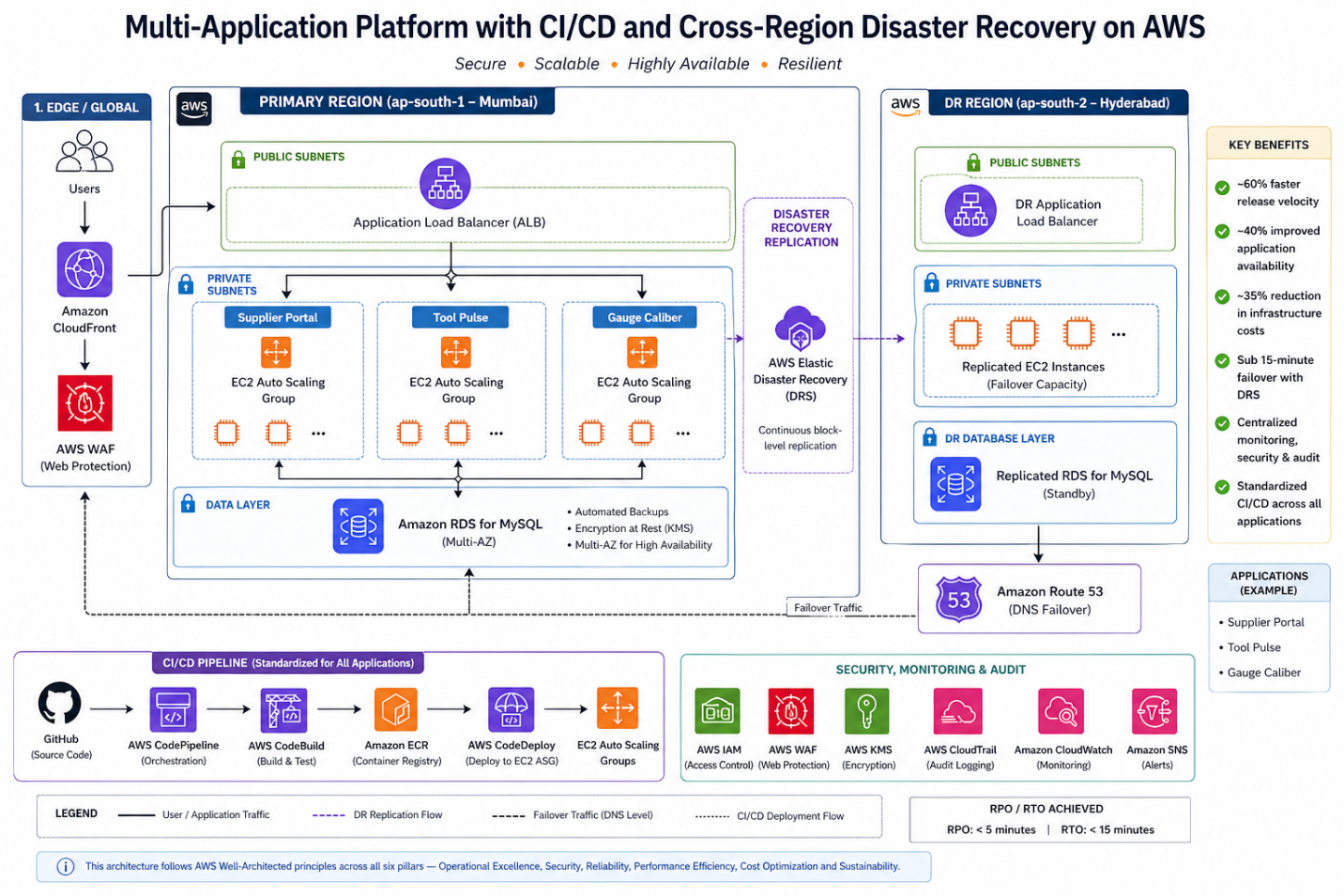
All three applications were deployed using a standardized pattern:
| Layer | Services | Business Value |
|---|---|---|
| Compute | EC2 + Auto Scaling Groups + ALB | Elastic capacity, zero over-provisioning |
| Database | Amazon RDS (MySQL), Multi-AZ | Managed resilience, automated failover |
| CI/CD | GitHub + CodePipeline + CodeBuild + CodeDeploy | Standardized, repeatable deployments |
| Security | IAM + WAF + KMS + CloudTrail + CloudFront | Layered defense, audit-ready |
| Monitoring | CloudWatch + SNS | Proactive alerting, faster MTTR |
| DR | AWS Elastic Disaster Recovery (DRS) | Cross-region failover < 15 minutes |
Strategic Decision: Standardized CI/CD Across All Applications
One of the most impactful design decisions was implementing a centralized CI/CD pipeline pattern across all three applications. This was a deliberate strategic choice, not just a technical convenience.
Why standardization matters more than optimization:
When each application has its own deployment process, you get three different failure modes, three different runbooks, and three different sets of tribal knowledge. Standardization means: – Any engineer can deploy any application — no single points of knowledge failure – One improvement benefits all three applications simultaneously – Incident response follows the same playbook regardless of which application is affected – New applications onboard in days, not weeks
Deployment Flow
- Code committed to GitHub
- CodePipeline triggers automatically
- CodeBuild: compiles application, executes unit tests
- CodeDeploy: deploys to staging, promotes to production EC2 Auto Scaling Group
# appspec.yml — CodeDeploy EC2 Deployment
version: 0.0
os: linux
files:
  - source: /
    destination: /var/www/app
hooks:
  BeforeInstall:
    - location: scripts/stop_server.sh
      timeout: 60
      runas: root
  AfterInstall:
    - location: scripts/install_dependencies.sh
      timeout: 120
      runas: root
  ApplicationStart:
    - location: scripts/start_server.sh
      timeout: 60
      runas: root
  ValidateService:
    - location: scripts/validate_service.sh
      timeout: 30
      runas: root
The ValidateService hook is critical — it runs a health check after deployment. If it fails, CodeDeploy automatically rolls back. This is what gives you safe, repeatable deployments across all three applications without manual intervention.
Business outcome: Release velocity improved by ~60%. More importantly, the risk of each release dropped dramatically — failed deployments auto-rollback instead of requiring 2 AM emergency calls.
Strategic Decision: Why EC2 Over Fargate?
This is a decision that technology leaders face constantly: the ideal architecture vs. the achievable architecture.
Fargate would have been architecturally cleaner — serverless containers with zero infrastructure management. But it would have required 3–4 months of application refactoring before any business value was delivered. These applications had: – OS-level dependencies requiring specific Linux configurations – Tight integration with legacy libraries that assumed filesystem access – A team more experienced with EC2 operations than container orchestration
EC2 with Auto Scaling delivered 80% of the benefit in 40% of the time — and positions the platform for a future Fargate migration once the applications are decoupled from OS-level dependencies.
The lesson for leaders: Don’t let architectural perfection delay business value delivery. A well-automated EC2 platform is infinitely better than a perfectly designed Fargate platform that’s still 6 months from production.
Auto Scaling Configuration
# Create Auto Scaling Group for Supplier Portal
aws autoscaling create-auto-scaling-group \
  --auto-scaling-group-name supplier-portal-asg \
  --launch-template LaunchTemplateName=supplier-portal-lt,Version='$Latest' \
  --min-size 2 \
  --max-size 10 \
  --desired-capacity 2 \
  --vpc-zone-identifier "subnet-<private-subnet-1>,subnet-<private-subnet-2>" \
  --target-group-arns arn:aws:elasticloadbalancing:ap-south-1:<account-id>:targetgroup/supplier-portal-tg/<id>

# Attach CPU-based scaling policy
aws autoscaling put-scaling-policy \
  --auto-scaling-group-name supplier-portal-asg \
  --policy-name cpu-target-tracking \
  --policy-type TargetTrackingScaling \
  --target-tracking-configuration '{
    "PredefinedMetricSpecification": {
      "PredefinedMetricType": "ASGAverageCPUUtilization"
    },
    "TargetValue": 60.0,
    "ScaleInCooldown": 300,
    "ScaleOutCooldown": 60
  }'
The same ASG pattern was applied consistently across all three applications. The ScaleOutCooldown of 60 seconds ensures rapid scale-out during production peak cycles, while the 300-second ScaleInCooldown prevents aggressive scale-in that could cause instability.
Business outcome: ~40% improvement in application availability during peak procurement cycles, with cost-efficient compute during non-peak hours.
Database Layer: Managed Resilience with Amazon RDS
All three applications used: – Amazon RDS for MySQL – Automated backups with point-in-time recovery – Multi-AZ failover for high availability – Encryption at rest via KMS
Why RDS over self-managed databases:
The customer had a single DBA managing databases for all three applications. RDS eliminated the undifferentiated heavy lifting — patching, backup management, failover configuration — and let that DBA focus on query optimization and schema design instead of server maintenance.
Business outcome: Eliminated manual backup complexity, reduced DBA operational burden by ~60%, and improved reliability with automated failover that requires zero human intervention.
Security by Design
Security controls were embedded across layers — not added as an afterthought:
Identity & Access
- IAM role-based policies with least privilege
- Separate roles per application — blast radius containment
Edge Security
- AWS WAF in front of ALB — SQL injection, XSS, bot protection
- CloudFront for content delivery and DDoS mitigation
Encryption
- AWS KMS for data encryption at rest
- Encrypted RDS storage and S3 buckets
Audit & Compliance
- CloudTrail logging for all deployment activities, IAM changes, and infrastructure updates
- Retention policies aligned with ISO audit requirements
Business outcome: All 4 ISO audit findings resolved as a byproduct of the architecture — no separate remediation project required. Audit readiness became a continuous state rather than a periodic scramble.
Disaster Recovery with AWS Elastic Disaster Recovery (DRS)
For a high-precision manufacturing enterprise, unplanned downtime is not just an IT problem — it is a production stoppage with direct revenue and contractual impact. This made structured, testable disaster recovery a non-negotiable part of the architecture, not an afterthought.
Previous State
- Manual recovery with no documented runbook
- Hours of downtime during any infrastructure failure
- No cross-region failover capability
- Backup processes dependent on individual team members
How DRS Works
AWS Elastic Disaster Recovery installs a lightweight replication agent on each source server. Once installed, the agent performs continuous block-level replication to a staging area in the secondary region (Hyderabad — ap-south-2). The recovery environment is always within minutes of the production state, not hours.
Implementation Phases
Phase 1 — Agent installation and initial sync
# Install the AWS Replication Agent on each source server (Linux)
wget -O ./aws-replication-installer-init.py \
  https://aws-elastic-disaster-recovery-ap-south-1.s3.amazonaws.com/latest/linux/aws-replication-installer-init.py

sudo python3 aws-replication-installer-init.py \
  --region ap-south-1 \
  --aws-access-key-id <replication-user-access-key> \
  --aws-secret-access-key <replication-user-secret-key> \
  --no-prompt
Replication credentials are created once in the DRS console under Settings → Replication Credentials. Never use your primary IAM credentials here — create a dedicated replication IAM user with DRS-only permissions.
Initial full sync took approximately 4–6 hours per server. After initial sync, replication is continuous and lightweight — typically under 5% of server CPU.
Phase 2 — Recovery settings configuration
For each source server: – Instance type mapping — production EC2 type matched in secondary region – Subnet and security group assignment in ap-south-2 – Launch template for recovery instances pre-configured to avoid manual steps during actual failover
Phase 3 — DR drill validation
Before going live, quarterly non-disruptive DR drills were established:
# Launch a non-disruptive DR drill — isolated instances, no production impact
aws drs start-recovery \
  --source-servers '[{"sourceServerID": "<source-server-id>"}]' \
  --is-drill true \
  --region ap-south-1

# Terminate drill instances once validated
aws drs terminate-recovery-instances \
  --recovery-instance-ids '["<recovery-instance-id>"]' \
  --region ap-south-1
The –is-drill true flag is the most important detail here. Without it, start-recovery triggers an actual failover. The drill mode launches recovery instances in an isolated network — production traffic is completely unaffected.
RPO / RTO Achieved
| Metric | Target | Achieved | How |
|---|---|---|---|
| RPO (Recovery Point Objective) | ≤ 30 minutes | ~5 minutes | Continuous block-level replication |
| RTO (Recovery Time Objective) | ≤ 1 hour | < 15 minutes | Automated instance launch |
The RPO achieved is significantly better than the target because DRS replicates at the block level continuously — unlike snapshot-based backups which capture state at fixed intervals.
Actual Failover Sequence
- Declare recovery event in DRS console or via CLI
- DRS launches pre-configured recovery instances in Hyderabad from latest replicated state
- DNS records updated to route traffic to secondary region
- Health checks validate application availability
- Team confirms normal operation — failover complete
Steps 1–4 are automated. Step 5 is the only human-in-the-loop action.
Business outcome: – Failover time: hours of manual recovery → < 15 minutes automated - Recovery testing: ad-hoc and untested → quarterly validated drills - Business risk: unquantified → defined, documented, and insured - Audit readiness: manual records → CloudTrail-logged failover events
A Presales Perspective: How to Sell DR to Executives
In Presales conversations, Disaster Recovery is the capability every enterprise says they want — and the first line item cut from the budget. The two objections I encounter most are: “We’ve never had a major outage” and “It sounds too complex to maintain.”
AWS Elastic DRS changed both conversations:
On complexity: The agent installs in under 30 minutes per server and replication is fully managed — there is no DR infrastructure to maintain. No separate DR environment to patch, no replication scripts to monitor, no manual sync processes.
On risk: The quarterly drill model lets customers see recovery happen before they need it. When a customer watches their application come up in a secondary region in 12 minutes during a drill, the budget conversation changes entirely.
For CFO conversations specifically: The framing that works is insurance math. Annual DRS cost for this platform: predictable monthly spend. Cost of a single 4-hour outage (production stoppage + SLA penalties + recovery labor + customer trust erosion): multiples of the annual DR investment. The question becomes: “Would you pay X/year to insure against a Y event that your current infrastructure has no protection against?” Framed as insurance, DR never loses the budget conversation.
For manufacturing enterprises specifically: The framing that resonates most is not technical — it is contractual. A single production stoppage that breaches an SLA with a Tier-1 customer costs more than the annual DRS bill. That is the business case, and it closes fast.
Monitoring & Operational Visibility
- Amazon CloudWatch — EC2 metrics, Auto Scaling activity, RDS performance, application logs
- Amazon SNS — Alert notifications and incident escalation triggers
- AWS CloudTrail — Complete audit trail for compliance
Combined, the platform delivers proactive alerting, faster MTTR, and audit-ready logging. The operations team shifted from reactive firefighting to proactive monitoring — a cultural change as significant as the technical one.
Quantitative Outcomes
| Metric | Result | Business Impact |
|---|---|---|
| Deployment Speed | ~60% faster releases | Features reach customers sooner |
| Scalability | ~40% improved availability at peak | No revenue loss during procurement cycles |
| Disaster Recovery | Failover < 15 minutes | Contractual SLA compliance guaranteed |
| Cost Optimization | ~35% infrastructure cost reduction | Budget redirected to innovation |
| Security | ISO-aligned IAM & encryption | Audit findings closed, compliance continuous |
The biggest transformation was not technical alone — it was operational maturity. The organization moved from “hoping nothing breaks” to “knowing exactly what happens when something does.”
Lessons for Technology Leaders
- Standardize before you optimize — Getting all three applications onto the same CI/CD pattern delivered more value than any single application optimization could have. Consistency reduces cognitive load, simplifies incident response, and accelerates onboarding.
- DR is not a technical project — it’s a business continuity investment — Frame it in contractual and revenue terms, not infrastructure terms. The CFO doesn’t care about RPO numbers — they care about SLA penalty avoidance.
- Gradual modernization beats big-bang migration — EC2 + Auto Scaling today, containers tomorrow. Deliver value incrementally and build organizational confidence with each phase.
- Quantify everything from day one — The 60% faster releases, 35% cost reduction, and <15 minute failover are what made this project referenceable. If you don’t measure the before state, you can’t prove the after state.
- Security and compliance are architecture outcomes, not separate projects — When IAM, KMS, WAF, and CloudTrail are embedded in the design, audit findings close themselves. Retrofitting security is always more expensive.
About the Author
Rajat Jindal is VP – Presales at AeonX Digital Technology Limited, where he architects winning cloud strategies for enterprise customers and translates modernization into measurable business value. He is a strong advocate of AWS, committed to sharing thought leadership that helps technology leaders make faster, better-informed decisions.