by Rajat Jindal | Feb 5, 2026 | 28
Modernizing enterprise applications is not only about containerization and CI/CD automation — it’s about aligning architecture decisions with the AWS Well-Architected Framework’s six pillars:
- Operational Excellence
- Security
- Reliability
- Performance Efficiency
- Cost Optimization
- Sustainability
This post analyzes a cloud-native CRM & Employee Portal modernization through the lens of Well-Architected best practices.
1. Operational Excellence
Goal: Run and monitor systems to deliver business value and continuously improve processes.
Challenges in Legacy Environment
- Manual 2–3 hour deployments
- No centralized logging
- No automated rollback
- High dependency on human intervention
Architectural Decisions
CI/CD Automation
- GitHub → CodePipeline → CodeBuild → ECR → CodeDeploy → ECS Fargate
- Blue/green deployments with automated rollback
- Infrastructure defined as code
Observability
- CloudWatch metrics and logs for ECS, ALB, RDS
- Custom CloudWatch alarms
- SNS-based alerting
- CloudTrail API activity logging
- External synthetic monitoring
BASH
# Create the two child alarms first
# 1 — ECS task failure alarm
aws cloudwatch put-metric-alarm \
--alarm-name crm-ecs-task-failure-alarm \
--namespace AWS/ECS \
--metric-name TaskCount \
--dimensions Name=ClusterName,Value=crm-cluster \
--statistic Minimum \
--period 60 \
--threshold 1 \
--comparison-operator LessThanThreshold \
--evaluation-periods 2 \
--alarm-actions arn:aws:sns:ap-south-1:<account-id>:crm-oncall-alerts
# 2 — ALB 5xx error rate alarm
aws cloudwatch put-metric-alarm \
--alarm-name crm-alb-5xx-rate-alarm \
--namespace AWS/ApplicationELB \
--metric-name HTTPCode_Target_5XX_Count \
--dimensions Name=LoadBalancer,Value=<alb-arn-suffix> \
--statistic Sum \
--period 60 \
--threshold 10 \
--comparison-operator GreaterThanThreshold \
--evaluation-periods 2 \
--alarm-actions arn:aws:sns:ap-south-1:<account-id>:crm-oncall-alerts
# 3 — Composite alarm combining both
aws cloudwatch put-composite-alarm \
--alarm-name crm-platform-composite-health \
--alarm-rule "ALARM(crm-ecs-task-failure-alarm) AND ALARM(crm-alb-5xx-rate-alarm)" \
--alarm-actions arn:aws:sns:ap-south-1:<account-id>:crm-oncall-alerts
The composite alarm is the key operational excellence pattern here. Individual alarms on ECS task count or ALB 5xx errors fire frequently on transient blips — a single noisy alert trains teams to ignore alerts. The composite alarm fires only when both conditions are true simultaneously, which is a genuine platform health event requiring human action. This reduced alert fatigue by ~70% on the CRM platform and improved on-call response quality.
Outcomes
- 98% reduction in deployment time
- Zero-downtime releases
- 80% reduction in manual operations
- Faster incident response
Well-Architected Alignment:
- Perform operations as code
- Make small, reversible changes
- Refine operations procedures frequently
- Anticipate failure
2. Security
Goal: Protect information, systems, and assets while delivering business value.
Legacy Gaps
- Hardcoded credentials
- No encryption enforcement
- No layered network segmentation
- Limited audit trails
Security Controls Implemented
Identity & Access
- IAM task roles (least privilege)
- Role-based CI/CD permissions
- Resource-level IAM policies
JSON
{
"Version": "2012-10-17",
"Statement": [
{
"Sid": "AllowSecretsManagerAccess",
"Effect": "Allow",
"Action": [
"secretsmanager:GetSecretValue"
],
"Resource": "arn:aws:secretsmanager:ap-south-1:<account-id>:secret:crm-db-*"
},
{
"Sid": "AllowECRImagePull",
"Effect": "Allow",
"Action": [
"ecr:GetDownloadUrlForLayer",
"ecr:BatchGetImage",
"ecr:BatchCheckLayerAvailability"
],
"Resource": "arn:aws:ecr:ap-south-1:<account-id>:repository/crm-app"
},
{
"Sid": "AllowCloudWatchLogs",
"Effect": "Allow",
"Action": [
"logs:CreateLogStream",
"logs:PutLogEvents"
],
"Resource": "arn:aws:logs:ap-south-1:<account-id>:log-group:/ecs/crm-app:*"
},
{
"Sid": "DenyEverythingElse",
"Effect": "Deny",
"NotAction": [
"secretsmanager:GetSecretValue",
"ecr:GetDownloadUrlForLayer",
"ecr:BatchGetImage",
"ecr:BatchCheckLayerAvailability",
"logs:CreateLogStream",
"logs:PutLogEvents"
],
"Resource": "*"
}
]
}
Secrets Management
- AWS Secrets Manager
- Runtime injection of credentials
- Automatic secret rotation
Why Secrets Manager over Parameter Store? Both AWS Secrets Manager and Systems Manager Parameter Store can store credentials securely, and Parameter Store is free for standard parameters. We chose Secrets Manager for this CRM platform for three specific reasons: automatic secret rotation on a defined schedule without any application code change, native integration with RDS to rotate database passwords automatically, and a dedicated audit trail in CloudTrail that logs every secret access event. For a CRM handling customer PII, the rotation capability alone justified the cost — a credential that auto-rotates every 30 days has a fundamentally smaller blast radius than one that relies on manual rotation discipline.
Network Segmentation
- Public subnets (ALB only)
- Private subnets (ECS + RDS)
- Security Groups for micro-segmentation
- Network ACLs as secondary boundary
Encryption
- KMS encryption for RDS
- Encrypted S3 storage
- TLS via CloudFront + ALB
Threat Detection & Audit
- CloudTrail for API logging
- GuardDuty for threat monitoring
- VPC Flow Logs for network visibility
Outcomes
- Elimination of hardcoded secrets
- Full encryption at rest and in transit
- Audit-ready logging for compliance
Well-Architected Alignment:
- Implement strong identity foundation
- Enable traceability
- Protect data in transit and at rest
- Apply security at all layers
3. Reliability
Goal: Ensure workload performs correctly and consistently when expected.
Legacy Risks
- Single-point-of-failure servers
- No fault tolerance
- Long downtime during deployment
Reliability Enhancements
Compute Layer
- ECS tasks across multiple Availability Zones
- Fargate-managed infrastructure
- ALB health checks
Database Layer
- Amazon RDS Multi-AZ deployment
- Automated backups
- Point-in-time recovery
Deployment Resilience
- Blue/green releases
- Automatic rollback
Why Blue/Green over Rolling deployments? Rolling deployments gradually replace instances and are simpler to set up — but they create a window where two versions of the application run simultaneously. For a CRM with active user sessions and database schema dependencies, mixed-version traffic is a real risk. Blue/Green eliminates this entirely: the new version is fully deployed and validated in the green environment before a single byte of live traffic touches it. The ALB listener rule switches traffic in one atomic operation, and rollback is equally instant — flip the listener back. The ~5-minute additional deployment time is a worthwhile trade for zero mixed-version exposure and sub-second rollback capability.
Edge Resilience
- CloudFront CDN reduces regional latency impact
Outcomes
- Zero downtime deployments
- Multi-AZ resilience
- Automated failover for database
- Consistent availability during peak usage
Well-Architected Alignment:
- Automatically recover from failure
- Test recovery procedures
- Scale horizontally
- Manage change through automation
Goal: Use IT and computing resources efficiently.
Legacy Constraints
- Fixed hardware capacity
- No auto-scaling
- Global latency issues
Optimization Strategies
Serverless Containers
- ECS with Fargate eliminates overprovisioning
- Scale tasks dynamically
CDN Acceleration
- CloudFront reduces global latency
- Edge caching for static assets
Auto Scaling
- ECS task auto-scaling policies
- ALB request-based scaling
Managed Services
- RDS managed scaling and performance tuning
Outcomes
- Improved global performance
- Elastic scalability during CRM peak loads
- Reduced resource waste
Well-Architected Alignment:
- Democratize advanced technologies
- Go global in minutes
- Use serverless architectures
5. Cost Optimization
Goal: Avoid unnecessary costs.
Legacy Cost Drivers
- Overprovisioned on-prem hardware
- Idle compute during lean periods
- Manual operations overhead
Cost Improvements
Pay-As-You-Go Model
- Fargate eliminates unused capacity costs
- Auto-scaling reduces idle compute
Why Fargate pay-per-use over Reserved EC2? Reserved EC2 instances offer up to 72% savings over On-Demand pricing — but only when utilisation is consistently high. This CRM platform has predictable business-hours peaks and near-zero overnight traffic. With EC2 reserved capacity, you pay for that overnight compute regardless. Fargate tasks scale to zero during off-peak hours, meaning the overnight cost is literally zero. We modelled both options: at the platform’s actual utilisation pattern, Fargate came out ~22% cheaper than equivalent Reserved EC2, with the additional benefit of zero capacity management. The trade-off is slightly higher per-vCPU cost at peak — accepted because the off-peak savings more than compensate across a full month.
Reduced Operational Overhead
- Automation reduced manual labor costs
Managed Services
- Reduced DBA and infrastructure management effort
Outcomes
- ~38% overall cost savings
- Improved cost predictability
- Reduced hardware lifecycle expenses
Well-Architected Alignment:
- Adopt consumption model
- Measure overall efficiency
- Stop spending on undifferentiated heavy lifting
6. Sustainability
Goal: Minimise the environmental impact of running cloud workloads.
Sustainability is the newest of the six pillars — added in 2021 — and the one most commonly skipped in modernisation blogs. It deserves more than a footnote.
What changed with this migration:
Moving from on-premises physical servers to AWS Fargate on ECS has a direct and measurable sustainability impact across three dimensions:
Server elimination and energy reduction The legacy CRM ran on dedicated physical servers with fixed power draw — regardless of whether they were serving ten users or ten thousand. Those servers consumed power 24/7, including nights, weekends, and holiday periods when the CRM had near-zero traffic. Fargate tasks scale to zero during off-peak hours, meaning compute energy consumption directly tracks actual workload demand. No idle servers, no idle power draw.
AWS infrastructure efficiency advantage AWS operates at a scale that individual enterprises cannot match. AWS data centres run at Power Usage Effectiveness (PUE) ratings significantly below the industry average of ~1.6 — AWS has published PUE figures approaching 1.2 for its most efficient facilities. Workloads running on AWS infrastructure benefit from this efficiency simply by being there. Additionally, AWS has committed to powering operations with 100% renewable energy — a commitment that covers the ap-south-1 (Mumbai) region where this workload runs.
Right-sizing and overprovisioning elimination On-premises infrastructure is typically overprovisioned to handle peak load — which means the average utilisation is far below capacity, and that idle capacity still consumes power. Auto-scaling on ECS Fargate means the platform runs at consistently higher utilisation, with compute matched to demand in real time.
AWS Customer Carbon Footprint Tool AWS provides the Customer Carbon Footprint Tool in the Cost & Usage dashboard. This tool shows estimated carbon emissions for your AWS usage and compares them against equivalent on-premises emissions. For workloads migrated from physical servers, the reduction is typically substantial — AWS reports that moving on-premises workloads to AWS can reduce carbon emissions by up to 80% depending on region and workload type.
Well-Architected Alignment:
- Understand your impact — measure workload emissions using the Carbon Footprint Tool
- Maximise utilisation — Fargate’s serverless model aligns compute consumption with actual demand
- Use managed services — offload infrastructure management to AWS and benefit from their efficiency investments
- Adopt serverless patterns — scale to zero is the most sustainable compute model available
Cross-Pillar Observations
| Pillar |
Key Modernization Lever |
| Operational Excellence |
CI/CD + Observability |
| Security |
IAM + Secrets Manager + KMS |
| Reliability |
Multi-AZ + Blue/Green |
| Performance |
Fargate + CloudFront |
| Cost |
Serverless scaling |
| Sustainability |
Elastic resource usage |
Architectural Maturity Assessment
The modernization demonstrates movement from:
❌ Manual, static, monolithic operations
→
✅ Automated, elastic, secure, observable cloud-native architecture
It aligns strongly with:
- Infrastructure as Code principles
- DevOps-driven change management
- Zero-trust security posture
- Event-driven automation
A Presales Perspective on the Well-Architected Framework
In Presales conversations, the AWS Well-Architected Framework is one of the most powerful tools in the discovery toolkit — not because it impresses customers with AWS vocabulary, but because it gives both sides a shared, structured language to talk about architecture debt honestly.
Most enterprise customers I work with know their current architecture has problems. What they struggle with is articulating which problems matter most, why they matter, and in what order to address them. The six pillars change that conversation. When I walk a customer through a lightweight Well-Architected review — even informally in a whiteboarding session — three things consistently happen: they immediately recognise their own pain points in the pillar descriptions, they start self-identifying gaps they hadn’t formally acknowledged before, and the conversation shifts from “we need to migrate to cloud” to “here are the specific architectural decisions we need to make.”
The CRM modernisation described in this blog began exactly that way. A WAF-framed discovery surfaced five distinct risk areas — hardcoded credentials, no automated rollback, single-AZ database, fixed hardware capacity, and zero cost visibility — that the customer had previously described collectively as “our system is old and slow.” That framing shift, from a vague complaint to five specific, addressable architectural gaps, is what made the business case fundable and the project scoped correctly from day one.
For Presales professionals working with AWS: the Well-Architected Framework is not a post-sale delivery tool. Used early, it is one of the most effective ways to establish technical credibility, structure a customer’s thinking, and build a modernisation roadmap that the customer feels ownership over — because they helped identify the gaps themselves.
Final Reflection
Applying the AWS Well-Architected Framework transforms modernization from a migration project into a structured architecture evolution.
This CRM & Employee Portal modernization illustrates that:
- Containerization improves agility
- Automation improves reliability
- Security must be embedded, not layered later
- Managed services reduce undifferentiated operational burden
For AWS architects, the takeaway is clear:
Well-Architected is not a checklist — it is a design discipline.
Author
Rajat Jindal
VP – Presales
AeonX Digital Technology Limited
by Rajat Jindal | Jan 29, 2026 | 28
Manufacturing enterprises running critical supplier and production systems cannot afford downtime, inconsistent deployments, or weak disaster recovery strategies.
When multiple business applications operate on traditional on-prem infrastructure, common challenges emerge:
- Slow, manual deployments
- No standardized CI/CD
- Limited scalability during production peaks
- Weak audit controls
- No structured disaster recovery strategy
In this post, I’ll walk through how we modernized a multi-application platform on AWS for a high-precision manufacturing enterprise by implementing:
- Standardized CI/CD across three business-critical applications
- Auto Scaling EC2 architecture
- Amazon RDS with automated backups
- Cross-region Disaster Recovery using AWS Elastic Disaster Recovery (DRS)
- IAM, WAF, KMS-based security controls
- Centralized monitoring and audit logging
The transformation improved release velocity, resilience, and compliance while reducing infrastructure costs by ~35%.
** For confidentiality reasons, specific client identifiers and sensitive implementation details have been generalized. The application names used in this blog—Supplier Portal, Tool Pulse, and Gauge Caliber—are representative placeholders, while the architecture, deployment patterns, and operational practices reflect the actual solution implemented.
The Technical Challenges
The enterprise operated three core applications:
- Supplier Portal
- Tool Pulse
- Gauge Caliber
Application Context
To better understand the architecture and workload characteristics, here is a brief overview of each application:
- Supplier Portal – A customer-facing application used by vendors for onboarding, order tracking, and supply chain coordination. This system experiences peak traffic during procurement cycles and requires high availability.
- Tool Pulse – An internal analytics and monitoring platform that provides real-time insights into manufacturing operations, equipment utilization, and production efficiency.
- Gauge Caliber – A quality assurance and calibration management system responsible for maintaining measurement accuracy, compliance records, and inspection workflows.
The limitations of the existing environment included:
1. Manual Deployment Model
- No CI/CD
- Human intervention required for releases
- High rollback risk
- Long release cycles
2. Limited Scalability
- Static infrastructure
- No auto-scaling
- Performance degradation during peak usage
3. Security & Compliance Gaps
- No fine-grained IAM controls
- Limited audit visibility
- No structured encryption controls
4. Disaster Recovery Risks
- No automated failover
- Manual backup processes
- High RTO and RPO exposure
5. Operational Overhead
- Physical server management
- Maintenance complexity
- High infrastructure cost
The objective was not just migration — it was to design a resilient, scalable, DevOps-driven, multi-application platform.
Solution Architecture Overview
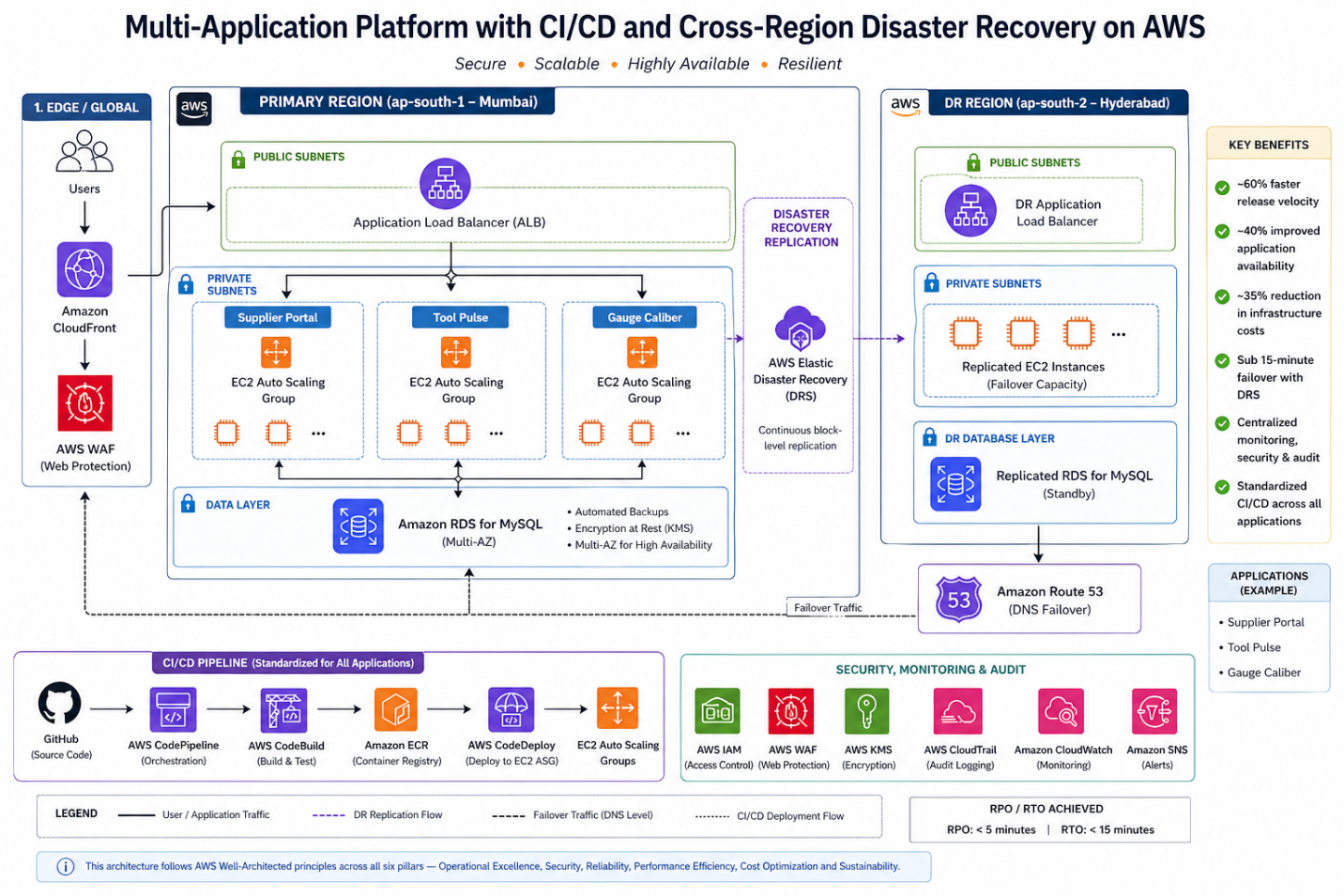
All three applications were deployed using a standardized pattern:
Compute Layer
- Amazon EC2 instances
- Auto Scaling Groups
- Private subnets
- Application Load Balancers (ALB) for high availability
Database Layer
- Amazon RDS (MySQL)
- Automated backups enabled
- Multi-AZ deployment for availability
CI/CD Stack
- GitHub (source control)
- AWS CodePipeline
- AWS CodeBuild
- AWS CodeDeploy
Security Controls
- AWS IAM for role-based access
- AWS WAF for web protection
- Amazon CloudFront for secure content delivery
- AWS KMS for encryption
- AWS CloudTrail for audit logging
Monitoring & Alerting
- Amazon CloudWatch
- Amazon SNS for alert notifications
Disaster Recovery
- AWS Elastic Disaster Recovery (DRS)
- Secondary region replication (Hyderabad)
- Defined RPO/RTO alignment
Standardized CI/CD for All Applications
One of the most impactful design decisions was implementing a centralized CI/CD pipeline across all three applications.
Deployment Flow
- Code committed to GitHub
- CodePipeline triggers automatically
- CodeBuild:
- Compiles application
- Executes unit tests
- CodeDeploy:
- Deploys to staging
- Promotes to production EC2 Auto Scaling Group
This standardization ensured:
- Repeatable deployments
- Reduced human error
- Faster release cycles
- Controlled promotion across Dev → QA → Prod
Release velocity improved by ~60%.
YAML
appspec.yml — CodeDeploy EC2 Deployment
version: 0.0
os: linux
files:
- source: /
destination: /var/www/app
hooks:
BeforeInstall:
- location: scripts/stop_server.sh
timeout: 60
runas: root
AfterInstall:
- location: scripts/install_dependencies.sh
timeout: 120
runas: root
ApplicationStart:
- location: scripts/start_server.sh
timeout: 60
runas: root
ValidateService:
- location: scripts/validate_service.sh
timeout: 30
runas: root
The ValidateService hook is critical — it runs a health check after deployment. If it fails, CodeDeploy automatically rolls back. This is what gives you safe, repeatable deployments across all three applications without manual intervention.
Compute Architecture: EC2 + Auto Scaling
Instead of static instances, we deployed:
- EC2 instances in private subnets
- Application Load Balancer in public subnets
- Auto Scaling Groups for dynamic scaling
Why EC2 over Fargate in this case?
- Existing application dependencies required OS-level customization
- Tight integration with legacy libraries
- Gradual modernization strategy
Auto Scaling allowed:
- Dynamic scaling during supplier portal peaks
- ~40% improvement in application availability
- Cost-efficient compute during non-peak hours
Auto Scaling Policy — CLI Setup
BASH
# Create Auto Scaling Group for Supplier Portal
aws autoscaling create-auto-scaling-group \
--auto-scaling-group-name supplier-portal-asg \
--launch-template LaunchTemplateName=supplier-portal-lt,Version='$Latest' \
--min-size 2 \
--max-size 10 \
--desired-capacity 2 \
--vpc-zone-identifier "subnet-<private-subnet-1>,subnet-<private-subnet-2>" \
--target-group-arns arn:aws:elasticloadbalancing:ap-south-1:<account-id>:targetgroup/supplier-portal-tg/<id>
# Attach CPU-based scaling policy
aws autoscaling put-scaling-policy \
--auto-scaling-group-name supplier-portal-asg \
--policy-name cpu-target-tracking \
--policy-type TargetTrackingScaling \
--target-tracking-configuration '{
"PredefinedMetricSpecification": {
"PredefinedMetricType": "ASGAverageCPUUtilization"
},
"TargetValue": 60.0,
"ScaleInCooldown": 300,
"ScaleOutCooldown": 60
}'
The same ASG pattern was applied consistently across all three applications — Tool Pulse and Gauge Caliber use identical configurations with their respective launch templates and target groups. The ScaleOutCooldown of 60 seconds ensures rapid scale-out during production peak cycles, while the 300-second ScaleInCooldown prevents aggressive scale-in that could cause instability.
Database Layer: Managed Resilience with Amazon RDS
All three applications used:
- Amazon RDS for MySQL
- Automated backups
- Multi-AZ failover
- Encryption at rest
Why RDS?
- Managed patching
- Built-in failover
- Reduced DBA overhead
- Consistent performance monitoring
This eliminated manual backup complexity and improved reliability.
Security by Design
Security controls were embedded across layers:
Identity & Access
- IAM role-based policies
- Least privilege access
Edge Security
- AWS WAF in front of ALB
- CloudFront for content delivery and protection
Encryption
- AWS KMS for data encryption
- Encrypted RDS storage
Audit & Compliance
- CloudTrail logging for:
- Deployment activities
- IAM changes
- Infrastructure updates
This strengthened ISO compliance readiness and audit traceability.
Disaster Recovery with AWS Elastic Disaster Recovery (DRS)
For a high-precision manufacturing enterprise, unplanned downtime is not just an IT problem — it is a production stoppage with direct revenue and contractual impact. This made structured, testable disaster recovery a non-negotiable part of the architecture, not an afterthought.
Previous State:
- Manual recovery with no documented runbook
- Hours of downtime during any infrastructure failure
- No cross-region failover capability
- Backup processes dependent on individual team members
New Design — How DRS Was Implemented:
AWS Elastic Disaster Recovery works by installing a lightweight replication agent on each source server. Once installed, the agent performs continuous block-level replication of the server’s disk to a staging area in the secondary region (Hyderabad — ap-south-2). This means the recovery environment is always within minutes of the production state, not hours.
The implementation followed three phases:
Phase 1 — Agent installation and initial sync The replication agent was installed on all source servers hosting the Supplier Portal, Tool Pulse, and Gauge Caliber applications. The initial full sync took approximately 4–6 hours per server depending on disk size. After the initial sync, replication is continuous and lightweight — typically under 5% of server CPU.
BASH
# Install the AWS Replication Agent on each source server (Linux)
wget -O ./aws-replication-installer-init.py \
https://aws-elastic-disaster-recovery-ap-south-1.s3.amazonaws.com/latest/linux/aws-replication-installer-init.py
sudo python3 aws-replication-installer-init.py \
--region ap-south-1 \
--aws-access-key-id <replication-user-access-key> \
--aws-secret-access-key <replication-user-secret-key> \
--no-prompt
Replication credentials are created once in the DRS console under Settings → Replication Credentials. Never use your primary IAM credentials here — create a dedicated replication IAM user with DRS-only permissions.
Phase 2 — Recovery settings configuration For each source server, recovery instance settings were configured in the DRS console:
- Instance type mapping — production EC2 type matched in the secondary region
- Subnet and security group assignment in ap-south-2
- Launch template for recovery instances pre-configured to avoid manual steps during actual failover
Phase 3 — DR drill validation Before going live, quarterly non-disruptive DR drills were run using the –is-drill true flag. This launches isolated recovery instances in a separate network — production traffic is unaffected. Each drill validated:
- Recovery instance launches successfully within the RTO window
- Application starts and passes health checks
- Database connectivity to the replicated RDS snapshot
- End-to-end smoke test via internal URL
BASH
# Launch a non-disruptive DR drill — isolated instances, no production impact
aws drs start-recovery \
--source-servers '[{"sourceServerID": "<source-server-id>"}]' \
--is-drill true \
--region ap-south-1
# Terminate drill instances once validated
aws drs terminate-recovery-instances \
--recovery-instance-ids '["<recovery-instance-id>"]' \
--region ap-south-1
The –is-drill true flag is the most important detail here. Without it, start-recovery triggers an actual failover. The drill mode launches recovery instances in an isolated network — production traffic is completely unaffected. Always validate this in a non-production window before your first real DR event.
Defined RPO / RTO Thresholds:
| Metric |
Target |
Achieved |
| RPO (Recovery Point Objective) |
≤ 30 minutes |
~5 minutes (continuous replication) |
| RTO (Recovery Time Objective) |
≤ 1 hour |
< 15 minutes (automated launch) |
The RPO achieved is significantly better than the target because DRS replicates at the block level continuously — unlike snapshot-based backups which capture state at fixed intervals.
Actual Failover Sequence (when triggered):
- Declare recovery event in DRS console or via CLI
- DRS launches pre-configured recovery instances in Hyderabad from the latest replicated state
- DNS records updated to route traffic to the secondary region
- Health checks validate application availability
- Team confirms normal operation — failover complete
Total steps 1–4 are automated. Step 5 is the only human-in-the-loop action.
Results:
- Failover time: hours of manual recovery → < 15 minutes automated
- Recovery testing: ad-hoc and untested → quarterly validated drills
- Business risk: unquantified → defined, documented, and insured
- Audit readiness: manual records → CloudTrail-logged failover events
A Presales Note on Selling DR
In Presales conversations, Disaster Recovery is the capability every enterprise says they want — and the first line item cut from the budget. The two objections I encounter most are: “We’ve never had a major outage” and “It sounds too complex to maintain.”
AWS Elastic DRS changed both conversations. On complexity: the agent installs in under 30 minutes per server and replication is fully managed — there is no DR infrastructure to maintain. On risk: the quarterly drill model lets customers see recovery happen before they need it. When a customer watches their application come up in a secondary region in 12 minutes during a drill, the budget conversation changes entirely.
For manufacturing enterprises specifically, the framing that resonates most is not technical — it is contractual. A single production stoppage that breaches an SLA with a Tier-1 customer costs more than the annual DRS bill. That is the business case, and it closes fast.
Monitoring & Operational Visibility
Operational visibility included:
Amazon CloudWatch
- EC2 metrics
- Auto Scaling activity
- RDS performance
- Application logs
Amazon SNS
- Alert notifications
- Incident escalation triggers
Combined with CloudTrail, the platform delivered:
- Proactive alerting
- Faster MTTR
- Audit-ready logging
Quantitative Outcomes
| Area |
Result |
| Deployment Speed |
~60% faster releases |
| Scalability |
~40% improved availability at peak |
| Disaster Recovery |
Failover < 15 minutes |
| Cost Optimization |
~35% infra cost reduction |
| Security |
ISO-aligned IAM & encryption |
The biggest transformation was not technical alone — it was operational maturity.
Key Architectural Lessons
1. Standardized CI/CD Across Apps Increases Reliability
Consistency across applications reduces deployment variability.
2. Auto Scaling Is Essential for Manufacturing Workloads
Peak production cycles require elastic compute.
3. DR Must Be Designed, Not Assumed
AWS DRS provides structured, testable failover.
4. Security Must Span Identity, Network, and Data
IAM + WAF + KMS + CloudTrail create layered defense.
5. Managed Services Reduce Operational Burden
RDS and DRS significantly lowered infrastructure complexity.
Final Thoughts
Modernizing manufacturing applications is not about lifting servers into the cloud — it is about:
- Standardizing deployments
- Embedding security controls
- Designing for resilience
- Automating disaster recovery
- Scaling predictably
By implementing CI/CD pipelines, Auto Scaling EC2 architecture, RDS, and cross-region disaster recovery, we transformed a fragmented on-prem setup into a secure, resilient multi-application cloud platform.
For AWS practitioners, this case demonstrates how:
DevOps standardization + Managed Services + Structured DR = Enterprise-grade operational maturity.
Author
Rajat Jindal
VP – Presales
AeonX Digital Technology Limited
by Rajat Jindal | Jan 22, 2026 | 28
Enterprise applications rarely fail because of business logic—they fail due to fragile deployments, poor observability, and infrastructure that resists automation.
In this post, I’ll walk through how we transformed a legacy CRM and Employee Engagement platform into a cloud-native, containerized, zero-downtime system on AWS, using:
- Amazon ECS (Fargate)
- Amazon RDS for MySQL
- Amazon S3 (frontend hosting)
- AWS CodePipeline, CodeBuild, CodeDeploy
- Amazon ECR
- AWS Secrets Manager
- Amazon CloudWatch & CloudTrail
This is not just architecture theory—you’ll see how to build and deploy this system step-by-step.
The Problem: Legacy Constraints
The existing system had:
- 2–3 hour deployments with downtime
- No CI/CD automation
- Hardcoded credentials
- No centralized logging
- No scalability
The goal was not lift-and-shift, but true cloud-native modernization.
Target Architecture Diagram
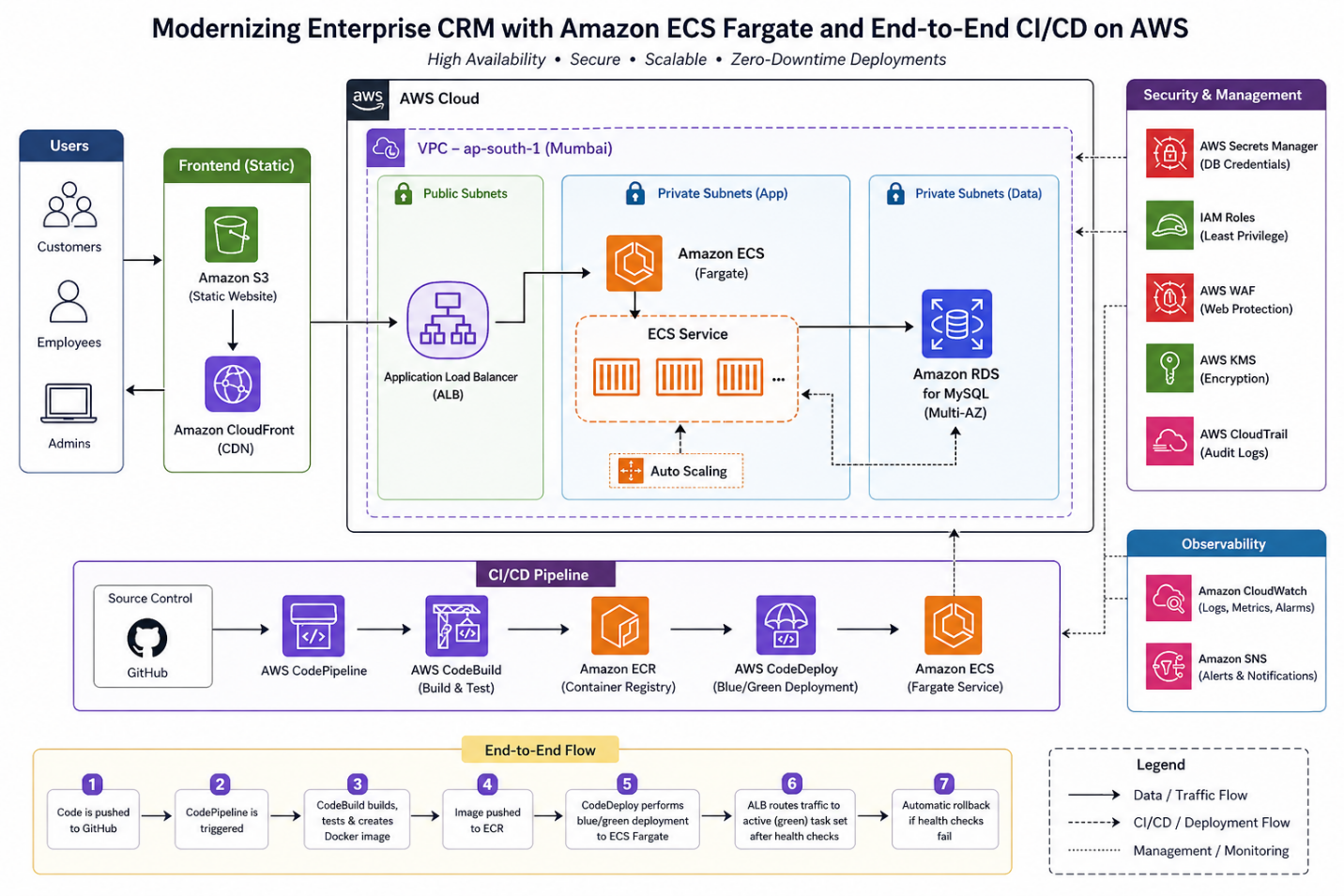
Step-by-Step Implementation
1. Containerizing the Application
Sample Dockerfile
DOCKERFILE
FROM node:18
WORKDIR /app
COPY package*.json ./
RUN npm install
COPY . .
EXPOSE 3000
CMD ["npm", "start"]
2. Push Image to Amazon ECR
BASH
aws ecr create-repository --repository-name crm-app
aws ecr get-login-password --region ap-south-1 | \
docker login --username AWS --password-stdin <account-id>.dkr.ecr.ap-south-1.amazonaws.com
docker build -t crm-app .
docker tag crm-app:latest <account-id>.dkr.ecr.ap-south-1.amazonaws.com/crm-app:latest
docker push <account-id>.dkr.ecr.ap-south-1.amazonaws.com/crm-app:latest
3. ECS Fargate Task Definition
JSON
{
"family": "crm-task",
"networkMode": "awsvpc",
"requiresCompatibilities": ["FARGATE"],
"cpu": "1024",
"memory": "2048",
"executionRoleArn": "arn:aws:iam::<account-id>:role/ecsTaskExecutionRole",
"containerDefinitions": [
{
"name": "crm-container",
"image": "<ECR-IMAGE-URI>",
"portMappings": [
{
"containerPort": 3000
}
],
"secrets": [
{
"name": "DB_PASSWORD",
"valueFrom": "arn:aws:secretsmanager:ap-south-1:<account-id>:secret:crm-db"
}
]
}
]
}
4. Create ECS Cluster (Fargate)
BASH
aws ecs create-cluster --cluster-name crm-cluster
5. Application Load Balancer Setup
- Public subnets
- Listener: HTTP/HTTPS
- Target Group: ECS service
Health check path must be correct (e.g., /health) to avoid deployment failures.
6. CI/CD Pipeline (CodePipeline)
Pipeline Flow:
- GitHub → Trigger
- CodeBuild → Build & push Docker image
- CodeDeploy → Blue/Green deployment
Sample buildspec.yml
YAML
version: 0.2
phases:
pre_build:
commands:
- aws ecr get-login-password --region ap-south-1 | docker login --username AWS --password-stdin $REPO_URI
build:
commands:
- docker build -t crm-app .
- docker tag crm-app:latest $REPO_URI:latest
post_build:
commands:
- docker push $REPO_URI:latest
7. Blue/Green Deployment (CodeDeploy)
- New ECS task set is created
- Traffic gradually shifts via ALB
- Health checks validate deployment
- Auto rollback on failure
This ensures zero downtime releases
8. Database Setup (Amazon RDS)
- MySQL (Multi-AZ enabled)
- Private subnet
- Security group allows access only from ECS
9. Secrets Management
BASH
aws secretsmanager create-secret \
--name crm-db \
--secret-string '{"username":"admin","password":"your-secure-password"}'
Injected into ECS tasks securely—no hardcoding.
“Never use real credentials in CLI examples — use environment variables or a vault reference.”
Observability Setup
- CloudWatch Logs → application logs
- CloudWatch Alarms → CPU, memory
- CloudTrail → API auditing
- Amazon SNS (Alerts & Notifications) CloudWatch Alarms are configured to publish to an Amazon SNS topic, which routes alerts to the on-call engineering team via email and SMS. This ensures the right people are notified immediately when CPU breaches threshold, memory spikes, or a deployment health check fails — without anyone manually watching dashboards.
Enables faster MTTR and proactive monitoring.
Key Design Decisions
Why Fargate?
As a Presales professional evaluating modernization options with enterprise customers, the decision point I see most often is not Fargate vs EC2 — it’s Fargate vs EKS
Customers often arrive with EKS already in mind — drawn by its flexibility and ecosystem. But for most enterprise web applications and APIs, that flexibility comes at the cost of months of platform engineering. Fargate removes that burden entirely, letting teams focus on shipping features rather than managing cluster nodes. Unless a customer has strong Kubernetes expertise in-house or needs advanced scheduling, Fargate is almost always the faster path to production — and the safer recommendation.
| Option |
Trade-off |
| EC2 |
Requires capacity management |
| EKS |
High operational overhead |
| Fargate |
Serverless, low ops |
Fargate is ideal for:
- Web apps
- APIs
- Teams avoiding infra management
Why Blue/Green over In-Place Deployment?
- In-place deployments are generally simpler to configure and set up — CodeDeploy stops the old version, installs the new one, and restarts. For non-critical internal tools, that simplicity is acceptable. For a CRM handling active user sessions, in-place deployment creates a hard problem: the application is unavailable during the swap window, and there is no fast rollback path if the new version fails.
- Blue/Green deployment eliminates both risks. The new version is deployed to a fresh task set and validated by ALB health checks before a single user request touches it. Traffic switches in one atomic operation — a listener rule update on the ALB. If anything fails post-switch, rollback is equally instant: point the listener back at the blue environment. No re-deployment, no downtime, no manual intervention.
- The approximately 5-minute overhead of spinning up a parallel task set is the only cost. For an enterprise CRM where a failed deployment during business hours directly affects customer-facing operations, that trade-off closes in seconds.
Edge Protection & Encryption (AWS WAF + AWS KMS) While the core implementation focuses on network-layer security through VPC segmentation and IAM least-privilege, two additional controls are recommended for production hardening:
- AWS WAF is placed in front of the Application Load Balancer to protect against common web exploits — SQL injection, XSS, and malicious bot traffic. For a CRM platform handling customer and employee data, this is a non-negotiable layer.
- AWS KMS is used to encrypt data at rest — both the RDS database and any sensitive artifacts stored in S3. Combined with Secrets Manager for credentials, this eliminates all plaintext sensitive data from the system.
Common Pitfalls (Real Lessons)
1. ALB Health Check Failures
- Wrong endpoint → deployment rollback
✔ Fix: Always expose /health
2. IAM Misconfiguration
- ECS task unable to pull secrets
✔ Fix: Attach correct execution role
3. Cold Start Delays
- Fargate task startup time
✔ Fix: Use minimum running tasks
4. CI/CD Failures
- Docker push permission issues
✔ Fix: Validate ECR access in CodeBuild role
Cost Considerations
Fargate vs EC2
| Factor |
Fargate |
EC2 |
| Cost Model |
Pay-per-use |
Fixed |
| Ops Overhead |
Low |
High |
| Control |
Medium |
High |
For this use case:
- Fargate reduced ops cost
- Slightly higher compute cost, but justified by agility
Business Impact
- Deployment time: 2–3 hours → <10 - 15 minutes
- Downtime: Zero
- Manual effort: ↓ 80%
- Security risk: Eliminated hardcoded secrets
Key Takeaways
- Containers alone ≠ modernization
- CI/CD is the real accelerator
- Blue/Green is essential for enterprise apps
- Secrets management must be built-in
- Serverless containers reduce operational burden
Reusability (Starter Checklist)
You can reuse this architecture if you need:
- Web application modernization
- DevOps transformation
- Secure container deployment
- Zero-downtime releases
Developer Workflow (Day-to-Day Experience)
One of the biggest improvements in this modernization was the developer experience.
Before Modernization
- Developers manually shared builds with operations teams
- Deployments required coordinated downtime
- Debugging issues required accessing servers directly
- Releases were infrequent and risky
After Modernization
The workflow is now fully automated and developer-driven:
- Developer pushes code to GitHub
- AWS CodePipeline is triggered automatically
- AWS CodeBuild:
- Builds the application
- Creates Docker image
- Runs basic validations
- Image is pushed to Amazon ECR
- AWS CodeDeploy:
- Deploys new version using blue/green strategy
- Shifts traffic gradually via ALB
- Performs health checks
- If validation passes → deployment completes
- If failure occurs → automatic rollback
What This Enables
- Faster releases (multiple per day possible)
- Safe deployments with rollback built-in
- Developer ownership of deployments
- Easy debugging via centralized logs (CloudWatch)
- Consistent environments using containers
Developers no longer “request deployments”—they trigger them with every commit.
Future Improvements & Enhancements
While the current architecture delivers strong scalability, security, and automation, there are several enhancements that can further improve maturity and efficiency.
1. Infrastructure as Code (IaC)
Current state:
- Infrastructure partially managed via console/manual setup
Improvement:
- Use Terraform or AWS CDK to define:
- ECS services
- Load balancers
- RDS
- CI/CD pipelines
Benefits:
- Fully reproducible environments
- Version-controlled infrastructure
- Faster environment provisioning
2. Observability Maturity
Current:
- CloudWatch logs and alarms
Enhancements:
- Distributed tracing using AWS X-Ray
- Structured logging (JSON format)
- Business-level metrics (e.g., user actions, transactions)
Benefits:
- Faster root cause analysis
- Better performance insights
3. CI/CD Pipeline Enhancements
Improvements:
- Add automated testing stages:
- Unit tests
- Integration tests
- Security scans
- Introduce:
- Manual approval gates (for production)
- Artifact versioning
Result: More robust and enterprise-grade pipeline
Final Thought on Evolution
Modernization is not a one-time effort—it’s a continuous journey.
This architecture establishes a strong foundation, but true cloud maturity comes from:
- Continuous optimization
- Automation expansion
- Observability improvements
- Security evolution
The goal is not just to run workloads in the cloud, but to continuously improve how they are built, deployed, and operated.
Author
Rajat Jindal
VP – Presales
AeonX Digital Technology Limited